How to Set Up Lead Scoring: Models, Thresholds, Automation


TL;DR
Lead scoring combines profile and behavioral signals to prioritize leads and hand off sales-ready contacts. This article covers explicit and implicit models, the BANT method, step-by-step implementation, a 0–100 scoring scale with thresholds, common mistakes, and automation tools.
Managers spend the same time on a random tire‑kicker and on a deal‑ready client — and often lose both. Lead scoring fixes this: it assigns each contact a score and indicates who to prioritize. Let’s break down how point‑based lead scoring works, which models to use, how to build a scoring scale, and how to avoid common implementation traps.
The simplest view: how lead scoring is structured
Lead scoring is a points system: each potential customer earns points for matching the ideal customer profile and for exhibited activity. The higher the final score, the “hotter” the lead and the higher its processing priority.
In essence, scoring turns the subjective “this one seems okay, that one not so much” into transparent rules. Instead of intuition — explicit criteria, weights, and thresholds. The same principles are often applied to the existing customer base for upsell and cross‑sell, then it’s called “customer scoring.”
The main effect is prioritization: sales stop scattering their efforts and focus on those closest to purchase.
Why business needs this: 6 practical use cases
Scoring addresses several marketing and sales pains at once:
- Prioritization. Managers see a queue of hot leads and don’t waste the day on cold contacts.
- Time savings. By Pareto principle ~20% of leads bring ~80% of revenue — scoring helps find that 20% fast.
- Unified criteria for marketing and sales. A common language emerges: what counts as MQL and SQL, and when to hand off a lead.
- Conversion improvement. Working relevant leads raises the share of deals closed.
- Nurturing warms leads. Immature contacts don’t get lost; they go into automated email and content nurture flows.
- Forecasting and analytics. Score dynamics reveal traffic quality by channel and source.
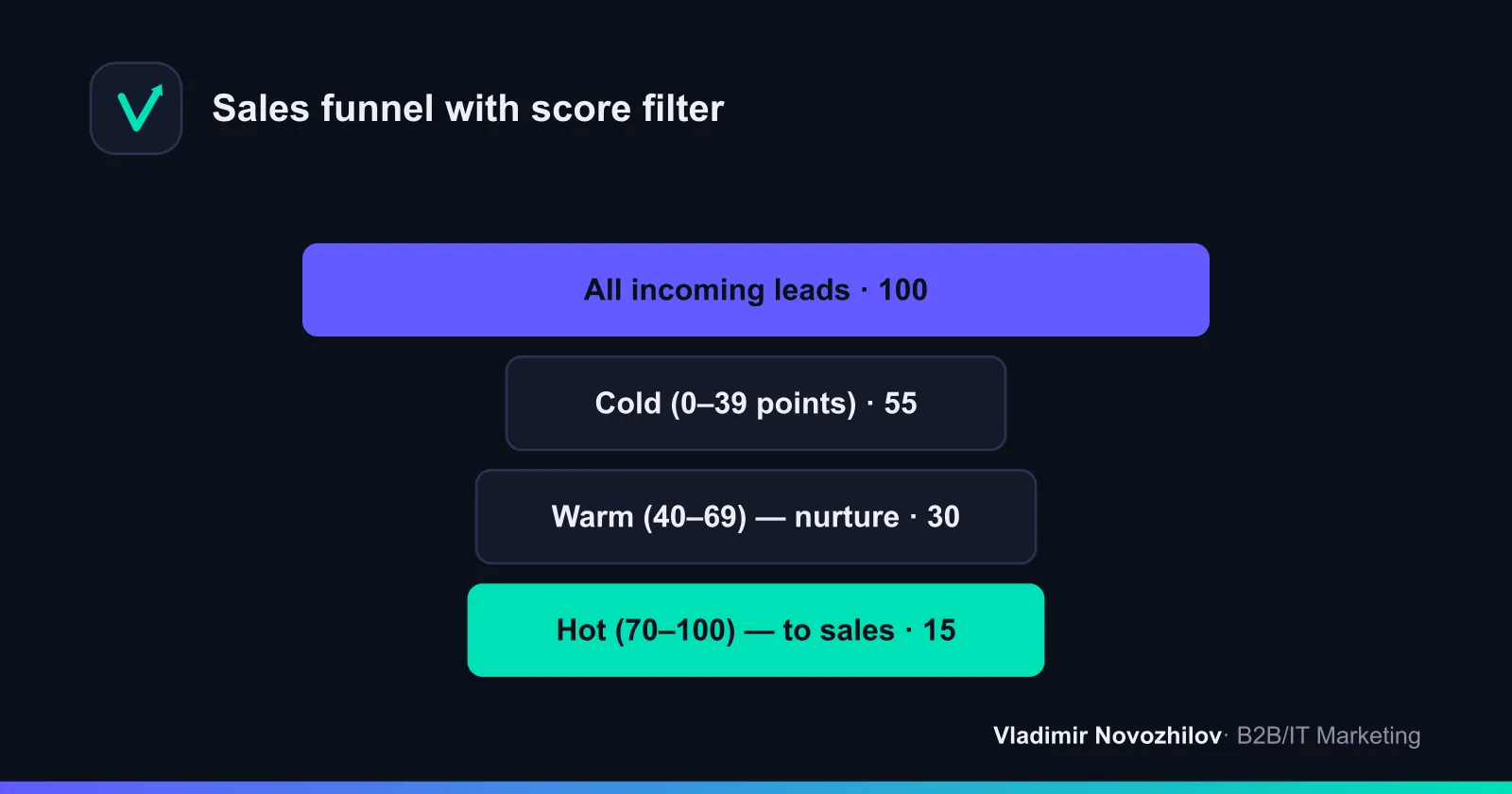
How we split leads: cold, warm, hot
The basic division is hot, warm, and cold leads. These are three readiness stages that are easy to map to scores.
- Cold leads — just acquainted with the brand, need not formed. Too early to send to sales: objective is gentle content nurture.
- Warm leads — researching solutions, comparing options, but still undecided. Case studies, demos, and consultations help.
- Hot leads — ready to close: requested pricing, signed up for a pilot, or reached a decision maker. These go to sales immediately.
Scoring automates this qualification: once a score crosses a threshold, the lead status changes.
Models: explicit and implicit approaches
Every model relies on two data types.
Explicit scoring evaluates what the lead told you: role, company size, industry, region, budget. These are the “form” attributes answering “who is this lead.”
Implicit scoring evaluates behavior: site visits, email opens, clicks, downloads, visits to the pricing page. These answer “how engaged is the lead right now.”
A strong model combines both: explicit filters non‑targets; implicit shows purchase readiness. Separately, there’s the BANT method — a classic B2B qualification framework.
Comparative table of scoring models
| Model | What it assesses | Data | Pros | Limitations |
|---|---|---|---|---|
| Explicit scoring | Fit to ICP | Form, CRM | Quickly filters non‑targets | Doesn’t show readiness to buy |
| Implicit scoring | Engagement and activity | Clicks, visits, emails | Captures moments of interest | Requires tracking automation |
| BANT method | Deal maturity | Dialogue answers | Easy for reps to use | Subjective, requires contact |
| Email scoring | Reaction to mailings | Opens, clicks | Cheap, built into services | Single channel only |
BANT and other scoring models
BANT scores a lead on four criteria: Budget, Authority, Need, and Timing. Each criterion gets a weight and the sum yields the final score.
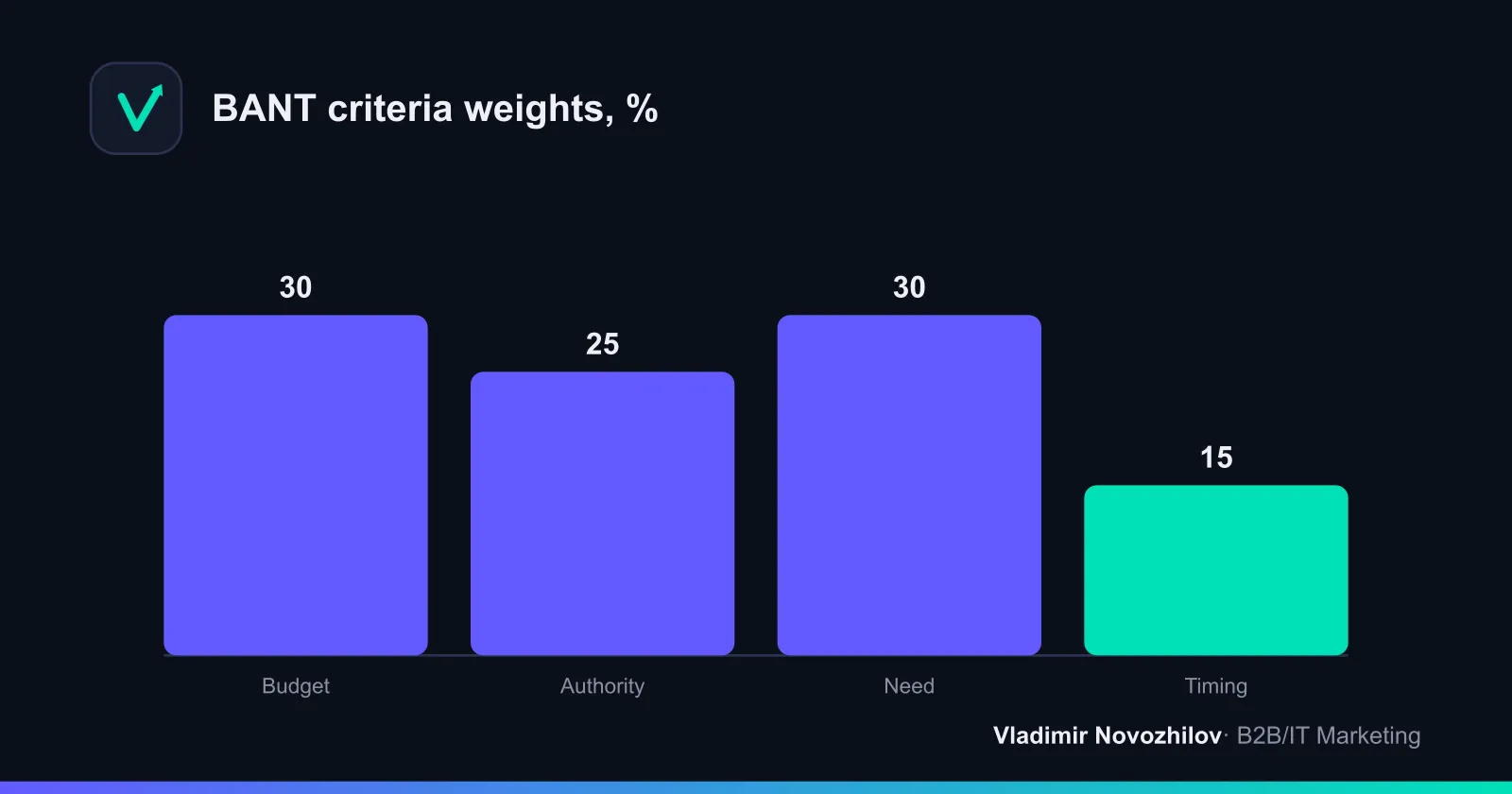
Example of BANT scoring for a B2B provider (each criterion 0–100, then weighted):
| Criterion | Weight | Lead score | Contribution |
|---|---|---|---|
| Budget | 30% | 80 | 24 |
| Authority | 25% | 60 | 15 |
| Need | 30% | 90 | 27 |
| Timing | 15% | 40 | 6 |
| Total | 100% | — | 72 (hot) |
Variants (CHAMP, MEDDIC) exist, but for most service and IT companies a combo of “explicit + implicit” with BANT elements in the criteria is sufficient.
Step‑by‑step implementation algorithm
Here’s a checklist that works in Excel or CRM:
- Describe the Ideal Customer Profile (ICP). Industry, company size, geo, decision maker role.
- Collect lead evaluation criteria. Split into explicit and implicit.
- Assign weights to criteria. Give higher weight to factors that influence deals most.
- Add negative scoring. Penalty points for non‑target attributes.
- Define thresholds. Boundaries for cold, warm, and hot leads.
- Agree handoff rules. What qualifies as MQL and SQL, and when to pass to sales.
- Set up scoring automation. Rules in CRM or email service.
- Run a pilot on historical data. Check whether scores match real outcomes.
- Collect sales feedback. Adjust weights.
- Review the model quarterly.
How to choose criteria and set weights
Weights reflect a criterion’s impact on deal closure. A pragmatic approach is to analyze won deals over the year and find common traits. If 80% of deals come from contacts with the role “manager” or above — the “role” criterion gets a high weight.
Rules for setting weights:
- Explicit criteria (who the client is) typically contribute 40–60% of the final score.
- Implicit criteria (what the lead does) make up the remaining 40–60%.
- No single criterion should exceed 30–35%, otherwise the model becomes skewed.
- Negative criteria can zero out the score (e.g., region outside service area).
Example 0–100 scale and sales handoff thresholds
Here’s a ready‑to‑use 0–100 scoring template with thresholds — copy and adapt.
| Score | Status | Action |
|---|---|---|
| 0–39 | Cold lead | Nurture with content, email sequence |
| 40–69 | Warm lead (MQL) | Personal outreach, demo invitation |
| 70–100 | Hot lead (SQL) | Immediate handoff to sales |
Example scoring for a specific lead:
| Criterion | Condition | Points |
|---|---|---|
| Corporate email | present | +15 |
| Decision‑maker role | manager | +20 |
| Target industry | yes | +15 |
| Visited pricing page | yes | +20 |
| Downloaded price/case | yes | +10 |
| Opened 3+ emails | yes | +10 |
| Region outside service area | yes | −25 |
| Total | 65 → warm |
Common implementation mistakes
This section is missing in many competitors’ guides, yet projects fail most often for these reasons:
- Too complex a model at the start. Thirty criteria with precise weights leads to paralysis. Start with 6–8.
- Ignoring negative scoring. Without penalties, active but non‑target leads clog the funnel.
- Disconnect between marketing and sales. If sales don’t trust the scores, they ignore the queue.
- A model with no review. Market and traffic change — weights become outdated in 3–6 months.
- Scoring for the sake of scoring. Points that don’t affect processes are wasted effort.
- Only explicit or only implicit data. A half picture produces false priorities.
Tools and services for automation
Tool choice depends on lead volume and process maturity. Comparison of approaches:
| Tool | Purpose | Scoring | Fits for |
|---|---|---|---|
| Excel/Google Sheets | Manual explicit scoring | Formulas manually | Pilot, low volume |
| CRM with scoring | Unified database + scoring rules | Automated by rules | Mid‑sized business, B2B |
| Email marketing services | Scoring by email response | Implicit automated | Content funnels |
| End‑to‑end analytics | Channel and traffic evaluation | Data to inform weights | High traffic |
The optimal scenario is CRM as the core: both form and behavioral data flow there and scoring rules recalc the score on every action.
How it works in a CRM in practice
In CRM, scoring is set via rules: “if field = value, add N points.” The system recalculates the score in real time, changes lead status, and triggers actions — notify a rep about a hot lead or add a warm lead to a nurture sequence.
“Once a contact hits 70 points, it automatically drops to the senior rep. Our first‑contact speed tripled,” — head of sales at an IT integrator.
Linking scoring with retention logic lets you measure not only conversion but LTV: high‑scoring leads more often become repeat customers.
How to measure model effectiveness
The model works if scores predict deal outcomes. Track:
- Conversion by segments. Hot leads should convert notably better than warm and cold.
- Processing speed. Time from submission to first contact for hot leads.
- False positive rate. How many “hot” scored leads didn’t buy — if many, weights are too high.
- Impact on revenue and LTV. Are average check and repeat purchases growing in priority segments?
“We reworked the first version after a month: it overloaded reps with false hot leads. After adding penalties accuracy rose and load dropped,” — performance agency marketer.
Review quarterly and after major traffic or product changes. Lead scoring is not a one‑off setup but a living tool that grows with the business.
Key takeaways
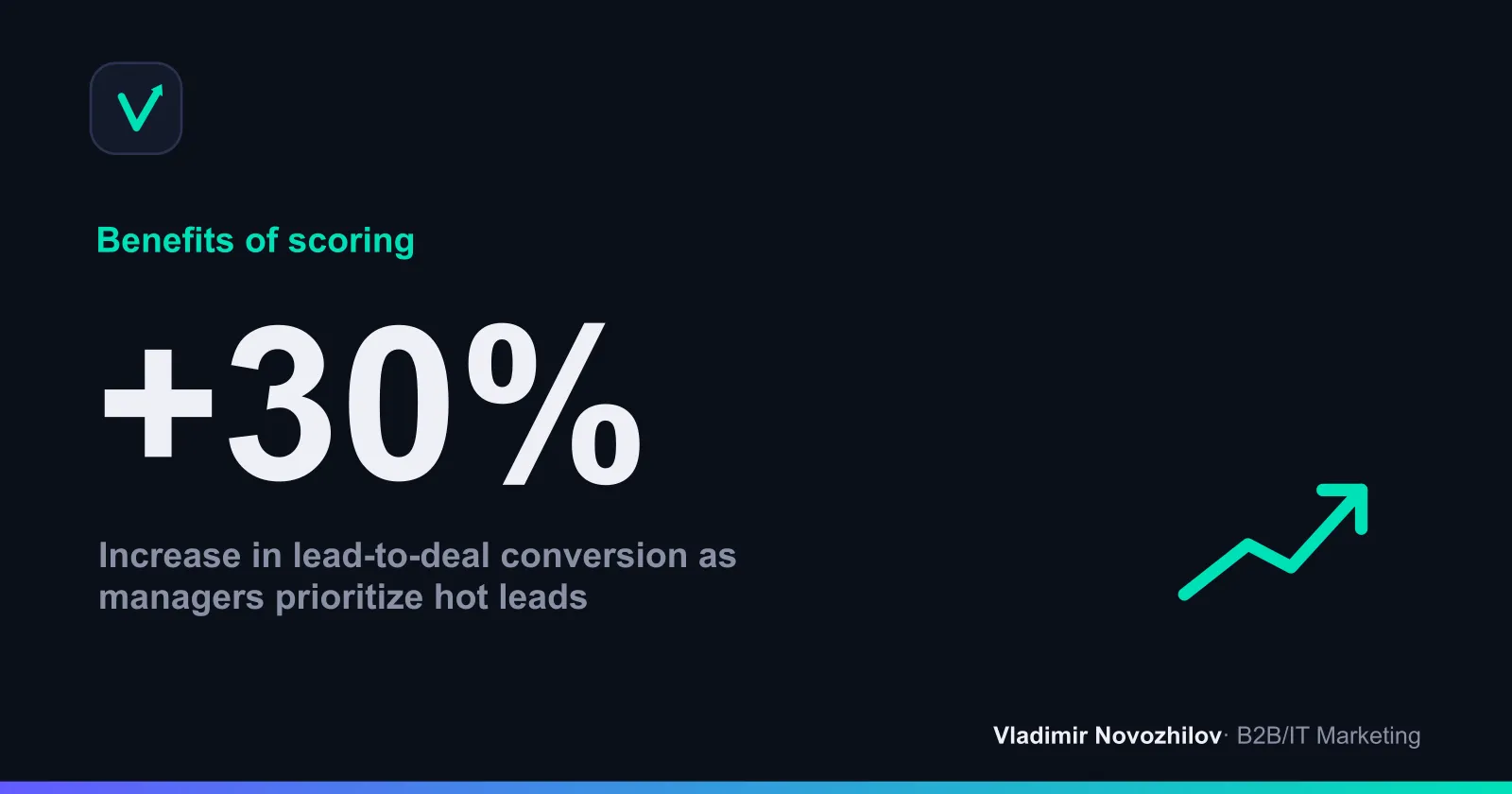
Scoring moves lead evaluation from intuition to a transparent system. Start with a simple model of 6–8 criteria, include negative scoring, set thresholds for cold, warm, and hot leads, and agree handoff rules with sales. Then automate scoring in CRM and review weights regularly. This approach saves rep time and consistently increases deal conversion.
FAQ
- What is the difference between explicit and implicit scoring and how to combine them?
- Explicit scoring evaluates "who the lead is" (industry, role, company size, region, budget) and quickly filters non-targets. Implicit scoring evaluates "what the lead is doing now" (site visits, clicks, emails, price page) and captures moments of interest. A strong model combines both: 40–60% weight on explicit attributes and 40–60% on behavior.
- Which thresholds should I use to separate cold, warm, and hot leads?
- Basic scale: 0–39 — cold (nurture), 40–69 — warm MQL (personal touch, demo), 70–100 — hot SQL (send to sales immediately). Launch a pilot, test on historical data, then adjust thresholds based on actual conversions.
- Why use negative scoring and what should be included?
- To prevent active but non-target leads from clogging the funnel. Add penalties for attributes that almost never lead to deals: non-target region, wrong industry, personal email instead of corporate, freelancer/self-employed, etc. In extreme cases a penalty can zero out the score.
- How to start scoring without a complex CRM or big resources?
- Start in Excel/Google Sheets: 6–8 key criteria, simple formulas, weights based on impact on deals. Run the model on historical leads, get sales feedback, set thresholds, and only then migrate rules to CRM or ESP for automated scoring.
- How to know the model works and how often to review it?
- Monitor: 1) conversion by segments (hot should convert noticeably better), 2) speed of first contact for hot leads, 3) false positive rate, 4) contribution to revenue and LTV. Review the model quarterly and after major traffic or product changes.