AI for Advertising Banners: Tools, Prompts and Checklists
TL;DR
How to choose and work with AI to create advertising banners. The article provides a quick tool selection, license and pricing comparisons, 20 ready prompts, a step‑by‑step process, an export checklist and an A/B testing methodology with CPA calculations.
Introduction — why use AI for advertising banners
AI for creating advertising banners is no longer about “an image for the sake of an image.” It’s about iteration speed, hypothesis testing, and lowering CPA by enabling more creative tests. Neural generation speeds up briefing, visual search and variation stages. Important detail: proper prompt engineering + a clear export checklist deliver readability, brand compliance and predictable CTR/CVR.
What changes in practice:
- time to first draft — from 1–2 days to 30–60 minutes;
- 10–30 variants per sprint instead of 2–3;
- CTR lift of 10–40% in early A/B cycles thanks to better visual relevance;
- risk control: licenses, Cyrillic support, clear export rules.
Quick pick: which AI for which task (table)
If you need an “answer right now” — take a template builder with brand kit. If style and photorealism matter — a model in a generator + post‑processing. If the priority is readable text on a Cyrillic banner, pick engines focused on typography.
| Task | Tool/model | Why | Alternative |
|---|---|---|---|
| Fast promo banners under brandbook | Canva Magic Studio | Templates, brand kit, auto format adaptation | Adobe Express, Recraft |
| Product/scene photorealism | Midjourney, Nano Banana | Rich styles, controllable light/texture | GPT Image (gpt‑image‑1) |
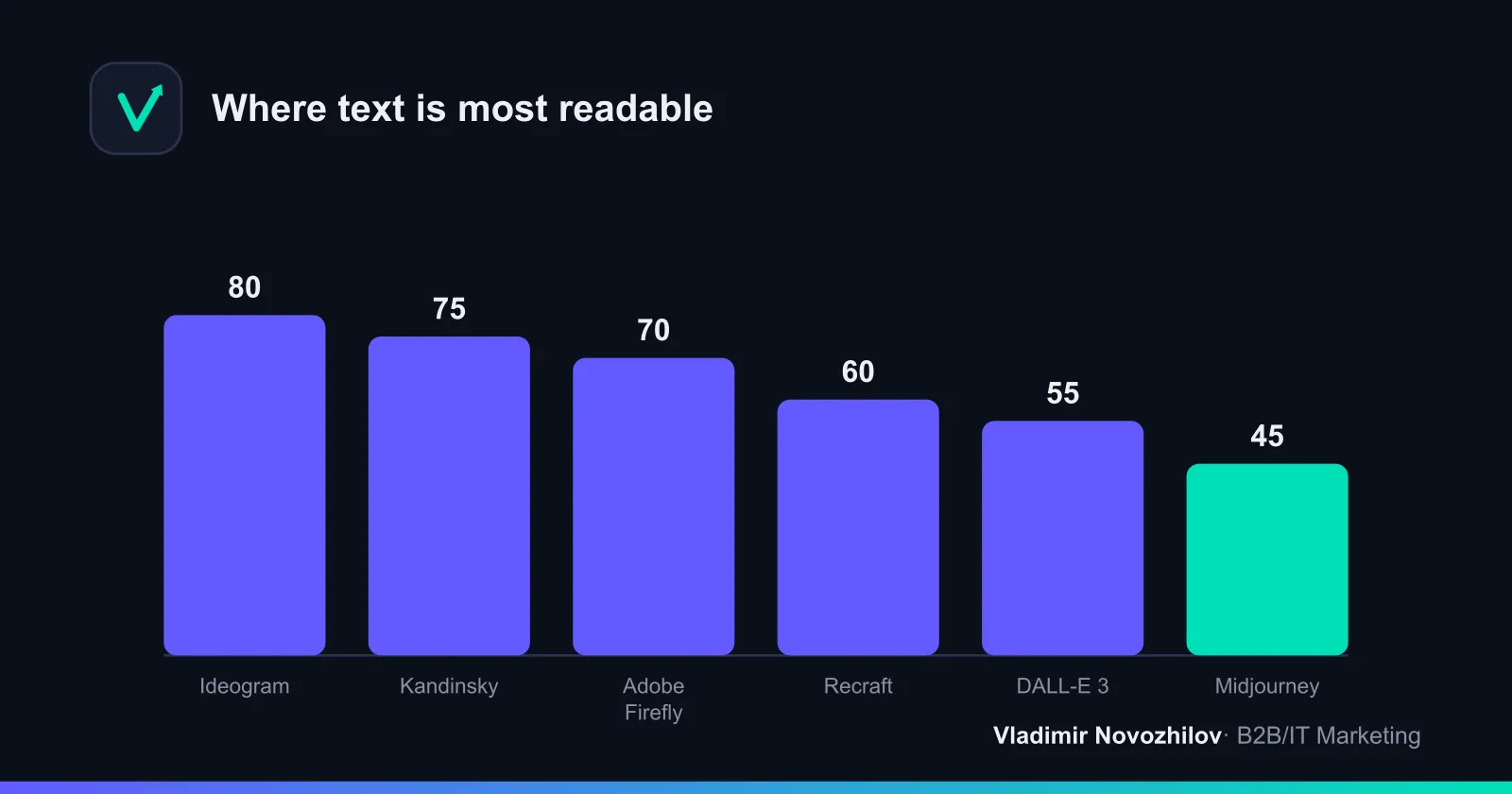
| Readable text (RU/EN) | Ideogram, Adobe Firefly | Best typography, Cyrillic support | Kandinsky, Recraft |
| Russian‑language availability + access in РФ | Kandinsky (FusionBrain), Syntx | Local payment, Cyrillic | Study AI / Photo Generator |
| Quick brief → image in one pipe | DALL‑E 3, GPT Image | Good brief parsing | Midjourney + editor |
| Mass generation via API | Syntx, Recraft, GPT Image API | Parameter templates, pipeline | CMS/scripts hookup |
TOP‑10 tools 2026 — short summary and when to use
Below — practical perspective, no vendor fanaticism. Choose for the task, not because it’s trendy.
- Midjourney. Strong styles, depth of light/materials. Cyrillic text limited; add captions in an editor for banner typography. Good for lifestyle and hero scenes.
- DALL‑E 3. Understands extended briefs, carefully keeps composition. Cyrillic text average. Handy for briefs like “product + benefit + mood”.
- Adobe Firefly. Focus on safe licensing and typography. Renders text above average and supports Cyrillic. Great for B2B/IT brand style.
- Canva Magic Studio. Fast results, format adaptations, brand kit. Ideal for marketers without deep graphic skills.
- Ideogram. Leader for readable text on banners, including Cyrillic. Useful for offers with large headlines and complex title composition.
- Kandinsky (FusionBrain). Russian language support, available in РФ. Good balance of quality and controllability; handy for e‑commerce scenes.
- Nano Banana. Presets for photorealism and product photography. Useful for catalogs, product cards and hero shots.
- Study AI / Photo Generator. Practical for social: realistic scenes, straightforward settings, Russian localization available.
- Syntx. For mass generation and production pipelines: parameter templates, API, integrations. Convenient for series of banners in dozens of sizes.
- Recraft. Strong vector and flat graphics; confident Cyrillic support; good for infographics, icons and B2B illustrations.
- GPT Image / gpt‑image‑1. Follows verbal briefs well, fits background and scene generation, convenient to pair with offer text generation in one flow.
Comparison by key criteria: quality, text, licenses, integrations
Metrics are orientation points based on practical tests and benchmarks. Always recheck current subscription and license terms.
| Tool | Scene quality | Cyrillic (readability) | Banner text | Commercial use | Price/mo, ₽ (estimate) | Integrations | Access in РФ |
|---|---|---|---|---|---|---|---|
| Midjourney | High | Low–medium | Add in editor | By subscription, allowed | from 1 500–3 000 | — | Partly |
| DALL‑E 3 | High | Medium | Medium | By subscription, allowed | from 2 000–3 500 | — | Limited |
| Adobe Firefly | High | Above medium | Good | Commercial allowed | from 1 500–2 500 | Adobe CC | Partly |
| Canva Magic Studio | Mid+ | Medium | Medium | By subscription, allowed | from 1 000–2 000 | Figma/Brand Kit | Yes |
| Ideogram | Mid+ | High | High | By subscription, allowed | from 1 000–2 000 | — | Partly |
| Kandinsky | Mid+ | High | Good | Allowed, check cases | from 0–1 000 | — | Yes |
| Nano Banana | High | Medium | Medium | By subscription, allowed | from 1 000–2 000 | — | Yes/partly |
| Study AI / Photo Generator | Mid+ | Medium–high | Medium | By subscription, allowed | from 1 000–2 000 | — | Yes |
| Syntx | Mid+ | Medium–high | Good | By subscription, allowed | from 2 000–5 000 | API | Yes |
| Recraft | Mid+ (vector) | High | Good | By subscription, allowed | from 0–1 500 | SVG/vector | Yes |
| GPT Image (gpt‑image‑1) | High | Medium | Medium | By subscription, allowed | from 2 000–4 000 | API | Partly |
Comment to the table:
- “Scene quality” — photorealism, composition, lighting; “Banner text” — how well the model handles headlines by itself. In real production text is often typeset manually.
- “Access in РФ” — payment and access stability; keep a backup combo of local and international tools.
How to create an AI banner: step‑by‑step workflow (example: −30% sale)
Case: e‑commerce sale, offer “−30% until Sunday”, goal — increase CTR in social and reduce CPA.
- Brief in 10 minutes
- Product/category, USP, season, audience, platforms and formats, brand constraints (colors, fonts), examples of competitor creatives.
- Tool selection
- Background/scene: Midjourney or GPT Image (if strict brief compliance needed).
- Text: Ideogram/Firefly or typeset in Figma/Photoshop.
- Draft scene generation
- 6–12 background variants. Pick 2–3 by composition and product focus. Upscale before moving to editor.
- Local correction (inpainting)
- Remove artifacts, paint a slot for headline/CTA. Check safe area for mobile — 8–10% from edges without critical elements.
- Headline and offer layout
- Grid 4–8 pt, line height 110–120%, contrast 4.5:1+, logo in top left/right corner, CTA — visual priority #2.
- Export: Web and adaptations
- Main master — 1080×1080. Auto‑generate 1080×1920 and 1200×628. Compress: WebP as base, PNG for transparency.
- Check and publish
- Run export checklist (see below), preview on smartphone and desktop. Release 3–5 variants in one ad set.
- A/B test 5–7 days
- Equal budgets. Metrics: CTR, CPC, CVR, CPA. Watch CPM per platform.
Prompt for background generation
Use a structured prompt to reduce noise and control composition.
Example: “Commercial promo banner: modern minimalist scene for an online clothing store; central object — light sneakers on cylindrical podiums; background — soft gradient from ivory to light gray; hard light source from the left, soft shadows; empty area top‑right for large headline; style — clean product photography, f/8, 50mm, high detail, no text, no watermark, negative: extra limbs, logos; aspect 1:1; priority: product focus, composition clarity;“
Prompt for text and typography
If you want the model to attempt rendering the headline (Ideogram/Firefly/Kandinsky):
“Large readable headline in Cyrillic: “−30% до воскресенья”, subhead: “Бестселлеры недели”, font — geometric grotesk, bold, high contrast, white text on warm gray background, even letterforms without artifacts, centered in the top‑right sector, add a neat CTA slab: “В каталог”, no watermark”
Tip: even with strong typography it’s often easier to typeset the final copy manually — that gives control over kerning, line breaks and brand consistency.
Prompt library: 20 ready prompts by niche
Below are “ready banner prompts” for a quick start. Change variables in {curly braces}.
- E‑commerce (shoes): “Product shot {product}, clean background, empty area for text, warm light, aspect 1:1, no text”
- E‑commerce (electronics): “Tech scene {gadget}, cool light, reflective surface, slot for price and CTA, aspect 4:5”
- FMCG: “Saturated color, product in motion, splashes, drops, closeup, dynamic, aspect 16:9”
- Fintech: “Abstract shapes, charts, brand colors {brand}, strictness, slot for offer, aspect 1:1”
- B2B service: “Vector illustration, flat style, process icons {X→Y}, calm tones, aspect 1200×628”
- EdTech: “Modern classroom, laptop, cafe, natural light, smiling people, space for text”
- Mobile app: “Screenshot in smartphone mockup, isometric, soft shadows, neutral background, aspect 9:16”
- Auto: “Dynamic shot {model}, slight motion blur, road at sunset, left slot for headline, aspect 16:9”
- Real estate: “Bright interior, focus on window/view, strict geometry, slab for price, aspect 4:5”
- HoReCa: “Dish closeup, textures, steam/smoke, warm background, accent light, free field for offer”
- Retail sale: “Sketch background with geometry, brand colors, large discount numbers, clean edges”
- SaaS/IT: “Abstract background in brand palette, feature icons, space for benefit bullets”
- Beauty/health: “Soft‑focus portrait, clear skin, neutral background, delicate CTA slab”
- Travel: “Location {city}, golden hour, minimalism, space for date/price, aspect 16:9”
- Games: “Neon, contrast, dramatic lighting, focus on hero, space for headline”
- Marketplace: “Collage of 3–5 products on white, realistic shadows, even grid, aspect 1:1”
- Retargeting: “Same visual language, cart icon, focus on return, neutral background”
- Corporate event: “Business scene, people discussing, glass/concrete, space for date and location”
- Legal/Consulting: “Strict vector, document icons, restrained colors, space for offer”
- Vision of the future: “Futuristic abstraction in brand colors, soft gradient, center empty for headline”
Mini “prompt‑builder” (append to the end of a request):
- Style: {photo/vector/isometric}
- Light/mood: {warm/cold, dramatic/soft}
- Composition: {rule of thirds, negative space top‑right}
- Constraints: {no text, no watermark, brand colors #HEX}
- Aspect ratio: {1:1/4:5/16:9/9:16}
Licenses and legal risks: how to safely use AI images in advertising
Key concepts: “commercial use”, “copyright” and the platform’s “licensing model”.
Safety checklist:
- Commercial use: check if your subscription allows images to be used in paid ads and on websites.
- Right ownership: who owns the result — you, the platform, or jointly. Record this in documents.
- Prohibitions: brands, celebrities, specific authors’ styles — avoid. Do not insert logos without rights.
- People/objects models: obtain releases, especially for recognizable faces and private property.
- Data source: if a service’s policy changes, keep the version of terms stamped on the generation date.
- “Available in РФ” marker: verify access stability and ruble payment; keep a local alternative in case of blocks.
Technical requirements: formats, sizes, export checklist
Formats:
- WebP — primary for web: low weight, good quality. Ideal for social and landing pages.
- PNG — logos, transparency, graphics with flat colors.
- JPEG — photorealistic scenes when max compatibility is needed.
- SVG — icons and vector graphics (especially from Recraft/vector scenes).
Export checklist (web):
- Sizes: master 1080×1080; adaptations 1080×1350, 1080×1920, 1200×628.
- Weight: WebP up to 200–300 KB (landings) and up to 500 KB (socials), JPEG 70–85% quality.
- Color: sRGB. Sharpness: light sharpening after resize.
- Safe‑area: 8–10% from edges — no text/logo.
- Text: minimum 12–16 pt on 1080 px, test on mobile — readability from 40–50 cm.
- Versions: @1x/@2x for retina or responsive export.
Print/outdoor (if needed):
- DPI: 300 for flyers; outdoor — 72–150 dpi at large formats.
- Bleed: 3–5 mm (flyers) and 5–10 mm (posters). Set guides and don’t place logos at the edge.
Tech processes:
- Inpainting — spot correction of background and artifacts.
- Upscaling — increase resolution before layout.
- Post‑processing — color grading, denoise, unify contrast across the series.
Table of sizes and platform requirements
| Platform | Key sizes | Weight/format | Notes |
|---|---|---|---|
| VK Ads | 1080×1080, 1080×1920 | WebP/PNG up to 5 MB | Avoid text overload, safety area for avatar/text |
| myTarget | 1080×1080, 1200×628, 1080×1920 | WebP/JPEG up to 5 MB | Adapt for mobile placements |
| Yandex.Direct (РСЯ) | 300×250, 336×280, 728×90, 160×600, 300×600 | PNG/JPEG/WebP up to 150 KB | Shorter texts, large CTA |
| Facebook/Instagram | 1080×1080, 1080×1350, 1080×1920 | WebP/JPEG up to 30 MB | Check previews for different placements |
| Google Display | 300×250, 728×90, 160×600, 300×600, 970×250 | PNG/JPEG/WebP | Prefer responsive ads |
Testing and metrics: how to A/B test creatives and measure impact
Algorithm:
- Hypotheses. Change one thing: hero, background, CTA color, offer format. 3–5 variants per cycle.
- Setup. Equal budgets and targeting, placements as similar as possible.
- Duration. 5–7 days or 100+ clicks per variant.
- Metrics. CTR → CPC → CVR → CPA. Watch CPM as a limiting factor.
- Winner criterion. Non‑overlapping 90% CI on CTR/CPA. If tie — new iteration.
Example of effect calculation (simplified):
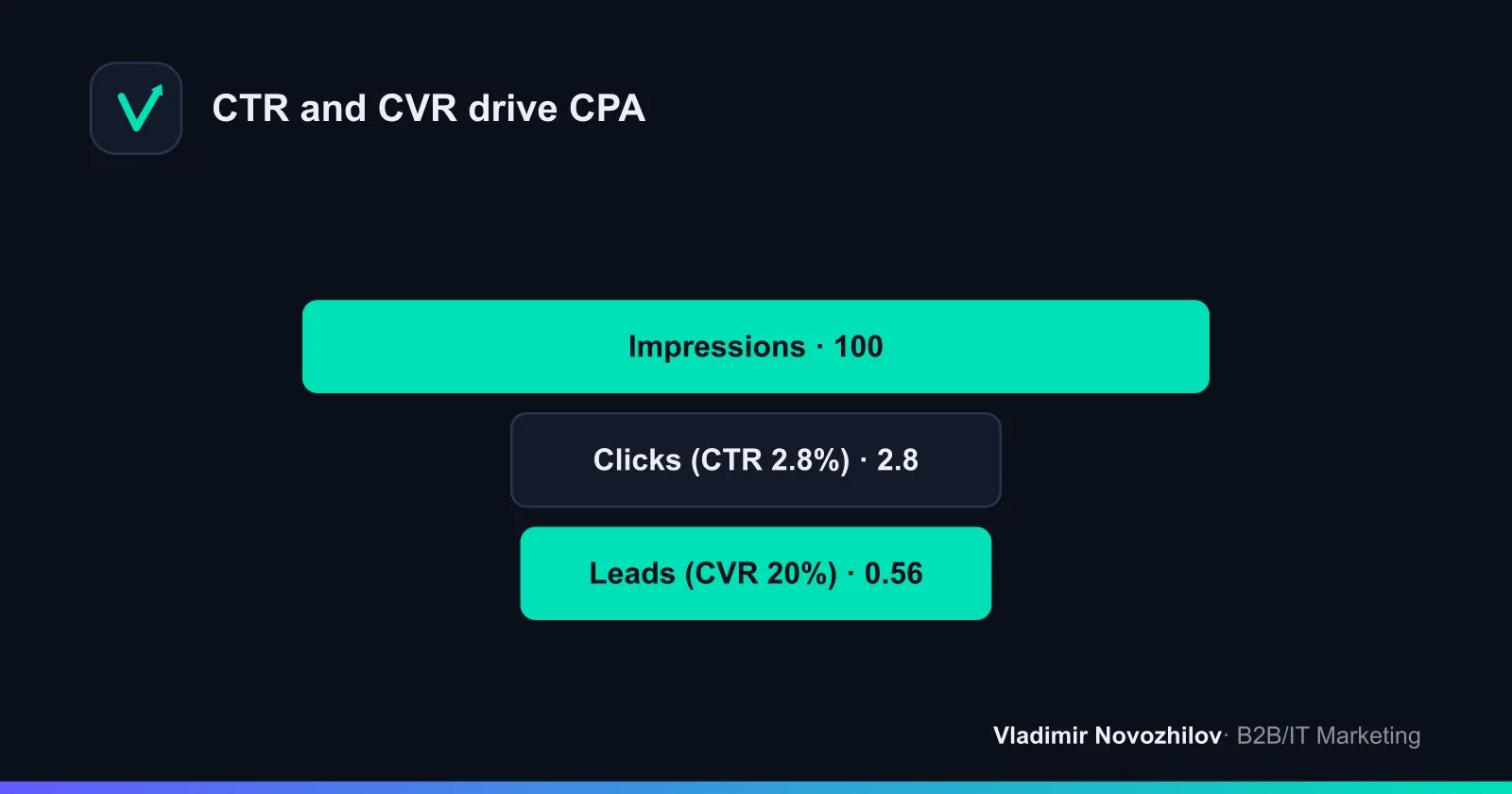
- Variant A: CTR 1.9%, CPC 24 ₽, CVR 12%, CPA = 24 / 0.12 = 200 ₽.
- Variant B: CTR 2.8%, CPC 20 ₽, CVR 11%, CPA = 20 / 0.11 ≈ 182 ₽.
- Savings: −9% CPA with similar CVR thanks to higher CTR and lower CPC.
Signals to pause: frequency > 3 in 3 days without improvement, rising CPM, falling CTR — pause losers and reallocate budget to winners.
Automation tools: CMS, API and generation pipelines
Typical pipeline:
- Data (CMS/catalog): SKU, price, offer, color scheme.
- Scene generation (Midjourney, GPT Image, Syntx API) — 3–5 variants.
- Post‑processing and upscaling.
- Text layout (Figma/Photoshop) via template.
- Export WebP/PNG and auto‑upload to ad account via API.
Practice:
- Parameterize prompts: {category}, {color}, {season}, {offer}.
- Store presets/“recipes” in a repository; version fonts and colors.
- For local РФ campaigns use services with ruble payment and stable access; export in universal formats.
Templates and files for a quick start (Figma/PSD/PNG)
-
Template 1. Universal social 1080×1080 (Figma/PSD)
- Layers: background, product, shadow, headline, subhead, CTA, logo, grid.
- Auto styles: H1/H2, palette, shadows, button.
- Export: WebP @1x/@2x; adaptations 1080×1920 and 1200×628.
-
Template 2. РСЯ/Display 300×250, 728×90, 300×600 (Figma)
- Components: global background, modular offer, CTA, logo.
- Guides: safe‑area for text, auto‑layout for quick adaptions.
-
Template 3. Site hero 1920×1080 (PSD)
- Layers for product and background replacement, smart‑object for photo, shapes for slabs.
- Export to WebP + fallback JPEG; retina version.
Examples before/after (raw AI → final banner)
- Before: generated background with product, even light, empty area top‑right; slight artifacts on product edge.
- After: inpainting edges, boost contrast on product, headline “−30% до воскресенья” in bold grotesk, CTA “В каталог” with icon, alignment to grid, export to WebP 220 KB. In A/B the warm‑lit + high‑contrast CTA version wins.
Mini‑cases: CTR/CPA numbers for AI creatives
- Retail (shoes, РФ). Tested 4 backgrounds (Midjourney) × 2 CTA palettes. Result: best CTR 2.9% vs benchmark 1.8%; CPA −24% at stable CPM.
- Fintech (landing, РФ). Background Recraft (vector) + text Adobe Firefly: CTR +31% vs control; CVR unchanged; CPA −15% due to lower CPC.
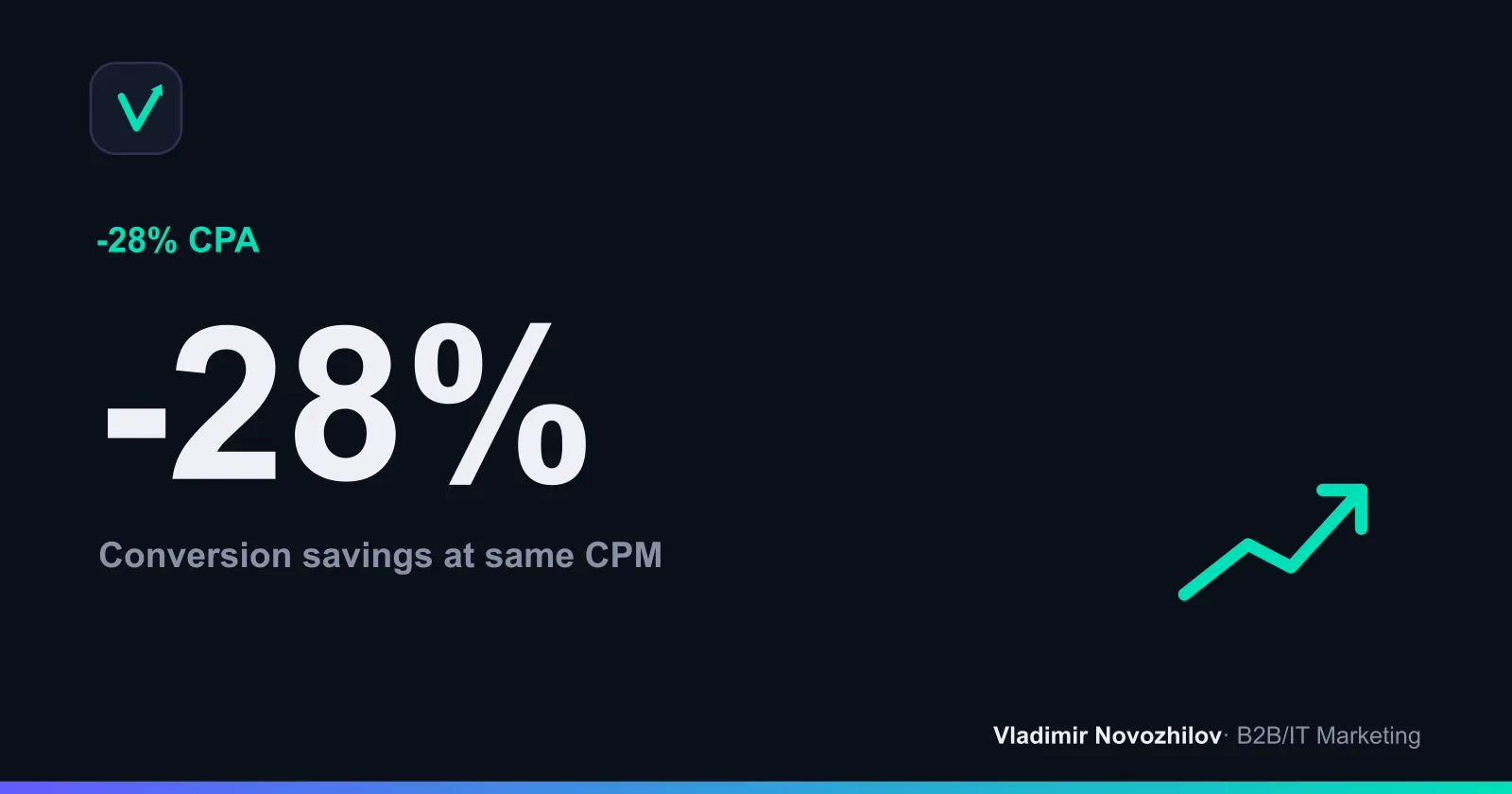
- FMCG (social). Dynamic splash scene (Kandinsky) vs static: CTR 3.2% vs 2.1%; CPA −28% after two iterations.
Layout & mobile adaptation checklist
- Check headline readability at 320 px screen width.
- Text contrast to background at least 4.5:1; shadows under white text help.
- Safe‑area 8–10%: logo and CTA not at the edges.
- Scale elements: logo 3–6% of width, CTA ≥ 44 px height.
- Move small details (icons, disclaimers) to a separate layer and hide in mobile version.
Conclusion
- Choose tools by task: photorealism, typography, local availability.
- Generation is half the success; the other half is layout, export and A/B tests.
- Legal: use only commercially permitted outputs, avoid brands and faces without releases.
- Metrics: optimize for CTR and CVR, calculate CPA and fix winners by statistics.
FAQ
- Can AI‑generated images be used in paid ads (Yandex, Google, social networks)?
- Yes, if the service permits commercial use and you do not infringe third‑party trademarks, likenesses or personality rights. Check the specific platform's license terms, avoid logos and recognizable characters, obtain releases for people and private property when needed. Keep the exported brief and the license version stamped on the campaign launch date.
- How to make text on a banner readable when generating with AI?
- Choose models with strong typography support and Cyrillic capability (Ideogram, Kandinsky, Adobe Firefly, Recraft). Generate the background separately and add text and logo in Figma/Photoshop. Use contrast 4.5:1+, letter‑spacing 0–2%, safe content area 8–10% from edges, and test readability at sizes 320–400 px on the long side.
- What are license limitations and how to verify commercial rights?
- Clarify three things: whether the subscription allows commercial use; who owns rights to the output; and whether there are restrictions on brands, celebrities or styles. Avoid models trained on closed libraries that forbid commercial use; record “generate from scratch” in the brief and don't use others' references without rights.
- Which formats and resolutions are best to export for ads and landing pages?
- For web: WebP (primary), PNG for transparency/logos, JPEG for photo banners; SVG for icons and vector graphics. Sizes by platforms: VK/myTarget/FB/IG — 1080×1080/1350/1920×1080; РСЯ/Google Display — 300×250, 336×280, 728×90, 160×600, 300×600. For retina export @2x or use responsive. DPI matters only for print (300 dpi).
- How to test and compare AI creatives: what stats and metrics to watch?
- Minimum — identical budgets and frequencies, 3–5 creatives in one ad set, 5–7 days or 100+ clicks per variant. Watch CTR, CPC, CVR and CPA. Stopping rule: if 90% confidence intervals for CTR/CPA do not overlap, declare a winner; otherwise increase sample size or change the hypothesis.