AI for Flyers and Brochures: services, prompts, templates
TL;DR
A practical guide to using AI for creating promotional flyers, brochures and posters: which tools to pick, how to write prompts, and how to export a print‑ready PDF with bleed, CMYK and 300 DPI. Includes a service comparison, step‑by‑step export checklist, 10 ready prompts and templates.
In this piece — a practical guide on using AI to create promotional flyers, brochures and posters: from choosing a service and writing a prompt to exporting a PDF for print with bleed, CMYK and 300 DPI. We’ll see where neural nets really speed up layout production, how to avoid common print shop mistakes, and which prompts work best across niches.
Short — what modern AI tools can do for promotional layouts
Modern generators and editors cover four tasks:
- Text: craft the offer, propose headlines, CTA variants and short descriptions (ChatGPT, MashaGPT, Nano Banana).
- Visual: generate illustrations and photo collages to brief (Midjourney, DALL·E), perform simple retouching and background scenes.
- Composition: select a template, auto‑layout and grid for A4/A5, leaflet, trifold, poster, etc. (Canva, Adobe Express, Visme, Microsoft Designer; in Figma — plugins and auto‑layout).
- Export: prepare the file for print — high‑quality PDF, sometimes with bleed and marks; for strict requirements — finalize in a professional editor and export as PDF/X‑1a with CMYK conversion.
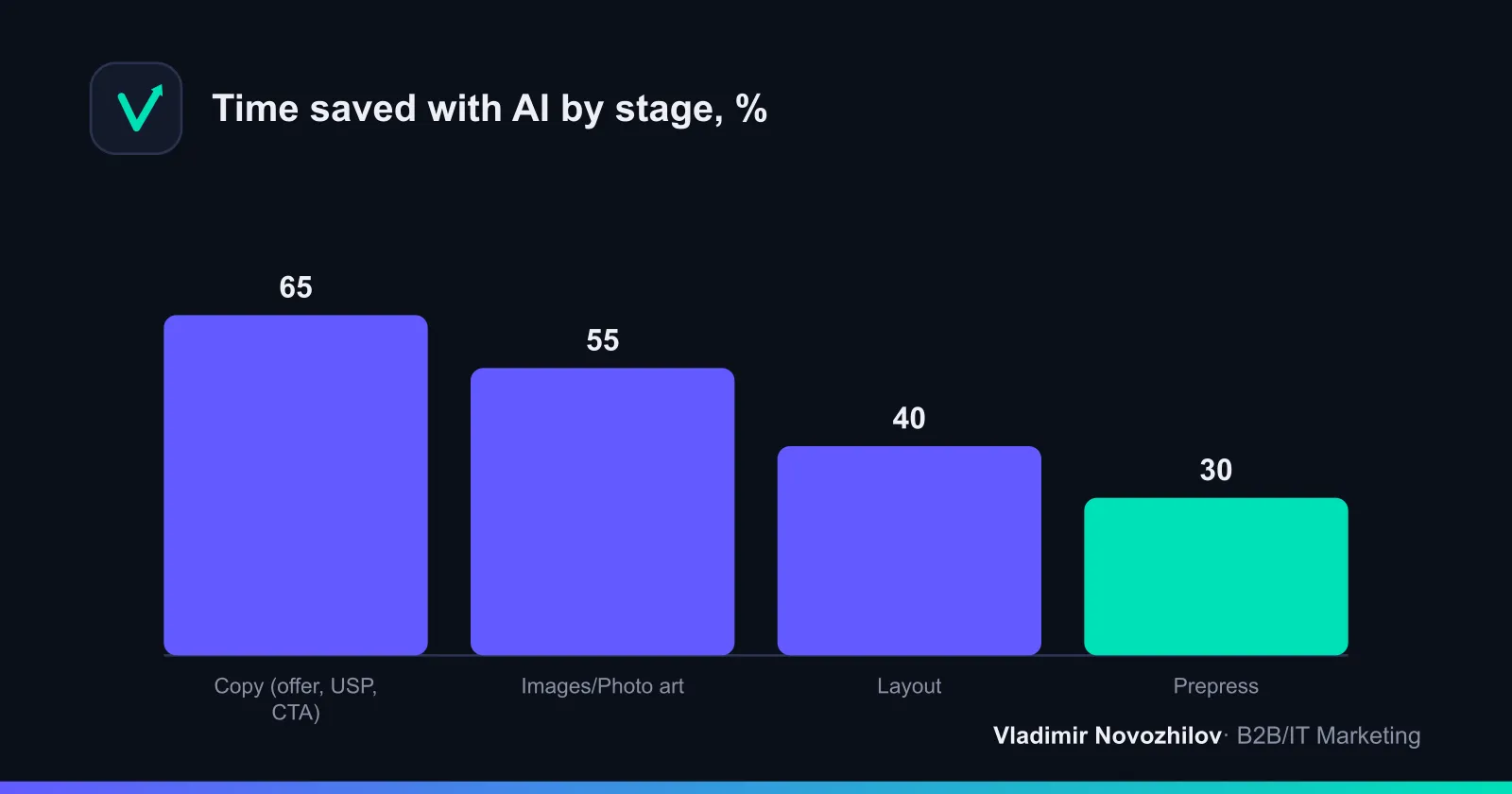
What matters: AI for creating promotional flyers does not replace design thinking and typographic principles. It saves 40–60% of time on drafts and variations, while a human is still responsible for final layout precision and meeting print requirements.
Comparison table: popular services (features, price, export, Russian support)
Below is an indicative matrix for key tools. Parameters are updated regularly in products, so always double‑check critical print features (PDF/X, CMYK, bleed) in the current version and your printer’s requirements.
| Service | Class | Russian language | Brochure templates | Image generation | Text generation | Auto‑layout AI | PDF export | PDF/X‑1a | CMYK | Bleed | 300 DPI | Example price/mo |
|---|---|---|---|---|---|---|---|---|---|---|---|---|
| Canva | Editor with AI | Yes | Yes (many) | Built‑in/plugins | Yes | Yes | Yes (PDF Print) | Limited (often RGB) | Mostly no | Yes | Yes | 0–1000 ₽ |
| Adobe Express | Editor with AI | Yes | Yes | Yes (Firefly) | Yes | Yes | Yes (PDF) | Via Adobe (Illustrator/InDesign) | Yes (via profile) | Yes | Yes | 0–1500 ₽ |
| Visme | Editor with AI | Yes | Yes | Available | Available | Yes | Yes (PDF) | Usually RGB | Usually no | Yes | Yes | 0–1500 ₽ |
| Microsoft Designer | Editor with AI | Partially | Yes | Yes | Yes | Yes | Yes (PDF) | Usually RGB | No | Partially | Yes | 0–1000 ₽ |
| Figma (+plugins) | Layout/moc | Yes | Via community | Via plugins | Via plugins | Auto layout | Yes (PDF) | External processing | Profiles via conversion | Yes (manual) | Yes | 0–1200 ₽ |
| Midjourney | Image generator | Yes (prompt) | No | Yes (strong) | No | No | PNG/JPG | No | No | — | High | 1000–3000 ₽ |
| DALL·E | Image generator | Yes | No | Yes | No | No | PNG/JPG | No | No | — | High | 0–2000 ₽ |
| ChatGPT | Text/concept | Yes | No | No | Yes (strong) | Recommendations | — | — | — | — | — | 0–2000 ₽ |
| MashaGPT | Text/RU style | Yes (RU‑oriented) | No | No | Yes | Recommendations | — | — | — | — | — | 0–1000 ₽ |
| Nano Banana | Prompt helper/texts | Yes | Request forms | No | Yes | Recommendations | — | — | — | — | — | 0–1000 ₽ |
Notes:
- “PDF/X‑1a” is usually produced via professional editors: InDesign/Illustrator or external converters with print profiles. Online editors most often output a “PDF for print” in RGB — sufficient for many printers, but not all.
- “300 DPI”: set raster images not lower than 300 DPI at 100% scale in the layout.
- “Bleed”: typically 3 mm around for RF/EU and 0.125” for the US.
How to choose a service for your task — checklist (goals, budget, format, run size)
- Goal: driving foot traffic, QR activations, product presentation at a trade show or direct mail? That determines format: flyer/leaflet A5, brochure A4 trifold/bifold, poster A3/A2.
- Content: do you need unique visuals or are stock photos and icons enough? For original photo‑art, use Midjourney/DALL·E plus an editor.
- Language/local: Russian audience, local currency and Cyrillic — check Russian support and proper fonts in the editor.
- Print: do you need CMYK, PDF/X‑1a and verified bleed? If yes — plan for final assembly/export in a professional editor.
- Team: do you need to quickly push variants to sales/owner? Easy sharing and comments are provided by Canva, Figma, Adobe Express.
- Budget/timelines: free tiers are fine for tests; for campaign work consider subscription for brand kit, advanced templates and higher resolution.
- Processes: do you need an “ai flyer generator/ai brochure maker” in one window? If yes — pick editors with built‑in AI modules.
Step‑by‑step: from idea to print
Step 1 — prepare the brief and target audience
A short but precise brief saves hours of back‑and‑forth. Record:
- Objective and KPI: foot traffic, registrations, leads, QR scans, calls.
- Audience and context: who, where will they see it, why should they care.
- Offer and proofs: benefit, deadline, guarantee, social proof.
- Mandatory elements: logo, contacts, QR, legal marks.
- Format and medium: A5 flyer, A4 trifold/bifold, A3/A2 poster, brochure.
- Printer: PDF requirements, CMYK, bleed (desired margin), safe zones, preferred profile, font requirements (vectorize/embed).
Feed the final brief into AI as context, then request draft texts and visual sketches.
Step 2 — writing the prompt (structure and blocks)
A good prompt is a formalized brief. Formula for flyer/brochure text:
- Context: industry, product, audience, objective.
- Style: business/friendly/premium, block lengths.
- Structure: H1 headline, subheadline, 3–5 benefit bullets, CTA.
- Constraints: Cyrillic, specific terms, line lengths.
- Formats: A5/A4, dark/light theme, tone.
Example prompt constructor for copy (copy and substitute):
You are a marketer. Write copy for [format: A5 flyer / A4 trifold brochure] in Russian.
Brand: [who we are], Audience: [who], Goal: [drive to .../generate leads ...].
Offer: [what we offer, deadline], Proofs: [reviews/rating/certificates],
CTA: [call + channel], Tone: [premium/friendly/strict].
Output: H1 (up to 8 words), subheadline (up to 14 words), 4 benefit bullets (each up to 10 words),
short paragraph (up to 50 words), CTA (up to 7 words). No anglicisms, Cyrillic.
For images (Midjourney/DALL·E) use: scene + style + composition + light/color + aspect ratio + exclusions (no text/watermarks) + region language.
Example visual prompt for an A5 cafe flyer:
cozy specialty coffee shop interior, artisan pastries on wooden counter,
soft morning light, shallow depth of field, warm color grading, minimal composition,
clean negative space for copy, photorealistic, 3:4 aspect ratio, no text, no watermark
Tip: ask ChatGPT to generate 10 prompt variants for your references and pick 2–3.
Step 3 — generate visuals and align the look
- Start with style and scene. Generate 5–8 variants and evaluate composition against your layout grid.
- Cyrillic check: don’t rely on embedded text — add copy later in the editor.
- Detail: ensure a clear focal point (product/scene) and free space for headline/CTA.
- Upscale: export sources at least 3000 px on the long side for A5/A4 at 300 DPI.
- Commercial rights: verify the service license allows commercial print.
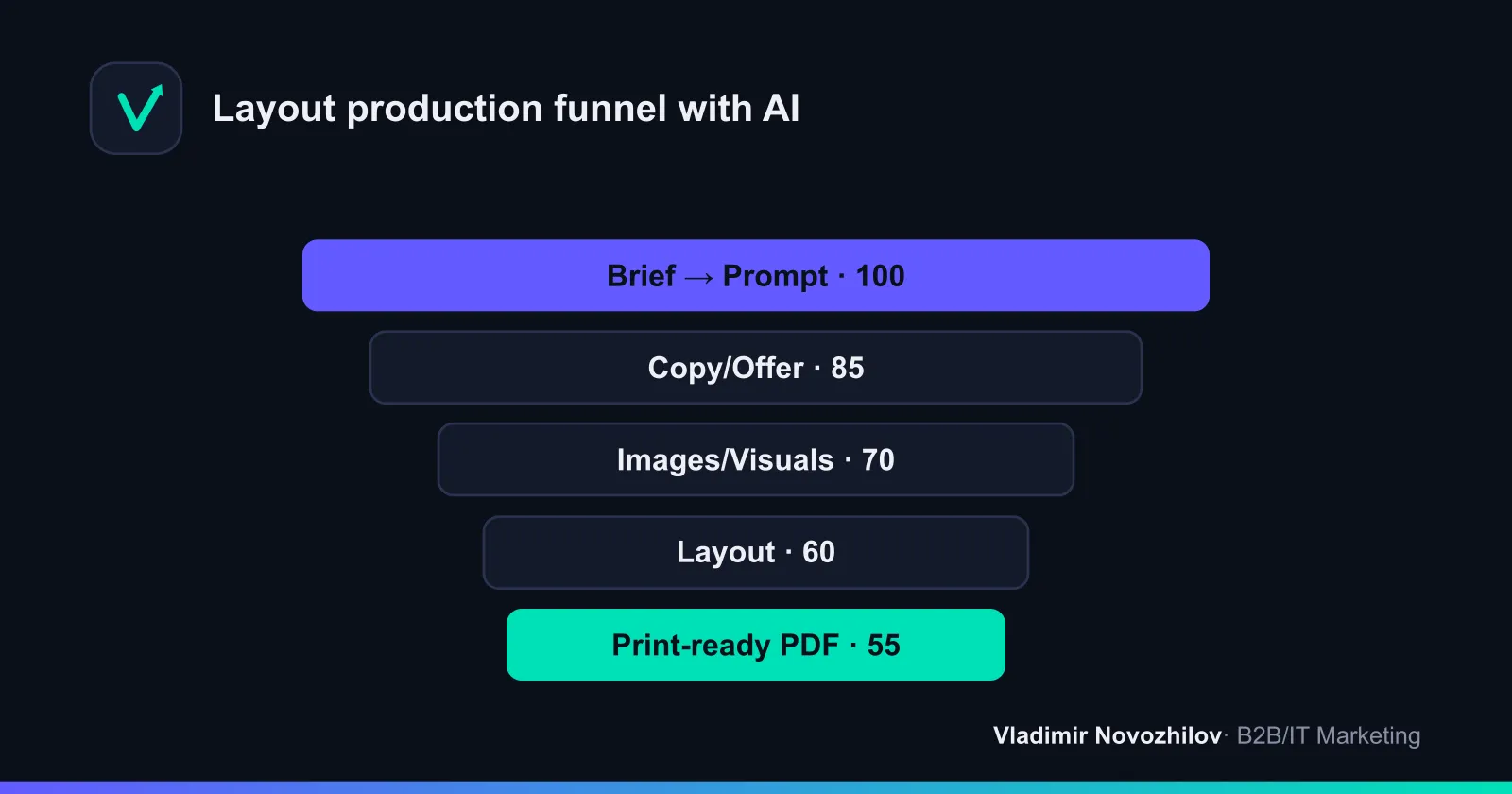
Step 4 — assemble layout and export (PDF/CMYK/bleed/DPI)
- Grid and margins: for A5 — keep working margins at least 5 mm; for A4 trifold — mark folds precisely.
- Fonts: use families with Cyrillic support, embed or convert to outlines.
- Color: for strict printer needs convert raster elements to CMYK and set the print profile.
- Bleed (desired oversize): add 3 mm (RF/EU) or 0.125” (US) on all sides. Extend backgrounds/images past trim.
- DPI/PPI: images at 100% scale — 300 DPI; at 50% — 600 DPI, etc. Avoid stretching.
- Export: if the printer requires a standard, use PDF/X‑1a. Otherwise, high‑quality “PDF for print” is acceptable. Include crop marks, enable bleed, embed fonts.
- Preflight: check black text (K‑only), raster resolution, safe distances from trim, QR correctness.
Printing standards: RF / EU / USA
- RF: A‑series formats (A4/A5), bleed 3 mm, PDF/X‑1a or high‑quality PDF; CMYK per printer profile; 300 DPI. K‑only black often required for small text and registration marks.
- EU: similar to RF: A‑series, 3 mm bleed, PDF/X‑1a; CMYK profiles per ISO Coated/Uncoated. Safe zone 5 mm.
- USA: inch formats (Letter, Half‑Letter, 11×17”), bleed 0.125”, safe zones ≥0.25”. PDF/X‑1a recommended. Color — CMYK (US Web Coated SWOP), 300 DPI.
Prompt library — ready templates for 10 popular niches
Below are prompts you can copy: flyer/brochure text and an image prompt. Change variables in brackets.
- Dental clinic (A5 flyer)
[TEXT]
Task: write A5 flyer copy for dental clinic [Name], city [City].
Audience: adults 25–45, safety and price matter.
Offer: first consultation and hygiene with [X%] discount until [date].
Output: headline (up to 7 words), subheadline (up to 14 words), 4 benefit bullets,
block about sterilization/certificates (up to 40 words), CTA with QR (up to 6 words). Tone: caring.

[IMAGE]
aesthetic dental studio, bright clean interior, smiling people not visible (focus on tools),
soft white-blue palette, space for copy, 3:4, no text- Coffee shop/pastry (A6 flyer)
[TEXT]
Write a short A6 flyer for coffee shop [Name] with chef pastry.
Offer: cappuccino + eclair for [₽Price], only on [Weekdays]. Tone: warm.
Output headline (emotional), 3 bullets, address, hours, CTA "Scan and get -10%".

[IMAGE]
macro shot artisan coffee and pastry on marble, warm tones, negative space, 2:3, no text- Fitness club (A4 trifold brochure)
[TEXT]
Create content for an A4 trifold brochure for fitness club [Name].
Goals: trial visit, selling memberships. Include 3 pricing plans,
schedule of zones, motivational block, 3 short testimonial quotes, CTA "7 days free".

[IMAGE]
athletic people training in modern gym, dynamic angle, high contrast, 16:9 crop left-safe for copy, no text- Online coding school for teens (A5 flyer)
[TEXT]
Tone: friendly. Goal: sign up for a free trial lesson in [Language/track].
Give a headline without jargon, a subheadline, 5 bullets, CTA. Add parent benefits: safety, mentors, portfolio.

[IMAGE]
teen coding club, laptops, diverse kids, bright colors, playful minimal style, 3:4, no text- Law firm (A5 flyer)
[TEXT]
Strict tone. Services: [arbitration/contracts/due diligence]. Offer: free document audit until [date].
Output H1, subheadline, 4 benefit bullets, trust block (cases, tenure), CTA "Call a lawyer".

[IMAGE]
minimal corporate law imagery, dark blue palette, architectural abstract, space for copy, 3:4, no text- Real estate agency (A4 bifold brochure)
[TEXT]
Bifold A4. Goal: viewing requests. Include: property of the week, mortgage from [%], team,
3 trust arguments, map/QR, CTA. Language: plain, avoid clichés.

[IMAGE]
modern apartment interior, natural light, editorial style, muted colors, 4:3, no text- Charity fund (A5 flyer)
[TEXT]
Empathetic neutral tone. Goal: donation via QR. Explain what funds go to, add a short story, transparency of reporting, CTA "Help now".

[IMAGE]
soft human-centric photography of helping hands, gentle light, ample negative space, 3:4, no text- Online cosmetics store (A3 poster)
[TEXT]
Product: [category]. Offer: launch + [X%] discount until [date].
Output big headline, subheadline, 3 bullets, CTA, terms in small print.

[IMAGE]
beauty product still life, glossy highlights, pastel background, editorial look, 4:5, no text- Engineering design bureau (A5 flyer, B2B)
[TEXT]
B2B tone: expert. USP: reduce R&D time by [X%], certification, NDA.
Structure: client problem → solution → result → CTA "Request a quote".

[IMAGE]
precision engineering, technical drawings, subdued palette, isometric elements, 3:4, no text- Medical center/clinic (A4 trifold brochure)
[TEXT]
Scope of services [list], focus on prevention. Include schedule, 3 package prices, team cards (3), licenses, CTA "Book online".

[IMAGE]
clean medical environment, light teal accents, human-centric but privacy-safe, 16:9, no text
Templates and files to “download” — print‑ready specs and sources
Below are specifications you can copy into your editor (Figma/Illustrator/InDesign) and start assembling.
A5 flyer (single‑sided)
Format: A5 (148×210 mm)
Bleed: 3 mm all around (final: 154×216 mm)
Safe zone: 5 mm
Color: CMYK (profile per printer)
Rasters: 300 DPI at 100% scale
Fonts: embed or convert to outlines
Export: PDF/X‑1a, crop marks, include bleed
A4 trifold (3 folds)
Format: A4 (210×297 mm) landscape
Bleed: 3 mm, final 216×303 mm
Folds: left panel 98 mm, center 99 mm, right 100 mm (compensation for thickness)
Safe zone: 5 mm from folds and trim
Color: CMYK; Raster: 300 DPI
Export: PDF/X‑1a, marks and bleed, black text — K100
A3 poster
Format: A3 (297×420 mm)
Bleed: 3 mm → 303×426 mm
Color: CMYK; Raster: 300 DPI
Export: PDF/X‑1a or high‑quality PDF
Figma grid (A5)
Frame size: 154×216 mm (with bleed)
Inner frame: 148×210 mm
Layout grid: 4 columns, gutter 8, margin 12 (inside safe zone 5 mm)
Styles: H1 36/42, H2 20/26, body 12/18, captions 9/12
Checklist before sending to printer
- Fonts embedded or converted to outlines.
- Bleed 3 mm (or 0.125” US) included in export with crop marks.
- Important text at least 5 mm from trim/fold lines.
- Raster images 300 DPI; no stretched images.
- Small black text — K‑only, not composite black.
- Color model agreed: CMYK profile from printer or RGB if the printer accepts it.
- QR code tested from a print sample (not screen); sufficient contrast.
Cases and metrics: campaign examples and results
Case 1. Retail (summer promo A5 flyer)
- Goal: increase in‑store traffic and seasonal collection sales.
- Process: copy — ChatGPT; visuals — Midjourney; assembly — Canva; export — PDF Print with 3 mm bleed.
- Run: 10,000; distribution — stands at checkouts and handouts at entrance.
- Result: in 2 weeks +14% QR scans to landing page, +9% transactions for promo SKUs, prep time cut from 3 days to 1 day.
Case 2. B2B service (trifold brochure for an exhibition)
- Goal: obtain qualified leads.
- Process: concept/copy — MashaGPT, manual term verification; visuals — DALL·E with edits; layout — Figma; export — PDF/X‑1a, CMYK.
- Run: 1,500; distribution at booth.
- Result: 7.8% QR scans → 3.2% inquiries, 14 SQL; design time 1.5 days instead of 4.
Case 3. Cafe (A3 poster)
- Goal: promote new breakfast line.
- Process: visuals — Midjourney; copy — ChatGPT; assembly — Adobe Express; print — high‑quality RGB PDF per local printer requirements.
- Result: +18% breakfast orders in first 10 days; layout ready in 6 hours vs 1.5 days.
Offline effect measurement methods
- QR codes with UTM tags and short links.
- Promo codes printed on the flyer/brochure.
- Control areas/points without distribution.
- Call‑tracking numbers.
Common mistakes and how to avoid them (print, in‑image text, rights)
- Cyrillic in images: letters “break.” Fix: don’t generate text in images; add copy in the editor.
- No bleed: white edges after trimming. Fix: add 3 mm (or 0.125”) and enable bleed export.
- RGB instead of required CMYK: color shifts. Fix: check with the printer; if needed — PDF/X‑1a and convert raster to CMYK.
- Illegibility: low contrast and small type. Fix: test print on a regular printer, adjust sizes and contrast.
- Poor photos: stretched to 300 DPI on paper but still soft. Fix: generate/source 3000+ px originals and check 100% scale.
- Legal rights: commercial print restrictions/model/rebrand uses. Fix: read the service terms, avoid recognizable brands and faces without release forms.
Tools and roles: how to connect AI tools together
- Text: ChatGPT, MashaGPT, Nano Banana — the “brain” for offer and structure and prompt construction.
- Images: Midjourney, DALL·E — the visual part; then retouch/crop in an editor.
- Layout: Canva/Adobe Express/Visme/Microsoft Designer — fast templates and auto‑layout; Figma — grid control and handoff to print.
- Export/print: Illustrator/InDesign — PDF/X‑1a, CMYK, preflight.
Prompt constructor (static): assemble your request in 2 minutes
Parameter table (replace brackets with your values):
| Parameter | Value |
|---|---|
| Format | [A5 flyer / A4 trifold / A3 poster] |
| Goal | [sales/traffic/leads/registration] |
| Audience | [who, where they will see it] |
| Offer | [term, deadline] |
| Tone | [premium/friendly/strict] |
| Visual style | [minimalism/photoart/illustration] |
| Mandatory elements | [logo/QR/contacts/legal notes] |
| Print requirements | [bleed 3 mm, 300 DPI, CMYK] |
Prompt glue (for copy):
You are a creator. Generate content for [Format] in Russian for [Audience].
Goal: [Goal]. Offer: [Offer]. Tone: [Tone].
Output H1, subheadline, 4–5 bullets, CTA, short paragraph.
Consider print requirements: [Print requirements]. Cyrillic.
Prompt glue (for image):
[Visual style], [key scene], clean composition with negative space for copy,
cohesive brand colors, [aspect ratio for format], photorealistic/illustrative, no text, no watermark
Mini‑guide on fonts, color and composition
- Fonts: one family with 2–3 weights is enough. Ensure Cyrillic support.
- Hierarchy: H1 2–3× larger than body; contrast at least 4.5:1 minimum.
- Grid: for A5 — 3–4 columns; for trifold — visually separate panels and avoid key phrases crossing the fold.
- Color: avoid oversaturated backgrounds — offset printing can push them into muddy darks; use warm/cool accents sparingly.
Legal notes in brief
- Image rights: check generator license (commercial print) and avoid recognizable brands/faces without releases.
- Text/data: don’t feed confidential info into AI; use anonymized wording.
- Fonts: ensure commercial license, especially for paid typefaces.
FAQ — short reminders
(See the block at the top of the article for details.)
- Which neural networks are good if I have no design experience? Editors with templates: Canva, Adobe Express, Visme, Microsoft Designer. They act as “ai brochure maker/ai flyer generator” and cover 80% of typical tasks.
- Can I skip CMYK? If the printer accepts RGB PDF Print and you print digitally, yes. For offset and strict brands prefer PDF/X‑1a and CMYK.
- How to avoid a “templated” look? Create your own offer, change the grid, use unique visuals (Midjourney/DALL·E), add brand elements.
- How long from idea to print with AI? Draft in 2–4 hours, final in 1–2 days with a clear brief and focused approvals.
- What about Cyrillic in images? Generate images without text. Add captions and headlines in the editor.
Conclusion: AI significantly speeds up creating flyers, brochures and promotional layouts — from the initial offer to packaging into a print‑ready PDF. Combine the strengths of tools: text — ChatGPT/MashaGPT/Nano Banana; visuals — Midjourney/DALL·E; layout and export — Canva/Adobe Express/Visme/Figma and when needed — PDF/X‑1a via professional editors. This way you get a fast launch and consistent print quality.
FAQ
- Which AI services are best for creating a promotional brochure from scratch?
- For a fast start, editors with templates and generators work well: Canva, Adobe Express, Visme, Microsoft Designer. For images — Midjourney or DALL·E; for text — ChatGPT, MashaGPT, Nano Banana. Final layout and print‑ready export are easiest to prepare in Figma/Illustrator or in the editor itself if it supports bleed and high‑quality PDF.
- Can an AI service produce a print‑ready PDF for a commercial printer (CMYK, bleed, 300 DPI)?
- Some online editors export a “PDF for print” with crop marks and bleed, but often in RGB. For strict printer requirements, produce PDF/X‑1a and convert to CMYK in InDesign/Illustrator or via a print profile. Always set the bleed (usually 3 mm in RF/EU, 0.125" in the US) and preflight the final file.
- How to compose a prompt for a promotional flyer: structure and required fields?
- Structure: objective + audience + offer + format/size + tone + visual style + text/logo constraints + print requirements (bleed/DPI). Add key messages, CTA and region (language/currency). For images — scene, style, composition and aspect ratio; for copy — block lengths and a list of headings.
- What are the limitations for Russian language and Cyrillic when generating text/in‑image text?
- Cyrillic text in generated images is unstable: characters may be distorted. Better to generate images without text and add copy later in the editor. For writing text itself, use ChatGPT/MashaGPT/Nano Banana with language and style specified. Manually check spelling and brand terms.
- Are there free options, and when is a paid subscription justified?
- Yes — Canva, Adobe Express, Microsoft Designer have free tiers, and image generators often offer trials. Subscription is justified when you need a brand kit, advanced templates, batch export, bleed control, higher resolution without watermarks, or time savings during approvals.