Competitive analysis worksheet: template, criteria, and example


TL;DR
A comparative table helps you evaluate competitors using consistent criteria—price, product, channels, market share, strengths and weaknesses. This article includes a ready Excel/Google Sheets template, a checklist for building the table, industry-specific versions, and a fully completed example with numbers and strategic takeaways.
Competitive analysis often drowns in chaos: notes in a notebook, screenshots of other sites, fragmented numbers in chat. Until all that is consolidated into a single format, it’s of limited use. A tabular comparison solves the systematization problem — turning raw observations into a working tool that shows where you win and where you lag.
Below is a ready template, comparison criteria, a step-by-step guide, industry variations, and a fully filled example with numbers. All of this can be assembled in Excel or Google Sheets in one workday.
Why you need a competitor comparison table at all
Essentially, it’s a structured juxtaposition of several companies according to a common set of criteria: price, product, promotion channels, market share, strengths and weaknesses. Rows contain comparison parameters; columns contain competitors (and be sure to include your company as the reference point).
Why this is useful in practice:
- Pricing. You see the real price corridor: where you’re more expensive without justification, and where you underprice yourself.
- Product. You understand which features and conditions are already table stakes and what could be turned into differentiation.
- Marketing. It’s clear which channels competitors use to get traffic and clients, and where there are unexploited niches.
- Positioning. The table shows objective differences, not the desired narrative.
The main value is not collecting data itself but the decisions you make based on it. Therefore, every table should have a final column called “Conclusion / what we do.”
How the table, SWOT, and competitive matrix relate
These three tools are often confused. In reality they complement each other and solve different tasks.
| Tool | What it shows | When to apply |
|---|---|---|
| Comparative table | Horizontal comparison of many companies across common criteria | Basic market review, pricing and product assessment |
| SWOT analysis | Strengths/weaknesses, opportunities and threats of a single company | Deep dive on a specific player or yourself |
| Competitive matrix | Players’ positions along two key axes (market map) | Finding free niches and differentiation points |
In addition, competitive analysis often uses SNW analysis (Strength–Neutral–Weakness — assessment “stronger / on par / weaker than market”) and Porter’s method (five forces: competitors, new entrants, suppliers, buyers, substitute products). For choosing criteria, classic frameworks are useful — 4P model (product, price, place, promotion) and 5C model (company, customers, competitors, partners, context).
A practical sequence is: first gather data in the comparative table, then run SWOTs for 2–3 key players, and finally visualize the result with a competitive matrix.
Which blocks make the table actionable
A universal competitor comparison table consists of several semantic blocks. Don’t overload it with a hundred rows — 8–12 meaningful criteria are enough.
- General info: name, website, year on market, operating region.
- Product and services: assortment, key characteristics, quality.
- Price and terms: price list, discounts, contract terms, payment methods.
- USP and positioning: unique selling proposition, core promise.
- Target audience: who the product is for, segments.
- Promotion channels: SEO, PPC, social media, affiliate, offline.
- Market metrics: market share, traffic, reach, reviews, rating.
- Strengths and weaknesses: short theses for each player.
- Conclusion: what this means for us and what action to take.
Weighting depends on the market: in B2B and services, product, expertise and contract terms are primary; in e-commerce, price and delivery speed matter most.
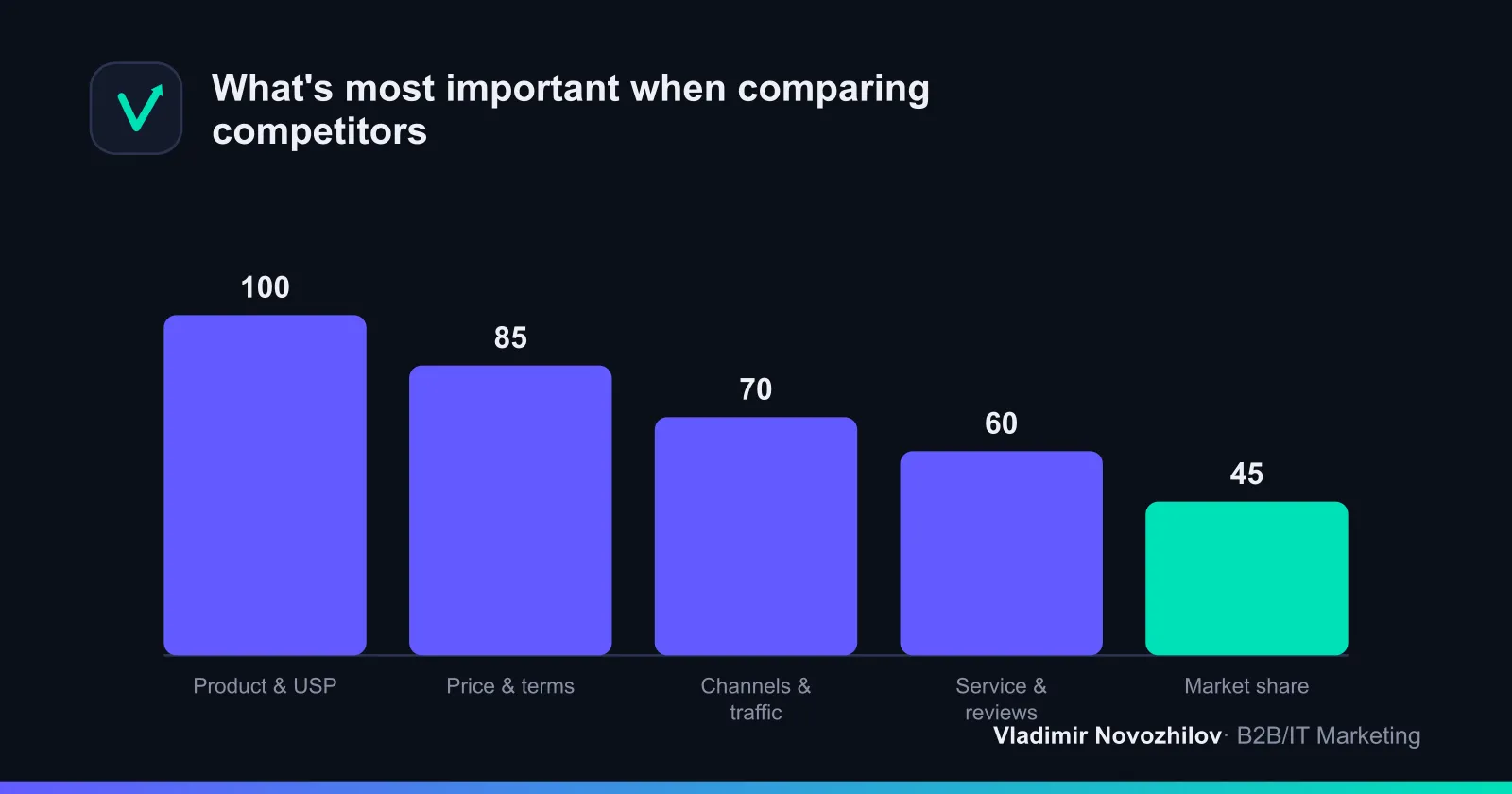
Which criteria and metrics to compare
Criteria are the heart of the table. Below is a basic set of 9 parameters suitable for most B2B, IT and services markets.
| Criterion | What we evaluate | Where to get the data |
|---|---|---|
| Pricing policy | Price level, corridor, discounts | Website, price lists, commercial offers |
| Product / service | Features, quality, assortment | Website, demos, reviews, mystery shopping |
| USP | Core promise to the customer | Homepage, advertising |
| Target audience | Segments, niches | Case studies, reviews, social media |
| Promotion channels | Sources of traffic and leads | SimilarWeb, SEMrush, Ahrefs |
| Market share / traffic | Reach, visits | Public reports, analytics |
| Service | Response speed, support | Test requests, reviews |
| Reputation | Rating, NPS, reviews | Review sites, maps, social media |
| Strengths/weaknesses | Final assessment | Own synthesis |
For product and subscription businesses add economic metrics: CAC, LTV, churn rate and NPS. You won’t get exact competitor numbers for these, but you can estimate order of magnitude from indirect signals (frequency of promotions, retention programs, reviews about churn) and record them as hypotheses.
Tip: assign each criterion a weight (for example 1–3) and a rating on a 1–5 scale. Then the table becomes a scoring model: you get an aggregate score per competitor, not just a set of observations.
Step-by-step: how to assemble the comparison table
Checklist for building a competitor table — from setting the goal to drawing conclusions.
- Define the goal. For example: “understand why clients churn” or “choose pricing for a new plan.” The goal dictates the criteria set.
- Select competitors. 5–7 companies: direct, indirect, potential (see above).
- Set the criteria. 8–12 parameters from the block above. No more — otherwise the table won’t be maintained. Cross-check with a list of competitor analysis questions so you don’t miss anything.
- Assign weights and scale. Set importance for criteria and a 1–5 rating scale.
- Collect data. Websites, price lists, reviews, test requests, analytics services. Record source and date.
- Enter into the table. Rows — criteria; columns — competitors and your company.
- Score. Calculate the aggregate score for each player.
- Conclude. In a separate column — what exactly we do: where to adjust price, what to refine in the product, which channel to test.
- Set the next update date and the responsible person.
The entire cycle for a mid-size market takes 1–2 workdays. After that — maintenance.
Who exactly to include in the comparison
A common beginner mistake is to look only at obvious leaders. Proper selection accounts for three types of players:
- Direct competitors — offer the same product to the same audience. Analyze them in detail; they are the core of the table.
- Indirect competitors — solve the same customer problem in a different way. For example, for an SEO agency an indirect competitor may be the client’s in-house marketer.
- Potential competitors — adjacent players who might enter your market. Keep them on your radar, but analyze them superficially.
Where to look: search results for key queries, ads, review sites and aggregators, client formulations like “how are you better than …”. Optimal composition: 3–4 direct, 1–2 indirect, 1 potential competitor plus you.
Ready template for the comparison table
You can build a competitor analysis template in Excel or Google Sheets in 10 minutes. Below is the structure to paste into the first row and column of a sheet.
| Criterion | Weight (1–3) | Us | Competitor A | Competitor B | Competitor C |
|---|---|---|---|---|---|
| Price (level) | 3 | ||||
| Product / features | 3 | ||||
| USP | 2 | ||||
| Target audience | 1 | ||||
| Promotion channels | 2 | ||||
| Traffic / market share | 2 | ||||
| Service and support | 2 | ||||
| Rating / reviews | 1 | ||||
| Aggregate score | |||||
| Conclusion / action |
To make Google Sheets compute the aggregate score automatically, use ratings 1–5 and in the “Aggregate score” row use the SUMPRODUCT formula over ratings and weights. In Excel use СУММПРОИЗВ for the ranges. The table will then rank players automatically.
How to adapt the template by industry
The basic template adapts to a niche by replacing some criteria. Below — what to add for different sectors.
| Industry | Key criteria beyond the basics |
|---|---|
| B2B and services | Industry expertise, case studies, contract terms, timelines, dedicated account manager |
| IT and products | Functionality, integrations, pricing tiers, support, roadmap |
| E-commerce | Price, availability, delivery speed, returns, product rating |
| Marketplaces | Search ranking, seller rating, reviews, sales volume, repricing |
For marketplace sellers the table often focuses on price and rating: compare competitor listings by price, number of reviews and search position, then adjust your own prices. In B2B the emphasis shifts to trust: case studies, client reviews, and niche expertise.
Example filled table with numbers
Let’s walk through an end-to-end example for a hypothetical web development agency. Ratings are on a 1–5 scale; weights are factored into the aggregate score.
| Criterion (weight) | Us | Competitor A | Competitor B |
|---|---|---|---|
| Price, per project (3) | from 350,000 ₽ / 4 | from 500,000 ₽ / 3 | from 200,000 ₽ / 5 |
| Product / stack (3) | Web + mobile / 5 | Web only / 3 | Template sites / 2 |
| USP (2) | Timelines from 6 weeks / 4 | Big brands / 5 | Cheap and fast / 3 |
| Channels (2) | SEO + content / 3 | PPC + PR / 5 | Social media / 3 |
| Traffic/month (2) | 12k / 3 | 45k / 5 | 8k / 2 |
| Rating / reviews (1) | 4.8 / 5 | 4.6 / 4 | 4.1 / 3 |
| Aggregate score | 41 | 44 | 33 |
Conclusions from the table:
- Competitor A is stronger in traffic and work with large clients, but more expensive. Our growth area — strengthen inbound marketing and win premium projects.
- Competitor B undercuts on price but lags on product. Matching their price would hurt margin; better to emphasize quality and tech stack differences.
- Our advantage is timelines and a broad stack (web + mobile). This should be highlighted in the USP and positioning.
One filled screen of the table produced three concrete actions on pricing, product, and marketing — which is precisely why it’s compiled.
Positioning map: visualizing the market
A competitive matrix turns the table into a clear visual. Choose two meaningful axes — for example “price” and “assortment breadth” — and place players across four quadrants.
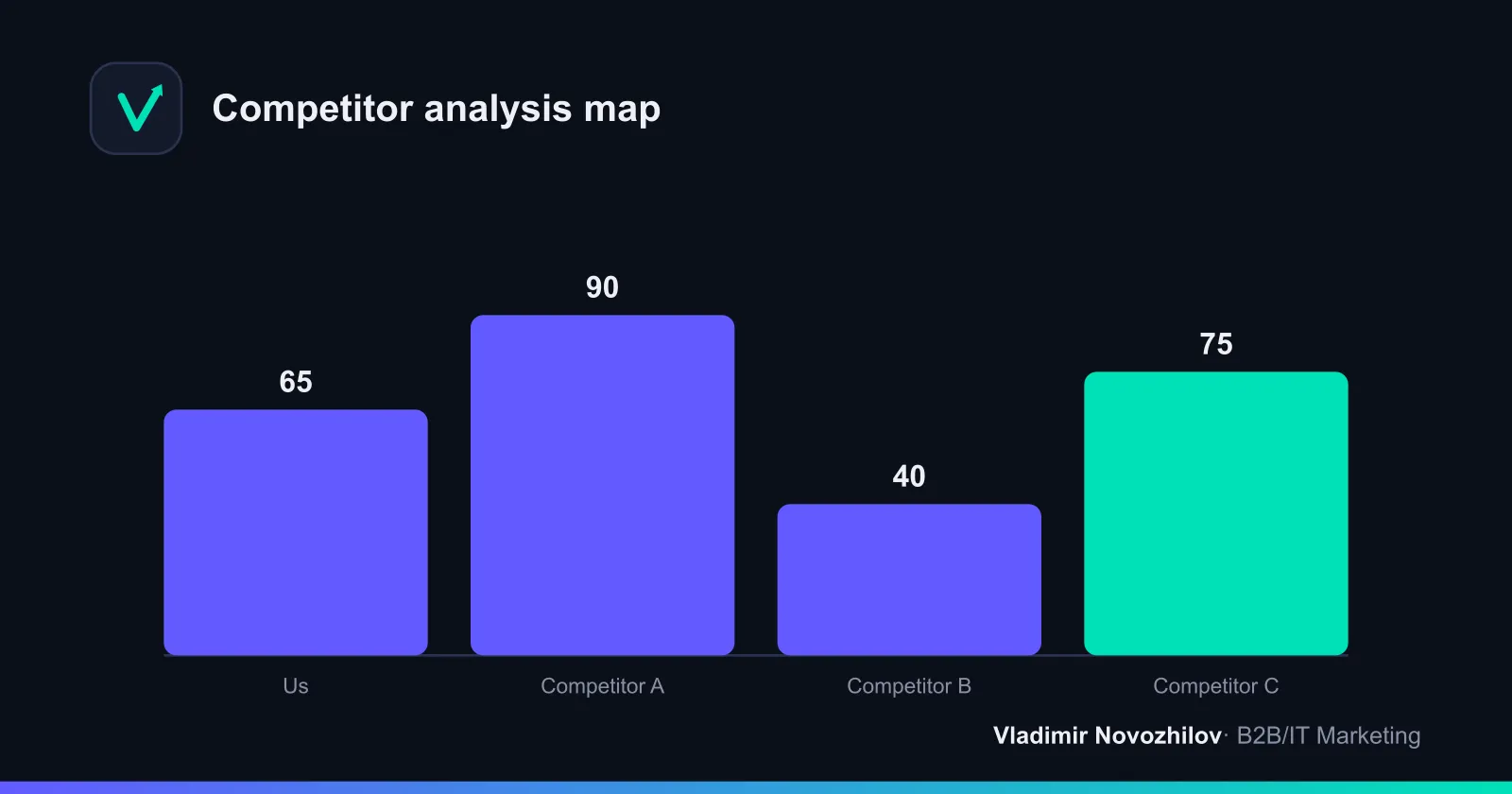
The map instantly highlights vacant zones. If the quadrant “high quality / mid price” is empty but demand exists, that’s a hypothesis for positioning. Choose axes that matter to the customer’s decision, not only what’s easy to measure.
How to turn the table into decisions
A table without actions is a dead document. Here’s how to turn it into decisions:
- Pricing. Place your price within the market corridor. If you’re in the top third without clear advantages — either increase value or adjust price.
- Product. Separate hygiene features (everyone has them) from potential differentiators (rare features).
- Marketing. Find channels competitors underutilize — customer acquisition costs are often lower there.
- Positioning. Build messaging around areas where your aggregate score is objectively higher.
A good practice is to write three priority actions for the quarter after each table update. This disciplines the team and prevents analysis from becoming an end in itself.
Automation: tools for data collection
Manual table filling takes time, especially when prices change frequently. Some data can be collected automatically.
| Task | Tools | What it provides |
|---|---|---|
| Traffic and sources | SimilarWeb, SEMrush, Ahrefs | Estimates of visits and competitors’ channels |
| SEO and keywords | SEMrush, Ahrefs | Search visibility, keywords, backlinks |
| Price monitoring | Repricers and price parsers | Tracking prices and promotions |
| Table storage | Google Sheets, Excel | Collaboration and scoring formulas |
Compare the two approaches:
| Parameter | Manual filling | Specialized services |
|---|---|---|
| Cost | Free but time-intensive | Paid subscription |
| Speed | Slow | Fast, scheduled |
| Numeric accuracy | Approximate | Higher for traffic and rankings |
| Qualitative assessment | Strong (human sees nuances) | Weaker |
The optimum is hybrid: pull quantitative data (traffic, prices, positions) from services and evaluate qualitative aspects (USP, service, product impression) manually.
Common mistakes when filling the table
- Too many criteria. No one will update 30 rows. Keep 8–12 significant items.
- Not including your own company. Without a reference point the comparison is meaningless.
- Ratings without source and date. After a month you won’t know where the figure came from or how fresh it is.
- Analysis for analysis’s sake. No conclusion/action column — the table is useless.
- Comparing only with leaders. Ignoring indirect and potential competitors creates blind spots.
- One-off exercise. The market changes but the table stays stuck at its creation date.
How often to update the table
Basic rhythm: a full review quarterly. Prices and promotions in dynamic niches — monthly or weekly, preferably automated. Positioning and assortment — semiannually. Always record the last update date and the responsible person directly in the table so it remains a living tool, not an archive.
Systematic competitive analysis is a habit, not a one-time study. A table assembled once pays off many times: every pricing, product, and marketing decision is then based on facts rather than impressions.
FAQ
- How many companies should be included in the table and which ones exactly?
- Ideally 5–7 players: 3–4 direct competitors, 1–2 indirect competitors, 1 potential entrant, plus your company as the reference point. Analyze direct competitors in detail; treat indirect and potential competitors at a high level.
- Which criteria to choose and how many rows should the table have?
- 8–12 truly important parameters are enough. Basic set: price, product/service, USP, target audience, channels, market share/traffic, service, reputation, strengths/weaknesses. For product businesses add CAC, LTV, churn, NPS as hypotheses from indirect signals.
- How to calculate an aggregate score for competitors?
- Assign a weight to each criterion (for example 1–3) and rate on a scale of 1–5. In the “Aggregate score” row use the sum of products of ratings and weights (in Excel/Google Sheets use SUMPRODUCT). The table will immediately rank players.
- Where to get source data for the comparison?
- Competitor websites and price lists, demos, test requests, reviews and ratings; SimilarWeb, SEMrush, Ahrefs for traffic and visibility; parsers and repricers for prices. Record the source and date for each figure.
- How often should the table be updated and who is responsible for its accuracy?
- Full review quarterly. Prices and promotions in dynamic niches monthly or weekly — preferably automated. Positioning and assortment semiannually. Record the last update date and the responsible person in the table.