Vibecoding for Performance Marketers: Tools, Dashboards, Automation

TL;DR
For the performance marketer tired of manual reports and repetitive clicks: vibecoding delivers fast, low‑cost solutions. This article provides working prompts, n8n and Google Apps Script examples, UTM templates, security advice, integrations with VK, MyTarget, Meta and Google Ads, and ROI calculations to know when the approach pays off.
If you spend hours on report consolidation and manual UTM checks, vibecoding lets you assemble a working kit in a day: a tag generator, exports from ad accounts, a CTR/CPC/ROMI dashboard — without waiting for developers. For a performance marketer this means less routine, more hypothesis testing and faster budget decisions.
What is vibecoding and how it differs from no-code and traditional development
Vibecoding is a method of building working tools using AI assistants (LLMs) and light scripts without becoming a full developer. You describe the task in natural language, the AI generates code/templates, you test them and refine prompts. The result can be anything from an HTML widget to an integration with an ad API.
Differences:
- From no‑code: more flexibility and control over data, fewer editor limitations. You can quickly go beyond standard connectors and build “nonstandard” solutions (accounts with rare APIs, custom aggregation, local platforms like VK Ads and MyTarget).
- From traditional development: less architecture and formalities, faster prototyping and cheaper. But guarantees on scalability and SLA are lower — a realistic risk assessment is important.
When to apply: quick MVP tools, reporting, scraping, ad account integrations, UTM services, ETL for dashboards. When not to: high‑load services, complex UI/security at bank level.
Why this is useful for performance and paid‑media specialists
The key value is speed and autonomy. You can:
- Speed up tests: launch a mini‑dashboard for CTR/CPC/conversion in an evening.
- Eliminate routine: UTM tagging, campaign deduplication, ROMI/CAC/LTV metrics.
- Automate ad accounts: scheduled exports from Meta/Facebook Ads API, Google Ads API, VK Ads and MyTarget API; alerts on budgets and anomalies.
- Build “tools for marketers without devs”: widgets, generators, parsers, mini‑reports.
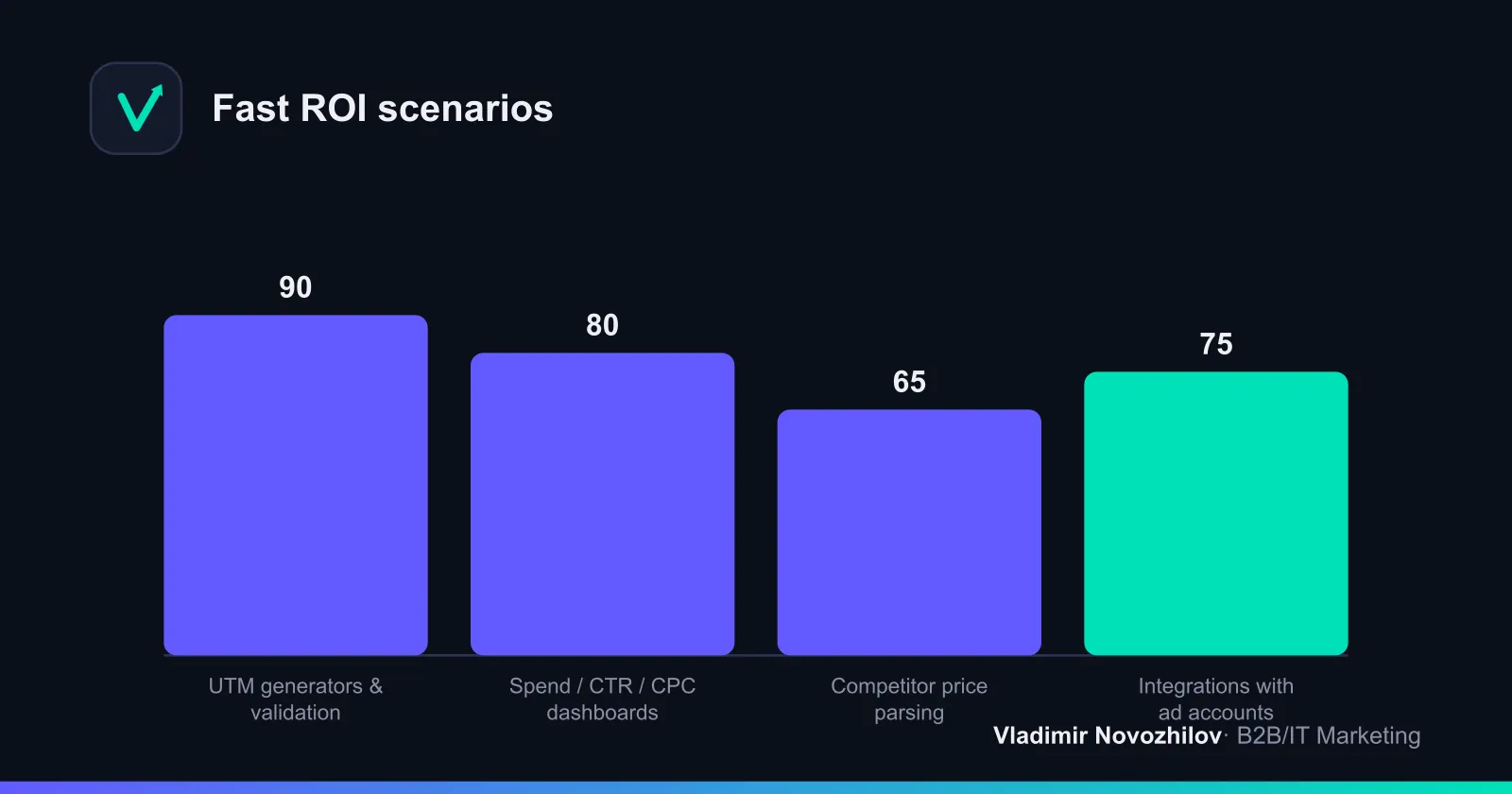
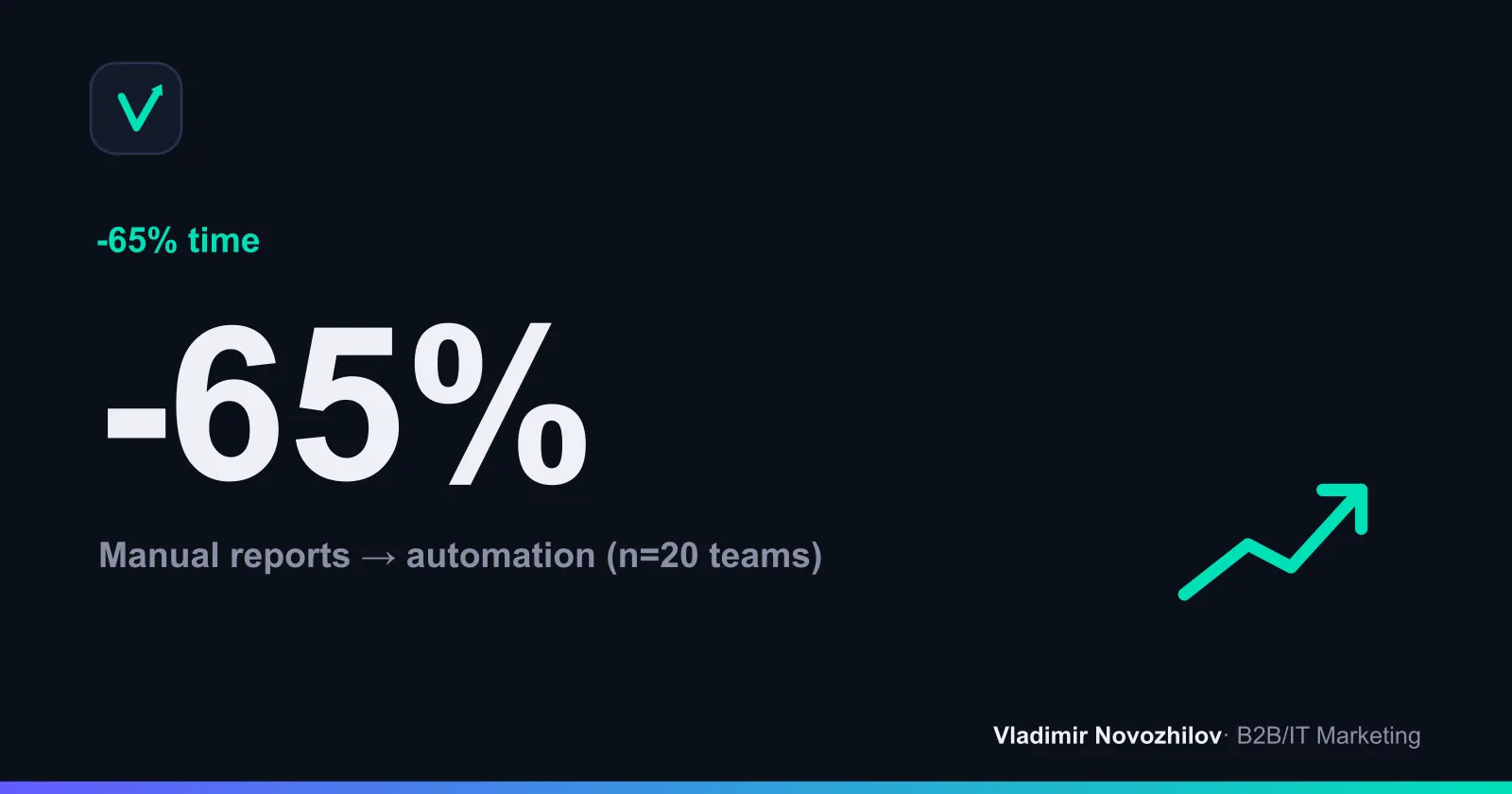
In practice this saves 30–70% of reporting time and reduces tagging and data consolidation errors.
Tools and environment for vibecoding (editors, sandboxes, CI/CD)
Minimum stack:
- AI‑enabled editors: Cursor (local environment with LLM prompts), Replit (browser sandbox). For UI widgets use a simple HTML/CSS/JS combo or Next.js for SSR/routing.
- Orchestration: n8n for building flows with minimal code; webhooks for events from CRM/ad accounts.
- Spreadsheets and scripts: Google Sheets + Google Apps Script (quick start, cheap ETL), CSV as interchange format.
- Storage: PostgreSQL for history of impressions/clicks/spend and subsequent visualization.
- CI/CD (optional): automatic deploy to a sandbox, secret and syntax checks. Any lightweight pipelines that run script tests will do.
- Security and access: OAuth for ad API access, secrets in environment, role‑based permissions.
Typical tasks for a performance marketer solved by vibecoding (UTM, parsers, ad data parsing, widgets)
- UTM generator with presets for sources/campaigns and error validation.
- Deduplication of campaigns and ads when importing from multiple accounts.
- Competitor price parser by SKU/category; alerts for price drops/rises.
- Ad account automation: nightly exports for spend/clicks/CTR, limit checks, pausing campaigns if budget exceeded.
- DIY ad dashboard: ROMI, CAC, LTV, channel contribution, CPC/CTR trends.
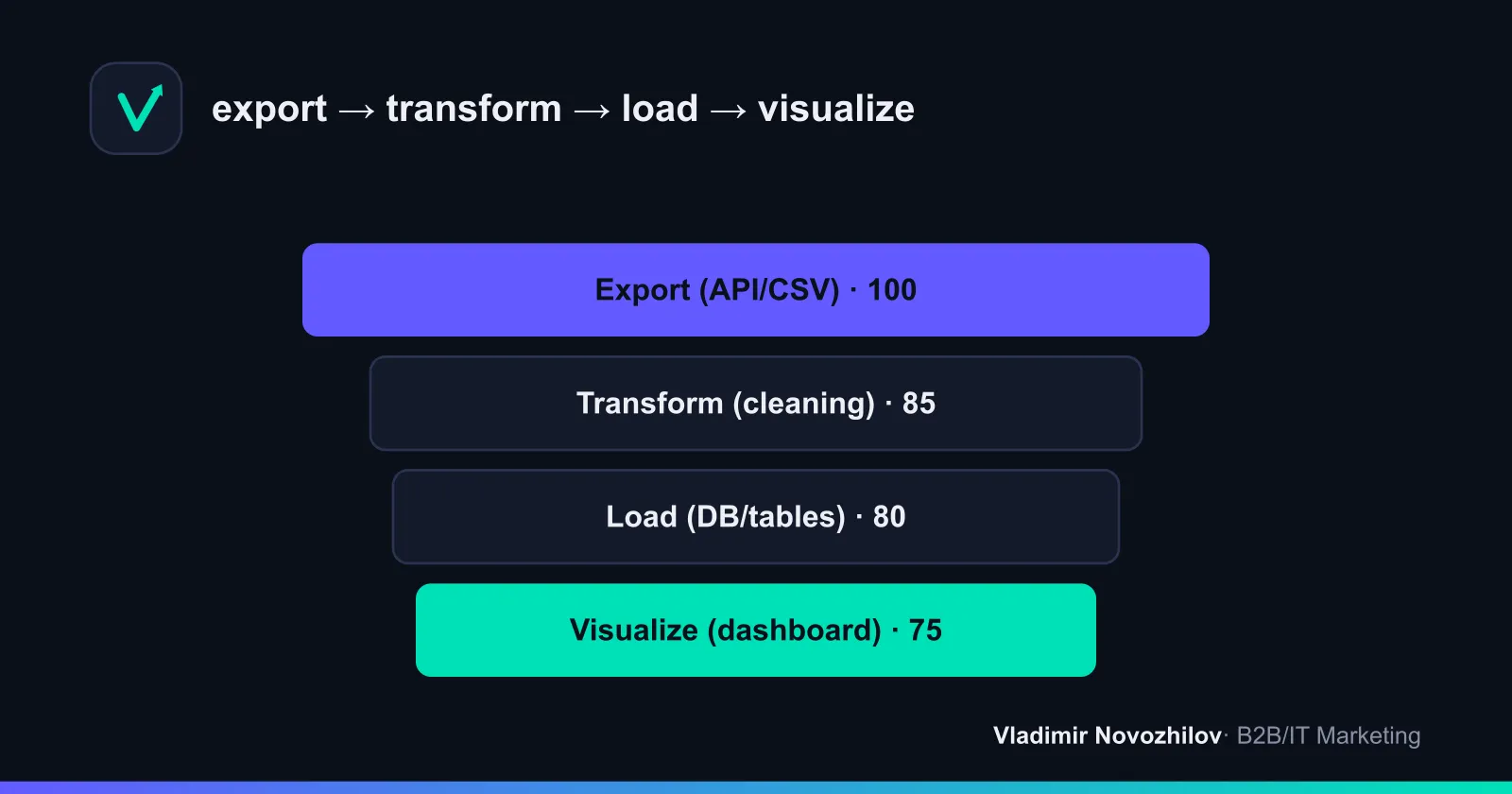
Step‑by‑step: how to build your own ad dashboard (export → transform → load → visualize)
Below is a universal scenario. Start with one account, then scale.
Step 1. Export
- Create a service account and complete OAuth for the chosen API (e.g., VK Ads). Save the token as an environment secret.
- In n8n add an HTTP Request node for the stats endpoint (period: yesterday/last 7 days). Scheduler: daily.
- Alternative: Google Apps Script with UrlFetchApp and parsing JSON into a sheet.
Step 2. Transform
- Clean fields: dates to ISO, currency to a single account currency, UTM tags to lowercase.
- Add computed fields: CPC = cost/clicks, CTR = clicks/impressions, ROMI = (revenue − cost)/cost.
Step 3. Load
- Option A: PostgreSQL. Schema fact_ads(cost, impressions, clicks, ctr, cpc, revenue, source, campaign, adset, ad, date). Upsert by key (source, campaign, date).
- Option B: Google Sheets. One sheet for raw data, another for aggregates.
Step 4. Visualize
- Build CTR/CPC over time; a spend table by source; ROMI/CAC cards; filters by campaign.
- Add an alert when CTR drops X% from the median and CPC rises.
Example: building a UTM generator with automatic tag validation
A mini HTML/JS widget (suitable for embedding into Notion/wiki). Save campaign token and channel presets.
UTM field template (CSV — save as utm_template.csv):
source,medium,campaign,content,term,prefix
vk,paid,{{offer}}_{{geo}}_{{segment}},{{banner}},{{keyword}},b2b
mytarget,paid,{{offer}}_{{geo}}_{{segment}},{{banner}},{{keyword}},b2b
google,cpc,{{offer}}_{{geo}}_{{segment}},{{adgroup}},{{keyword}},b2b
JS build function:
<input id="base" placeholder="https://example.com/landing"/>
<select id="source">
  <option value="vk">vk</option>
  <option value="mytarget">mytarget</option>
  <option value="google">google</option>
</select>
<input id="campaign" placeholder="offer_geo_segment"/>
<input id="content" placeholder="banner1"/>
<input id="term" placeholder="keyword"/>
<button onclick="build()">Build</button>
<pre id="out"></pre>
<script>
function sanitize(v){return encodeURIComponent((v||'').trim().toLowerCase())}
function build(){
  const b=document.getElementById('base').value;
  const s=document.getElementById('source').value;
  const c=sanitize(document.getElementById('campaign').value);
  const cnt=sanitize(document.getElementById('content').value);
  const t=sanitize(document.getElementById('term').value);
  const url=new URL(b);
  url.searchParams.set('utm_source',s);
  url.searchParams.set('utm_medium', s==='google'?'cpc':'paid');
  url.searchParams.set('utm_campaign',c);
  if(cnt) url.searchParams.set('utm_content',cnt);
  if(t) url.searchParams.set('utm_term',t);
  document.getElementById('out').textContent=url.toString();
}
</script>
Validation in Google Sheets (put this formula into a “Check” column):
=IF(AND(
  REGEXMATCH(A2,"utm_source="),
  REGEXMATCH(A2,"utm_medium="),
  REGEXMATCH(A2,"utm_campaign=")),
  "OK",
  "Error: missing key UTM")
Prompt to LLM (copy verbatim):
You are a performance marketer assistant. Generate a minimal HTML+JS UTM generator:
- Fields: base URL, source(select: vk, mytarget, google), campaign, content, term.
- Automatically set utm_medium=cpc only for google, otherwise paid.
- Add sanitize to lowercase and URL‑encode values.
- Return a single HTML file, no external libraries.
Example: price/competitor parser script and Telegram alerts
Google Apps Script: collects prices from a list of URLs, detects drops/rises and sends an alert.
const SHEET = SpreadsheetApp.getActive().getSheetByName('prices');
const BOT = PropertiesService.getScriptProperties().getProperty('TELEGRAM_BOT');
const CHAT = PropertiesService.getScriptProperties().getProperty('TELEGRAM_CHAT');

function fetchPrices(){
  const rows = SHEET.getRange(2,1,SHEET.getLastRow()-1,2).getValues(); // A:URL, B:CSS selector
  const out = [];
  rows.forEach(([url, selector], i)=>{
    try{
      const html = UrlFetchApp.fetch(url, {muteHttpExceptions:true}).getContentText();
      const price = (html.match(/([0-9][0-9\s]{0,6}[,.][0-9]{2})\s?(₽|RUB|KZT|BYN|UAH)/i)||[])[0]||'';
      out.push([new Date(), url, price]);
    }catch(e){ out.push([new Date(), url, 'ERROR']); }
  });
  SHEET.getRange(SHEET.getLastRow()+1,1,out.length,3).setValues(out);
}

function alertDelta(){
  const data = SHEET.getDataRange().getValues();
  const latest = data.slice(-data.length).slice(-rowsCountByURL(data)); // simplified
  // Compare last 2 values per URL and send an alert if |∆|>5%
  // ...details can be extended via prompt
  sendTG('Price parser: update complete, check deltas.');
}

function sendTG(text){
  UrlFetchApp.fetch('https://api.telegram.org/bot'+BOT+'/sendMessage',{
    method:'post', payload:{chat_id:CHAT,text:text}
  })
}
Prompt to LLM:
Generate a Google Apps Script for parsing prices from websites (list of URLs and CSS selectors in a Sheet). Requirements:
- Up to 50 pages per run, throttling 1 s/request.
- Support Cyrillic and currencies ₽, KZT, BYN, UAH, USD, EUR.
- Log errors and send summary to Telegram. Return code as a single function and installation notes for triggers.
Ad account automation: integrations with Meta, Google Ads, VK, MyTarget (practice and prompts)
The goal is to have fresh daily spend, impressions, clicks, conversions and manage limits. Below is an n8n skeleton.
n8n flow (node description):
- Cron — daily run at 04:00 local.
- HTTP Request — VK Ads API /statistics/get: params date_from, date_to, ids_type=campaign.
- HTTP Request — MyTarget API /statistics/v1/campaigns/daily.
- HTTP Request — Google Ads API SearchStream: GAQL for yesterday metrics.
- HTTP Request — Meta Marketing API /insights: level=adset, fields=spend,impressions,clicks.
- Function — normalize fields to a unified schema.
- PostgreSQL — upsert into fact_ads table.
- IF — alert if daily spend > limit.
- Telegram — post message to “Performance” channel.
Function fragment (normalization):
return items.map(i=>({json:{
  source: i.json.source,
  date: i.json.date,
  campaign: i.json.campaign || i.json.campaign_id,
  impressions: Number(i.json.impressions||0),
  clicks: Number(i.json.clicks||0),
  cost: Number(i.json.spend||0),
  ctr: (Number(i.json.clicks||0))/Math.max(1,Number(i.json.impressions||0)),
  cpc: (Number(i.json.spend||0))/Math.max(1,Number(i.json.clicks||0))
}}));
Prompts to LLM (ready templates):
- “Prepare an n8n flow with four HTTP nodes for VK Ads, MyTarget, Google Ads and Meta Marketing API. Return correct endpoints, auth parameters via OAuth/tokens and a field unification scheme to {source,date,campaign,impressions,clicks,spend}.”
- “Generate a GAQL query for Google Ads API that returns yesterday’s campaign.name, metrics.impressions, metrics.clicks, metrics.cost_micros and form conversion.”
- “Write an n8n Function check that creates an alert if CTR falls below the 14‑day median by 30% or CPC rises by 25%.”
Regional notes:
- RU/CIS: VK Ads and MyTarget are available directly. For foreign accounts there may be restrictions; proxies and regional accounts might be required.
- EU: follow GDPR — do not pull personal data without legal basis and consent; store aggregated data.
- Currency: convert spend to accounting currency (e.g., RUB or USD) and keep exchange rates table.
Security, secret storage and access rights (OAuth, tokens, restrictions)
Security checklist:
- Use OAuth where possible; grant minimum scopes.
- Keep secrets only in environment/secret stores. Do not commit tokens to code/sheets.
- Rotate keys every 30–90 days. Maintain access logs and IP restrictions.
- Role separation: read-only access separate from campaign change rights.
- Backup DBs/sheets, encrypt archives, version prompts and scripts.
- Legally: comply with local personal data laws and GDPR. Specify purpose and retention period, anonymize when required.
When to move from vibecoding to production — checklist and risk signals
Signals to move to full development:
- Load: >1M rows/month of impressions/clicks or >10 sources.
- SLA and audit: need 24/7 resilience, monitoring, versioning, tests.
- Complex UI/workflows: roles, queues, many system integrations.
- Security: company‑policy‑level encryption needs. If you have 1–5 sources, volumes up to hundreds of thousands of rows and no strict SLAs — vibecoding remains optimal.
ROI examples: how much the team saves and unit‑economics samples
Formulas:
- ROMI = (Revenue − Ad spend) / Ad spend.
- CAC = Marketing spend / Number of new customers.
- LTV — average revenue over customer lifetime.
Automation benefit example:
- Before: 3 hours/day on reporting × 20 days × 1 specialist = 60 h/month. Rate 1 500 ₽/h → 90 000 ₽/month.
- After: 30 min/day = 10 h/month → 15 000 ₽/month. Saving 75 000 ₽/month.
- Flow development cost: 12 hours × 1 500 ₽ = 18 000 ₽ → payback < 1 month.
Comparison of approaches:
| Approach | Time to launch | Start cost | Integration flexibility | Scalability | Risks |
|---|---|---|---|---|---|
| Vibecoding (AI+script) | 1–3 days | Low | High | Medium | Medium (depends on discipline) |
| No‑code builder | 1–5 days | Medium | Medium | Medium | Low/Medium |
| Classical development | 2–6 weeks | High | Maximum | High | Low with a proper team |
Ready templates and downloadable artifacts (UTM template, CSV templates, prompts, checklist)
- Expenses CSV template (fact_ads.csv):
date,source,campaign,adset,ad,impressions,clicks,cost,currency,conversions,revenue
2026-08-01,vk,brand_ru_search,grp1,ad1,10000,230,1200,RUB,25,35000- Exchange rates CSV (rates.csv):
date,from,to,rate
2026-08-01,USD,RUB,89.6- Data unification prompt template:
You are a data engineer. Convert JSON from {VK,MyTarget,Meta,Google Ads} to the schema {date,source,campaign,adset,ad,impressions,clicks,spend,currency}. Return a JS function for an n8n Function node.- Security checklist: OAuth enabled, secrets in environment, rotation 90 days, IP restrictions, weekly backups, role access, personal data aggregated.
Cases: 2–3 detailed real cases for a performance marketer
Case 1. E‑commerce, CIS: VK Ads + MyTarget
- Task: reduce reporting time and introduce ROMI by channel (currency — RUB).
- Solution: n8n flow to export spend/clicks/impressions, PostgreSQL as storage, CTR/CPC/ROMI dashboard. UTM validator removed 12% broken links.
- Result in 4 weeks: −68% reporting time, +9% ROMI via budget reallocation, CAC down 6%.
Case 2. B2B leadgen, global campaigns: Google Ads + Meta
- Task: consolidate CPC/CTR and leads from forms with CAC calculation and LTV forecast (currency — USD, regions — EU/US; GDPR compliance — no personal fields, only aggregates).
- Solution: Apps Script → Sheets (daily exports), normalization, a dashboard data mart; alert on CPC +20% day‑on‑day; ROMI by channel.
- Result in 6 weeks: ROMI from 0.85 to 1.12, CPC down 11%, saved 40 h/month.
Case 3. Marketplace, RU: competitor price parser
- Task: react quickly to price drops for key SKUs.
- Solution: Google Apps Script scrapes prices and sends Telegram alerts on >5% deviation.
- Result: +4 p.p. conversion on product cards after timely price adjustments, maintained share of impressions in target categories.
FAQ — answers to common questions
We summarize key points briefly.
- Can vibecoding replace developers? No. It’s a fast, flexible way to solve marketing tasks but not a substitute for production systems with high SLAs.
- How to build a dashboard without developers? Use n8n or Apps Script for ETL and PostgreSQL/Sheets for storage; visualize with any BI. Start with CTR, CPC, ROMI, CAC, LTV.
- What to choose: no‑code vs vibecoding? If built‑in connectors suffice — no‑code is faster to start; if you need custom metrics or rare APIs — vibecoding is more flexible.
- How to handle regional restrictions? For RU/CIS — VK Ads/MyTarget; for global — Meta/Google Ads. For EU, follow GDPR; when APIs are restricted use regional accounts and proxies per platform rules.
- How to verify UTM correctness? Implement a generator, validation in Sheets and weekly sampled test clicks from bots on test links.
Conclusion: vibecoding for the performance marketer is a practical way to quickly deploy UTM services, ad account automation and dashboards for CTR/CPC/ROMI, secure access with OAuth and secrets, and — most importantly — save time and lift ROMI within the first month.
FAQ
- Can vibecoding fully cover reporting for ad accounts?
- Yes — standard reports for CTR, CPC, spend and leads can be handled by an export→transform→load→visualize pipeline: ad APIs (Meta, Google Ads, VK, MyTarget) → storage (PostgreSQL or Google Sheets) → visualization. Critical points: set up incremental exports, deduplication and alerts on errors. For financial accounting and ROMI, connect CRM and revenue.
- Do I need programming knowledge to vibecode as a performance marketer?
- Basic concepts are sufficient: data structure (CSV/JSON), variables, conditions and API requests. Almost everything is generated via LLM prompts and edited in Cursor/Replit. Start with Google Sheets scripts and simple n8n flows. As tasks grow, add PostgreSQL and OAuth.
- How to securely store and use ad account API keys?
- Do not store tokens in sheets. Use OAuth, separate service accounts, environment secrets (vault/secret manager), key rotation and least privileges. Restrict IPs, encrypt backups and comply with local data laws and GDPR when working with the EU.
- How long does the first working dashboard or UTM generator take?
- UTM generator — 30–60 minutes including tag checks. Basic spend/CTR/CPC dashboard for one account — 2–4 hours using n8n/Apps Script. A multi‑channel report with ROMI and CAC — 1–2 days including CRM/revenue connection and LTV calculations.
- When is it better to hire developers instead of vibecoding?
- When you need complex integrations with high load, strict SLAs, advanced UI/workflows, version control and scalability. Signals: >3 data sources with millions of rows, 99.9% availability requirements, frequent schema changes, enterprise‑level security demands.