10 Micro‑Tools for Marketers: Build in an Evening

TL;DR
You can realistically build 2–3 mini‑tools in one evening without code: a UTM generator, a unit‑economics calculator, or a lead magnet with an automatic email. Below are step‑by‑step instructions, Google Sheets templates, LLM prompts, and integration diagrams with CRM and analytics tailored for the Russian market.
Marketing doesn’t always need a bulky stack. Often the winner is the one who quickly assembles simple micro‑tools: a UTM generator, a mini unit‑economics calculator, a lead magnet with a triggered email, or a chat‑bot for qualification. These assemblies are done no‑code, in an evening, and can be immediately connected to Yandex.Metrica/Google Analytics and CRM (AmoCRM/Bitrix24).
Below are 10 practical mini‑projects, step‑by‑step instructions, Google Sheets templates, LLM prompts and integration diagrams. The material is targeted at a Russian audience: I give local alternatives and notes on 152‑ФЗ regarding personal data.
What micro‑tools are and why build them (30/60/90 minute cases)
Short definition: a micro‑tool is a narrow no‑code assembly for one operational marketing task that automatically sends data to analytics and CRM and saves 30–90 minutes per day.
The vibe‑coding approach: you build a “draft by vibe” — a simple version of the tool without idealization, using ready blocks (sheets, forms, Make/n8n scenarios). You need results today — polish the aesthetics later.
Examples by time:
- 30 minutes: UTM generator and an offer generator on an LLM.
- 60 minutes: a page checklist audit in Google Sheets, a unit‑economics calculator.
- 90 minutes: a lead magnet with an autoresponder and a chat‑bot that sends leads to CRM.
How to choose a task for a micro‑tool (importance/time matrix)
Place candidates on a matrix: X axis — build time (30/60/90 minutes), Y axis — impact on metrics (leads, conversion, decision speed). Start in the “fast and useful” quadrant: UTM generator, unit economics, autoresponder for a lead magnet.
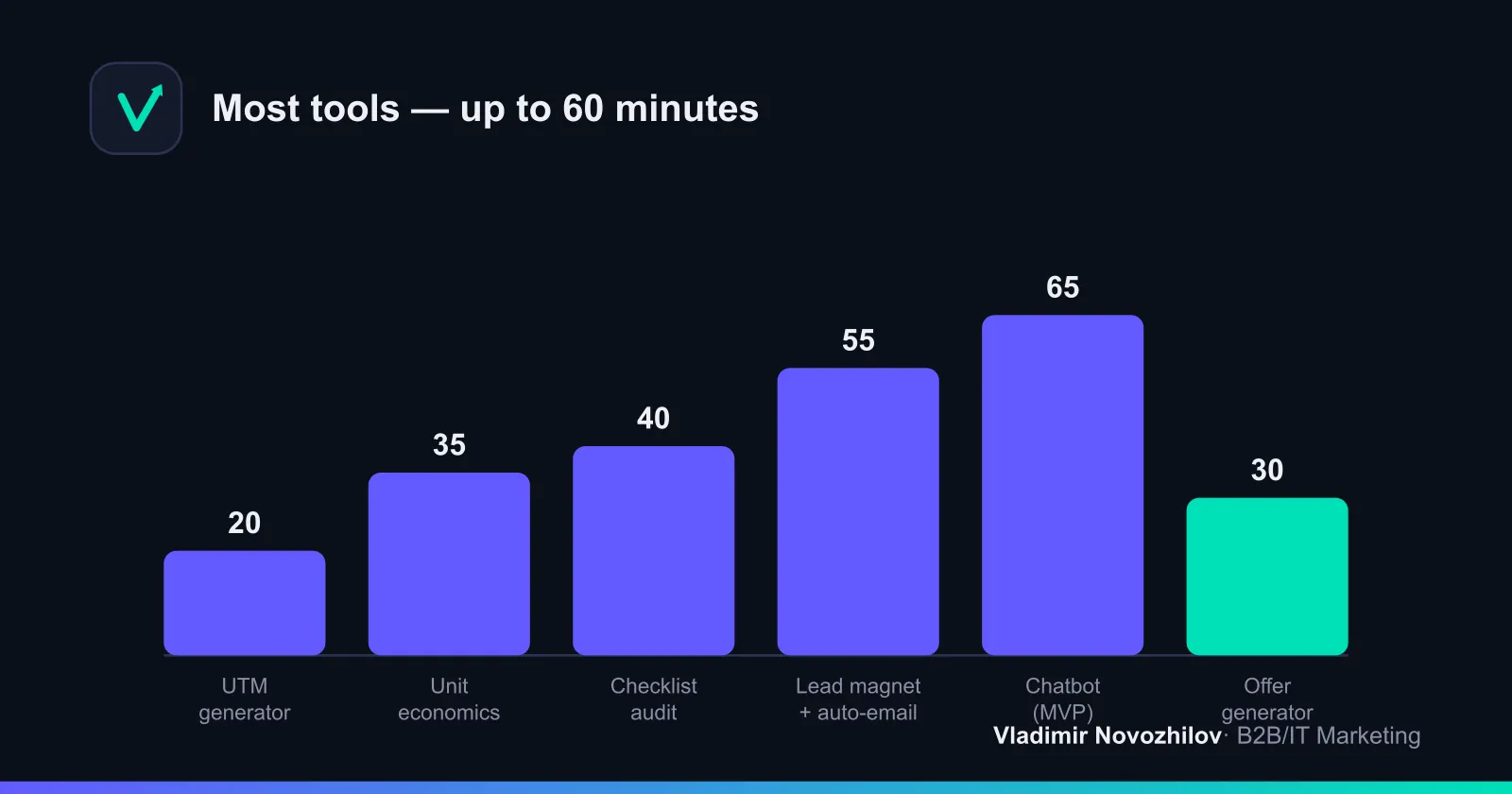
Comparative table of 10 micro‑tools for a quick start:
| # | Tool | Task/Function | Build time | Complexity | Example use case |
|---|---|---|---|---|---|
| 1 | UTM‑generator | Unified link tagging | 30 min | Low | Tag campaigns before launch |
| 2 | Checklist audit | Quick LP check | 45 min | Low | Title, H1, speed, pixels |
| 3 | Unit‑economics calculator | CAC, LTV, ROI | 60 min | Medium | Evaluate channel payback |
| 4 | Lead magnet + autoresponder | Leads and nurture | 60–90 min | Medium | Deliver a guide + welcome series |
| 5 | Qualification chat‑bot | Collect answers and scoring | 90 min | Medium | Qualify inbound leads |
| 6 | Offer generator (LLM) | Fast variants of value props | 30 min | Low | Headlines for A/B tests |
| 7 | Reviews/data collector | Forms → Sheets → alert | 45 min | Low | Cases/UGC/surveys |
| 8 | Call source marking | Source in cookie/form | 60 min | Medium | Link submission to channel |
| 9 | Simple conversion tracker | Events to Metrica/GA | 45 min | Low | Goals: lead, demo, download |
| 10 | Reviews widget on Tilda | Trust and CRO | 60 min | Low | Showcase fresh reviews |
Detailed step‑by‑step builds follow.
1. UTM‑generator on Google Sheets + Webhook (step‑by‑step)
Goal: standardize UTM tags, remove the “utm=fb / Facebook / META” chaos and immediately write every generated link to CRM and analytics.
Checklist of steps (8–9 items):
- Create a Google Sheet: input fields: Base URL, Campaign, Source, Medium, Content, Term, Extra Params.
- Add reference lists: allowed sources, channels, teams.
- Insert the concatenation formula (see below). Add case normalization.
- Create a “Generated URL” column and a “Copy” button. You can do it without a script: just a formula cell.
- Add columns “Owner” and “Comment” for internal audit.
- Attach a Webhook: on row add, send JSON to Make/n8n.
- In the Make/n8n scenario: branch 1 — create a lead/note in AmoCRM/Bitrix24; branch 2 — send an event to Metrica/GA.
- Validate standards: UTM only in lower case, no spaces, encode Cyrillic characters.
- Document campaign naming rules.
Google Sheets template (with formulas)
Paste into the “Generated URL” cell:
=LOWER(
  A2 & IF(
    OR(LEN(B2&B2&C2&D2&E2&F2&G2)>0, LEN(H2)>0),
    "?utm_source=" & SUBSTITUTE(C2, " ", "-") &
    "&utm_medium=" & SUBSTITUTE(D2, " ", "-") &
    "&utm_campaign=" & SUBSTITUTE(B2, " ", "-") &
    IF(LEN(E2)>0, "&utm_content=" & SUBSTITUTE(E2, " ", "-"), "") &
    IF(LEN(F2)>0, "&utm_term=" & SUBSTITUTE(F2, " ", "-"), "") &
    IF(LEN(G2)>0, "&" & G2, "")
  , "")
)
Where A2 — Base URL; B2 — Campaign; C2 — Source; D2 — Medium; E2 — Content; F2 — Term; G2 — Extra Params.
Mini‑case: standardizing UTMs at a B2B integrator reduced “garbage” campaigns in analytics by 72% and sped up paid channel reporting by one day.
Setting up webhook → collecting data in CRM/Google Analytics
Payload structure (example):
{
  "generated_url": "https://example.com/?utm_source=facebook&utm_medium=cpc&utm_campaign=spring_sale",
  "campaign": "spring_sale",
  "source": "facebook",
  "medium": "cpc",
  "user": "marketer@company",
  "ts": "{{now}}"
}
Make/n8n scenario (pseudocode):
Webhook → Router →
  → Node: AmoCRM/Bitrix24 (note on deal "UTM created …", or entity "Marketing action")
  → Node: Yandex.Metrica/GA (Event: category=utm_generator, action=create, label=campaign)
Recommendations for Russia: store the UTM sheet in the corporate account, restrict access to minimum. No personal data is collected, but limit access on a “marketing only” basis.
2. Automatic checklist audit of a page (Screaming Frog/API or Google Sheets)
Goal: check an LP against basic criteria in 30–45 minutes without a full audit.
Option A — Google Sheets (fast and free):
- Columns: URL, Title, H1, Meta Description, Robots, Canonical, Status Code, Speed Note.
- Example formulas:
=IMPORTXML(A2, "//title")
=IMPORTXML(A2, "//h1[1]")
=IFERROR(IMPORTXML(A2, "//meta[@name='description']/@content"), "—")
=IFERROR(IMPORTXML(A2, "//link[@rel='canonical']/@href"), "—")- Check rules:
- Title 40–60 characters, H1 aligned in meaning with Title.
- Description 120–160 characters.
- No duplicate canonical.
- Status 200; mark redirects in yellow.
- Speed: add a manual note from your Core Web Vitals tool.
Option B — Screaming Frog (deeper): export CSV, load into Sheets, add conditional formatting “OK/Warning”.
Mini‑case: changing Title/H1 on an IT service landing per the checklist increased snippet CTR in organic search by +9%.
3. Micro unit‑economics calculator (embed into a landing)
Goal: quickly calculate CAC, LTV, ROI to decide on traffic scale.
Key formulas:
- CAC = Marketing spend / Number of new customers
- LTV = Average order × Margin × Number of purchases per period
- ROI = (Revenue − Spend) / Spend
Example table (values):
| Metric | Value |
|---|---|
| Spend on channel | 300 000 |
| Leads | 750 |
| Conversion to customer | 8% |
| Customers | 60 |
| CAC | 5 000 |
| Average order | 12 000 |
| Margin | 60% |
| Purchases per year | 2 |
| LTV | 14 400 |
| ROI | 188% |
Implementation:
- In Google Sheets create “Input” and “Results” sheets, protect formulas.
- In Tilda insert an “HTML” widget and publish the sheet as an embed (or rebuild the calculator in Tilda Zero‑Block with formulas).
- Send an event “calc_click” to Metrica/GA when users run a calculation.
Mini‑case: a B2B company sped up media planning — CAC/LTV calculations per channel in one widget reduced plan prep from 2 days to 2 hours.
4. Quick lead magnet + triggered mailing (no‑code: Tilda/NotiSend/Make)
Goal: deliver useful material immediately after signup and warm the lead with a 3‑email series.
Checklist of steps:
- On Tilda create an LP with a form: fields Email, Name, Consent to personal data processing (152‑ФЗ) with a link to the policy.
- Prepare the lead magnet: PDF guide or checklist.
- Connect NotiSend (or another Russian ESP): create a list “Lead Magnet”.
- In Make/n8n: on new subscription → send email #1 with the material, after 24 hours send email #2 (case studies), after 72 hours send email #3 (invite to demo/webinar).
- Events: subscription, open, click — send to Metrica/GA and CRM.
- Implement double opt‑in if the company security policy requires it.
- Tag all links in emails with UTM for precise tracking.
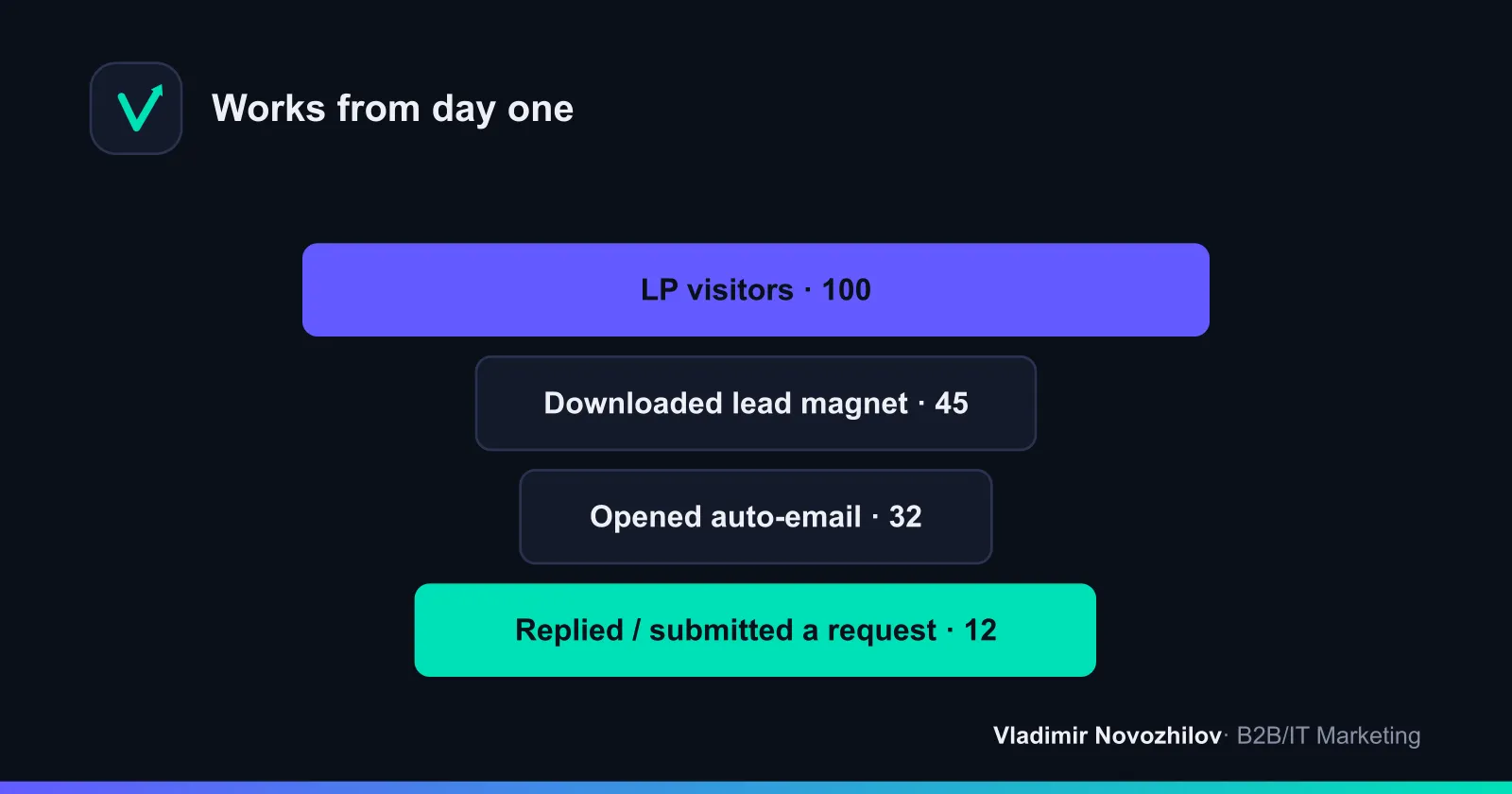
Mini‑case: a simple nurture chain for an IT service increased conversion from subscription to request to 12% within 14 days.
5. Chat‑bot for lead qualification (constructor + integrations)
Goal: ask 4–6 questions, assign score and send the lead to CRM with a tag “hot/warm/cold”.
Checklist of steps:
- Choose a Telegram bot constructor with visual blocks and webhook support.
- Design branches: industry, budget, role, decision timeline, phone/email.
- Set up scoring: +2 for budget ≥ X, +1 for timeline ≤ 1 month, +1 for decision maker.
- Send data via webhook to Make/n8n.
- Mapping → AmoCRM/Bitrix24: contact, deal, note “score=5/6”.
- Events to Metrica/GA: start_bot, completed_quiz, sent_to_crm.
- Enable manager notifications in Telegram for score ≥ 4.
Mini‑case: in one week the bot reduced 30% of the managers’ load and sped up responses to “hot” leads to 5 minutes.
6. Offer generator using an LLM: prompts and templates
Goal: get 3–5 usable headline/value‑proposition variants for a landing, ads and emails.
Prompt template (insert your data):
Context: we sell {product} to {audience}. Main pains: {3 pains}.
Constraints: up to 120 characters, no jargon, one concrete result.
Give 5 offer variants + 5 subhead variants. Tone: business, clear.
Response format: JSON with keys offer, sub, angle.
Pipeline “step‑by‑step neural tool assembly”:
- Prepare a fact‑sheet: USP, segments, proofs.
- Run the prompt in an LLM (you can use local models).
- Validate: clear result, specificity, constraints respected.
- Save top variants in a tabular test bank.
- Track CTR/CR in A/B tests, keep the top‑3.
Offer quality checklist:
- Delivers a measurable result or addresses a clear pain.
- Segment/condition is specified.
- No generic words or empty adjectives.
- Fits the layout (length ≤ 120 characters).
7. Reviews/secondary data collector (forms → Google Sheets → notifications)
Goal: consistently grow a database of reviews/case studies without losing new responses.
Steps:
- Create a form: Full name, company, role, rating, free comment, consent to publish.
- Link it to Google Sheets.
- In Make/n8n set a trigger: new row → send to chat channel/email to the manager.
- For cases add a field “numeric result”.
- On the landing show a widget with the latest 6–9 reviews (filter by publication consent).
- Send an event “review_published” to CRM as an account manager activity.
Mini‑case: a regular UGC showcase on the landing increased conversions by +7–12% on warm traffic.
8. Simple call‑tracking/source marking script (steps and examples)
Goal: connect visit source and submission/call without complex systems.
Script: save UTM and referrer to a cookie, push them into hidden form fields.
<script>
(function(){
  function g(k){
    var p=new URLSearchParams(window.location.search);return p.get(k)||"";
  }
  function s(n,v,d){
    var e="";if(d){var t=new Date();t.setTime(t.getTime()+d*24*60*60*1000);e="; expires="+t.toUTCString();}
    document.cookie=n+"="+encodeURIComponent(v)+e+"; path=/";
  }
  var utm = ["utm_source","utm_medium","utm_campaign","utm_content","utm_term"].map(k=>k+"="+g(k)).join("&");
  if(utm.replace(/(utm_\w+=)/g,'').length>0){ s("utm", utm, 90); }
  s("ref", document.referrer||"direct", 90);
})();
</script>
Then add hidden fields in the form: utm, ref, landing_url. On submission, record these fields in CRM and analytics. For calls: swap the number on the site by source (a basic approach: different numbers for 2–3 key sources and manually tag calls in CRM).
Mini‑case: implementing simple source marking allowed attributing 68% of calls without paid call‑tracking.
9–10. Two more commonly requested builds
- Simple conversion tracker:
- Create a list of key events: lead, demo, download, call_request.
- Insert a single script on the site that sends events to Yandex.Metrica/GA.
- In Make/n8n duplicate events to CRM.
- Validate goals and reports by UTM.
- Reviews widget on Tilda:
- Make a table of approved reviews.
- Render 6–9 cards in Zero‑Block, add segment filters.
- Send click/slide events to analytics.
Templates, files and checklists: copy and run (material pack)
Use directly from the article.
- UTM‑generator — table structure:
[Base URL] | [Campaign] | [Source] | [Medium] | [Content] | [Term] | [Extra Params] | [Generated URL]- Unit‑economics — input fields and formulas:
Input: Spend, Leads, Conversion, Average order, Margin, Purchases/year
Customers = Leads * Conversion
CAC = Spend / Customers
LTV = Average order * Margin * Purchases/year
ROI = ((Customers * Average order * Margin) - Spend) / Spend- JSON webhook (universal template):
{
  "event": "{lead|utm_created|calc_run}",
  "source": "{site|bot|sheet}",
  "campaign": "{campaign}",
  "payload": {"email":"{email}","phone":"{phone}","utm":"{utm}"},
  "ts": "{{iso}}"
}- Make/n8n scenario (textual scheme):
Webhook → Validate → Branch A: CRM (Amo/Bitrix) → Branch B: Analytics (Metrika/GA) → Branch C: Alert (Telegram/Email)- LLM prompt bank (offers):
[BRIEF] Audience: {…}; Product: {…}; Pains: {…}; Proofs: {…}
[TASK] Give 5 offers and 5 subheads. Tone: business. Limit: ≤120 characters.
[FORMAT] JSON {offer, sub, angle}- Implementation checklist (universal):
- Goal and success metric articulated.
- Data flows to CRM and analytics.
- Access rights and 152‑ФЗ compliance verified.
- Tests passed: 5–10 dry runs without errors.
- Documentation: 1 page describing fields and the schema.
FAQ: common mistakes and how to avoid them
- Mistake: UTM chaos. Fix: a dictionary of sources/channels, ban manual entry, single formula.
- Mistake: tools not connected to CRM/analytics. Fix: always add a webhook and event mapping.
- Mistake: no consent for data processing. Fix: add a checkbox and policy on the LP, store consents.
- Mistake: dependence on a single foreign service. Fix: duplicate scenarios in n8n/Make, keep backups.
Conclusion: 30/60/90‑day roadmap for rolling out micro‑tools
30 days:
- Week 1: UTM generator, conversion tracker.
- Week 2: unit‑economics calculator, LLM prompt bank.
- Week 3: checklist audit LP, reviews collector.
- Week 4: lead magnet + autoresponder (first email), basic report in Metrica.
60 days:
- Qualification chat‑bot, extend the nurture sequence, first A/B tests of offers.
- CRM funnel linkage: reports by source, CAC/LTV/ROI by channel.
90 days:
- Iterate based on data: rebuild weak links, add number swapping, improve scoring.
- Documentation and an internal “template shelf” for the team.
Bottom line: start with three quick assemblies, verify events land in Metrica/GA and CRM, then follow the roadmap. Micro‑tools mean faster decisions and less routine as soon as tomorrow.
FAQ
- What are micro‑tools for a marketer and what tasks do they help with?
- These are small no‑code assemblies for one specific task: tag traffic, quickly calculate CAC/LTV, build a lead magnet with an autoresponder, or qualify leads with a chat‑bot. Their goal is to remove routine and reduce decision time. You can realistically assemble 2–3 such tools in an evening and connect them to Yandex.Metrica/Google Analytics and CRM (AmoCRM/Bitrix24).
- How to build a UTM generator without code in an evening — step by step?
- Create a Google Sheet with fields: URL, Campaign, Source, Medium and a concatenation formula for UTM. Add a "Copy link" button and a webhook in Make/n8n: when a row is added, send a lead to CRM and an event to analytics. The template formula and JSON payload example are provided in the article.
- Is it possible to build an offer generator based on a neural model and how to craft prompts?
- Yes. Use an LLM (e.g., ChatGPT or local models), prepare a prompt template with context: audience, pains, offer, length limits. Insert real product data, add tone examples, and ask the model for 3–5 offer variants. The article includes ready prompts and a checklist for evaluating offer quality.
- Which no‑code platforms are best for quick builds in Russia?
- For spreadsheets — Google Sheets; for sites/landings — Tilda; for integrations — Make, n8n (self‑hosted); for mailings — NotiSend and other Russian ESPs; chat‑bots — Telegram constructors with webhooks. Keep analytics in Yandex.Metrica and duplicate key events to CRM.
- How to integrate a micro‑tool with CRM and analytics (order of actions)?
- 1) Define the event and data fields. 2) Create a webhook receiver in Make/n8n. 3) Map fields into AmoCRM/Bitrix24. 4) In parallel send the event to Yandex.Metrica/GA (goals/Events). 5) Test with sample submissions and set up error alerts. 6) Document the schema and field list.