Vibe-coding for Marketers: Build Tools Without Developers

TL;DR
Vibe‑coding is a way to quickly assemble working marketing tools using LLMs without developers. This article provides 10 ready tasks with prompts, comparison tables of tools, a 7–14 day start map, security and deployment checklists, and instructions to calculate ROMI and CAC to justify initiatives to management.
Why marketers should learn vibe‑coding now
Vibe‑coding for a marketer is a way to assemble working tools faster than waiting in a standard queue for developers and cheaper than a full product build. The typical scenario: you need a promo page, a ROMI calculator, a price parser or a chatbot for lead gen — all of these can be built in an evening with an LLM while you act as the task owner, not the programmer.
The key to success is to describe the task correctly, choose the stack (Lovable, Cursor, Claude Code, Replit, n8n), tidy up UTM and data, then deploy properly to Vercel / Render and ensure backups. Below are concrete instructions, prompts and checklists.
What vibe‑coding is and how it differs from no‑code and programming
In short: an LLM helps write code for your task, and you steer the process, review and glue the solution into an MVP.
- Programming: you write code by hand; you bear full responsibility for architecture and implementation.
- No‑code: you assemble blocks in a visual editor — fast to start, but you hit platform limits.
- Vibe‑coding: you describe the task “as you would to a developer,” and an LLM (for example in Cursor or Claude Code) generates code. Your role: task definition, review, tests, deployment.
Where vibe‑coding excels:
- Fast MVPs and hypotheses, landing pages and calculators.
- Small API integrations without complex business logic.
- Reporting automation and data collection into SQLite / Google Sheets.
Where you really need developers:
- Complex payment integrations and strict SLAs.
- High loads and corporate‑grade security.
- Complex DB schemas and processes requiring PostgreSQL with replication and migrations.
Which marketing tasks vibe‑coding is best for
- Research and monitoring: price scraping of competitors, collecting reviews, exporting positions.
- Content ops: UTM auto‑generation, duplicate headline checks, auto‑posting to social networks.
- Lead generation: landing pages, forms/quizzes, mini‑CRM for tests.
- Ads and analytics: ROMI/CAC/LTV calculators, dashboards via ad API clients.
- Sales support: chatbots for initial qualification and brief collection.
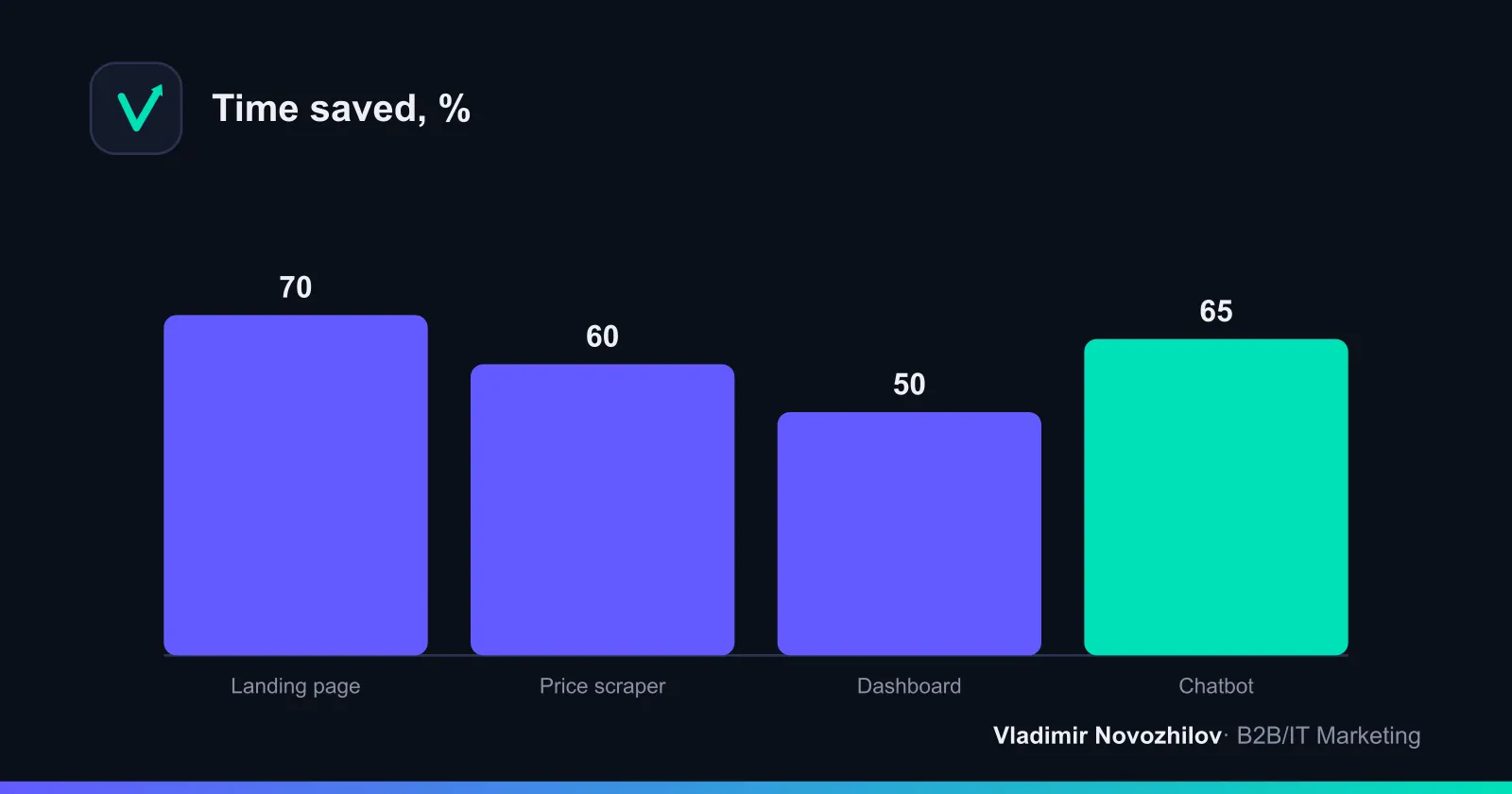
Practice shows time savings of 50–70% on typical tasks thanks to rapid code generation and elimination of routine work.
10 practical tasks for a marketer
Each task: short instructions, ready prompt, time estimate and risks.
1) Promo landing page in one evening
What we build: a simple promo page with a lead form, UTM fields and a deadline timer. Framework: Next.js or static HTML/CSS/JavaScript.
Short instructions:
- Define the offer, target action, deadline and trust blocks.
- Choose: Next.js (easy to deploy on Vercel) or a static file set.
- Prepare the form: name, phone/email, consent for personal data processing (152‑ФЗ/GDPR), hidden UTM fields.
- Storage: MVP — Google Sheets or SQLite; production traffic — PostgreSQL.
Prompt (copy into Cursor or Claude Code):
Ты — помощник по фронтенду. Собери одностраничный лендинг на Next.js с формой лида.
Требования:
- Блоки: заголовок оффера, преимущества (3–5), кейс в цифрах, FAQ, форма, футер с политикой.
- В форме: name, email/phone, чекбокс согласия (152‑ФЗ/GDPR), скрытые UTM (utm_source, utm_medium, utm_campaign, utm_content).
- Валидируй email/phone на клиенте, кнопку «Отправить» неактивна без согласия.
- Отправка формы — на API‑роут /api/lead; сервер сохраняет в SQLite (таблица leads: id, name, contact, utm_source, utm_medium, utm_campaign, utm_content, created_at).
- Добавь простой таймер до дедлайна, адаптив 360–1440, светлая тема.
- Выведи инструкции по деплою на Vercel и список env‑переменных.
Time: 2–4 hours. Risks: data validation and personal data storage — add a privacy policy and consent checkbox.
2) Price parser for competitors with daily digest
Goal: monitor prices and assortment changes; report to Google Sheets and Telegram.
Instructions:
- Define the list of URLs and frequency.
- Check robots.txt; do not abuse request rates.
- Storage: SQLite with fields sku/url/price/date.
Prompt:
Сгенерируй Node.js‑скрипт (ESM) для парсинга цен с 5 сайтов (HTML без авторизации).
Требования:
- Используй fetch + cheerio, задержка 2–5 сек между запросами, ретраи 3 раза.
- Храни результаты в SQLite (таблица prices: url, sku, price, captured_at).
- Сравни с предыдущим значением; при изменении >5% — отправь сообщение в Telegram (бот‑токен и chat_id из env).
- Экспортируй сводку в Google Sheets (сервисный аккаунт, creds из env).
- Добавь логи, конфиг через .env, инструкцию запуска cron.
Time: 3–6 hours. Risks: IP blocking by sites; respect limits and don’t parse protected data.
3) UTM generator with a link library for the team
Instructions:
- Table with campaign presets, automatic URL length control and UTM correctness checks.
Prompt:
Сделай веб‑страницу (HTML/CSS/JS без фреймворков) для генерации UTM‑ссылок:
- Поля: base_url, utm_source, utm_medium, utm_campaign, utm_term, utm_content.
- Кнопки: «Сгенерировать», «Скопировать», «Сохранить пресет».
- Локальное хранилище (LocalStorage) для пресетов, валидация URL.
- Кнопка «Проверить редиректы»: прогони URL через fetch и выведи финальный URL.
Time: 1–2 hours. Risks: inconsistent campaign naming — add hints and dropdowns.
4) Auto‑posting to Telegram + VK + Yandex Zen from Google Sheets
Instructions:
- Columns: datetime, text, media_url, statuses.
- Runs on cron, posts and marks status.
Prompt:
Напиши Node.js‑скрипт для автопостинга из Google Sheets:
- Авторизация в Google через сервисный аккаунт; таблица содержит: datetime, text, media_url, channels.
- Каналы: Telegram (бот sendPhoto/sendMessage), ВК (API photos.getWallUploadServer + wall.post), Дзен (RSS‑публикация через API, если доступно; иначе пропусти).
- Логи в консоль и в файл, статусы «OK/ERR» записывай обратно в лист.
- Переменные окружения для токенов; добавь инструкцию по расписанию (cron) и ретраям.
Time: 2–4 hours. Risks: API limits and platform moderation — account for delays and media formats.
5) Ads dashboard via ad accounts APIs
Instructions:
- Focus on 5–7 metrics: spend, impressions, clicks, CPC, conversions, CAC, ROMI.
- Collect into SQLite for MVP; use PostgreSQL for multi‑user and SQL aggregations.
Prompt:
Собери лёгкий дашборд на Next.js + SQLite:
- API‑клиенты для кабинетов (псевдо‑данные + интерфейсы вызовов), адаптируй под реальные токены.
- Модель данных: daily_metrics(date, channel, spend, impressions, clicks, conversions, revenue).
- Вьюхи: график расходов по каналам, таблица KPI, фильтры по дате/каналу.
- Расчёты: CPC=spend/clicks, CAC=spend/conversions, ROMI=(revenue−spend)/spend.
- Экспорт CSV и кнопка «Обновить».
Time: 4–8 hours. Risks: heterogeneous API schemas — unify the input field vocabulary.
6) One‑minute automated reports in Google Sheets instead of an hour
Prompt for Google Apps Script:
Создай Apps Script, который раз в день:
- Подтягивает данные из вкладок «Канал_1»… «Канал_N», суммирует расходы, клики, конверсии в «Итоги».
- Считает CPC, CAC, ROMI, отмечает красным строки, где CAC > целевого, а ROMI < 0.
- Отправляет PDF‑снимок листа «Итоги» на email(ы) из списка.
Time: 1–2 hours. Risks: Apps Script quotas — ensure correct numeric locale for decimal separators.
7) Chatbot for lead qualification
Instructions:
- Bot asks 4–6 questions, checks UTM, saves answers and sends lead to CRM.
- Storage: SQLite/PostgreSQL; start with SQLite.
Prompt:
Сделай Telegram‑бота на Node.js (Telegraf):
- Диалог: имя → компания → бюджет (диапазоны) → срок → e‑mail → согласие на обработку ПДн.
- Сохраняй диалоги в SQLite (таблица leads: chat_id, name, company, budget, timeline, email, utm_source, created_at).
- Команда /export — выгружает CSV.
- Вебхук для деплоя на Render, переменные окружения для токенов.
Time: 2–4 hours. Risks: phrasing and conversion — test on 10–20 dialogues.
8) Payback calculator (ROMI/CAC/LTV) on a landing
Instruction: embed the calculator directly into a landing section.
Prompt:
Напиши HTML/JS‑виджет «Калькулятор ROMI/CAC/LTV»:
- Поля ввода: бюджет, клики, конверсии, средний чек, маржа, LTV‑множитель.
- Вычисления: CPC, CAC=бюджет/конверсии, выручка=конверсии*ср_чек, прибыль=выручка*маржа, ROMI=(прибыль−бюджет)/бюджет, LTV=ср_чек*LTV‑множитель.
- Отображение: карточки KPI + цветовая индикация (красный при ROMI<0).
- Без внешних зависимостей, адаптив.
Time: 1–2 hours. Risks: formula correctness — add test cases.
9) A/B test of two headlines on a landing
Prompt:
Добавь в статический лендинг JS‑модуль, который:
- С вероятностью 50/50 показывает H1_A или H1_B, кладёт вариант в localStorage.
- Отправляет событие (вариант, time_on_page, клик по CTA) в эндпоинт /api/ab.
- Сервер считает конверсию по вариантам и выводит на админ‑странице.
Time: 1–3 hours. Risks: traffic volume — don’t draw conclusions with n<200 sessions per variant.
10) Chrome extension to highlight duplicate SEO tags
Prompt:
Сгенерируй Chrome Extension (Manifest v3), который по клику:
- Сканирует текущую страницу и выдаёт отчёт: title, meta description, h1..h3, каноникал.
- Подсвечивает дубли и слишком длинные/короткие значения.
- Кнопка «Скопировать отчёт» в буфер.
Time: 2–4 hours. Risks: browser permissions and policies — check the manifest.
Tools and stack: how to choose (Lovable, Cursor, Claude Code, Replit, n8n)
Below is a compact comparison matrix as of 2026.
| Инструмент | Сценарии | Порог входа | Что удобно | Ограничения | Цена (2026) |
|---|---|---|---|---|---|
| Lovable | Быстрые MVP, лендинги, CRUD | Низкий | Автогенерация проекта под ТЗ, простые деплой‑шаги | Сложные интеграции потребуют ручной доработки | от 15–25 USD/мес |
| Cursor | Генерация/редактирование кода, проекты на Next.js | Средний | Инлайн‑правки кода, рефакторинг, работа с репозиториями | Нужна базовая грамотность в Git | от 20–30 USD/мес |
| Claude Code | Диалоговая генерация модулей, объяснение кода | Низкий/средний | Понятные разъяснения, сильные промпт‑шаблоны | Меньше IDE‑фич, чем в Cursor | от 20–25 USD/мес |
| Replit | Хостинг/IDE в браузере, боты и скрипты | Низкий | Быстрый старт без локальной среды | Не для тяжёлых нагрузок | от 10–20 USD/мес |
Plus: n8n or Make for flow automations, Git/GitHub for versioning and review.
How to write prompts: structure, examples and ready templates
Prompt structure for vibe‑coding in marketing (how‑to):
- Context: business goal and time constraints.
- Inputs/outputs: what is provided as input, which files/endpoints should be produced.
- Tech anchors: stack (Next.js, JavaScript/HTML/CSS, SQLite/PostgreSQL), responsiveness and performance requirements.
- Quality rules: tests, logs, env variables, deployment instructions.
- Risks and limits: personal data, API quotas, backups.
Ready template:
Ты — помощник маркетолога. Мне нужен [инструмент] для [цели].
Выход: список файлов, код, инструкции по запуску/деплою, env‑переменные, тестовые данные.
Стек: [указать].
Требования к качеству: адаптив, логирование, валидация, простые тесты.
Проверь, что: 1) нет токенов в коде, 2) данные ПДн не уходят в логи, 3) инструкции понятны.
Step‑by‑step plan: 7–14 day start map with tasks and KPIs
Week 1 (foundations):
- Day 1: Install IDE (Cursor/Lovable), Git, starter project “landing”. KPI: deploy Hello World to Vercel.
- Day 2: Landing MVP + lead form. KPI: 1 test lead in SQLite.
- Day 3: Deploy UTM generator to a subdomain. KPI: 5 valid UTM links.
- Day 4: ROMI/CAC calculator on the landing. KPI: correct calculations for 3 cases.
- Day 5: Auto report in Google Sheets. KPI: daily PDF delivery.
- Day 6: Backup DB, rollback to previous release. KPI: successful restore on staging.
- Day 7: Week review, fixes, security checklist.
Week 2 (integrations):
- Day 8: Price parser. KPI: sheet with 100 records.
- Day 9: Qualification chatbot. KPI: 10 test dialogues, CSV export.
- Day 10: Channel dashboard. KPI: chart and KPI table for the week.
- Day 11: Headline A/B test. KPI: correct event capture.
- Day 12: Scheduled auto‑posting. KPI: 3 posts per channel.
- Day 13: Documentation: README, run scripts, rollback checklist.
- Day 14: Demo to management: ROMI and hours saved.
Templates and “repository”: starter project file structures
Below are minimal structures and starter files you can copy.
- Landing (Next.js, SQLite)
/my-landing
  /app
    page.tsx
    /api
      /lead
        route.ts
  /lib
    db.ts
  package.json
  .env.example
Snippet of route.ts:
import { NextResponse } from 'next/server';
import Database from 'better-sqlite3';
const db = new Database('leads.db');
db.prepare('CREATE TABLE IF NOT EXISTS leads(id INTEGER PRIMARY KEY, name TEXT, contact TEXT, utm_source TEXT, created_at TEXT)').run();
export async function POST(req: Request){
  const body = await req.json();
  const stmt = db.prepare('INSERT INTO leads(name, contact, utm_source, created_at) VALUES (?,?,?,?)');
  stmt.run(body.name, body.contact, body.utm_source, new Date().toISOString());
  return NextResponse.json({ok:true});
}- Price parser (Node.js + SQLite)
/price-watcher
  index.mjs
  db.mjs
.env.example- ROMI/CAC/LTV calculator (static)
/roi-calc
  index.html
  styles.css
app.js- Chatbot (Node.js, Telegraf)
/lead-bot
  bot.js
  db.js
  .env.example
Security and data: 152‑ФЗ/GDPR checklist, how not to store tokens in code
Basic rules for both jurisdictions:
- Do not paste tokens and passwords in prompts or code; use environment variables (.env or project panels on Vercel/Render/Replit).
- Do not send personal or commercial data to public models without a processing policy.
- Clean logs of personal data; enable log rotation.
- Minimize collection: only required fields.
For Russia (152‑ФЗ):
- Legal basis and consent: add a checkbox and consent text, keep a consent registry.
- Data localization: host/DB located in the Russian territory for primary storage where required.
- Protection: access control, access logs, incident response plan.
For the EU (GDPR):
- Legal bases (consent/legitimate interest), Privacy Notice and DPA with processors.
- Data subject rights: export/delete on request, DPO/contact.
- DPIA for large‑scale automated processing.
Secrets checklist:
- Ensure .gitignore excludes .env.
- Inject secrets via Vercel/Render/Replit environment panels.
- Call APIs server‑side using secrets; do not expose them to the browser.
- Rotate tokens every 90 days and use separate service accounts.
Deployment and support: where to host, CI/CD and rollback
Minimal working pipeline:
- Hosting: frontend and Next.js — Vercel; bots and workers — Render or Replit.
- Repo: Git / GitHub, branches main/dev, releases with tags.
- CI/CD: auto‑deploy from main, preview from PRs.
- Backups: scheduled dumps of SQLite/PostgreSQL, keep 7–30 days.
- Rollback: keep last two releases; rollback script.
What to click (Vercel):
- New Project → Import Git Repository → Framework: Next.js → Add Environment Variables → Deploy.
What to click (Render):
- New + → Web Service → Connect Repository → Runtime: Node → Add Environment Variables → Deploy → Autoscale off (for MVP).
Deployment and backup checklist:
- Run smoke tests (form, DB write, logs without errors).
- Dump DB before migrations; apply migrations; verify indexes.
- Document version, commit hash, env variables and owner.
How to evaluate impact: metrics, time accounting and ROI calculation
We calculate time and cost savings, and impact on ROMI and CAC.
Formulas:
- CAC = marketing spend / number of customers.
- ROMI = (revenue from marketing − marketing spend) / marketing spend.
- LTV = average order value × LTV multiplier (repeat purchases or lifecycle margin).
Example “before/after” table (hours and money):
| Задача | До (ч) | После (ч) | Экономия (ч) | Ставка, ₽/ч | Экономия, ₽ |
|---|---|---|---|---|---|
| Лендинг | 12 | 4 | 8 | 1500 | 12 000 |
| Парсер | 16 | 6 | 10 | 1500 | 15 000 |
| Дашборд | 20 | 10 | 10 | 1500 | 15 000 |
| Бот | 14 | 5 | 9 | 1500 | 13 500 |
| Итого | 62 | 25 | 37 | 1500 | 55 500 |
ROMI case after automating reports and UTM control:
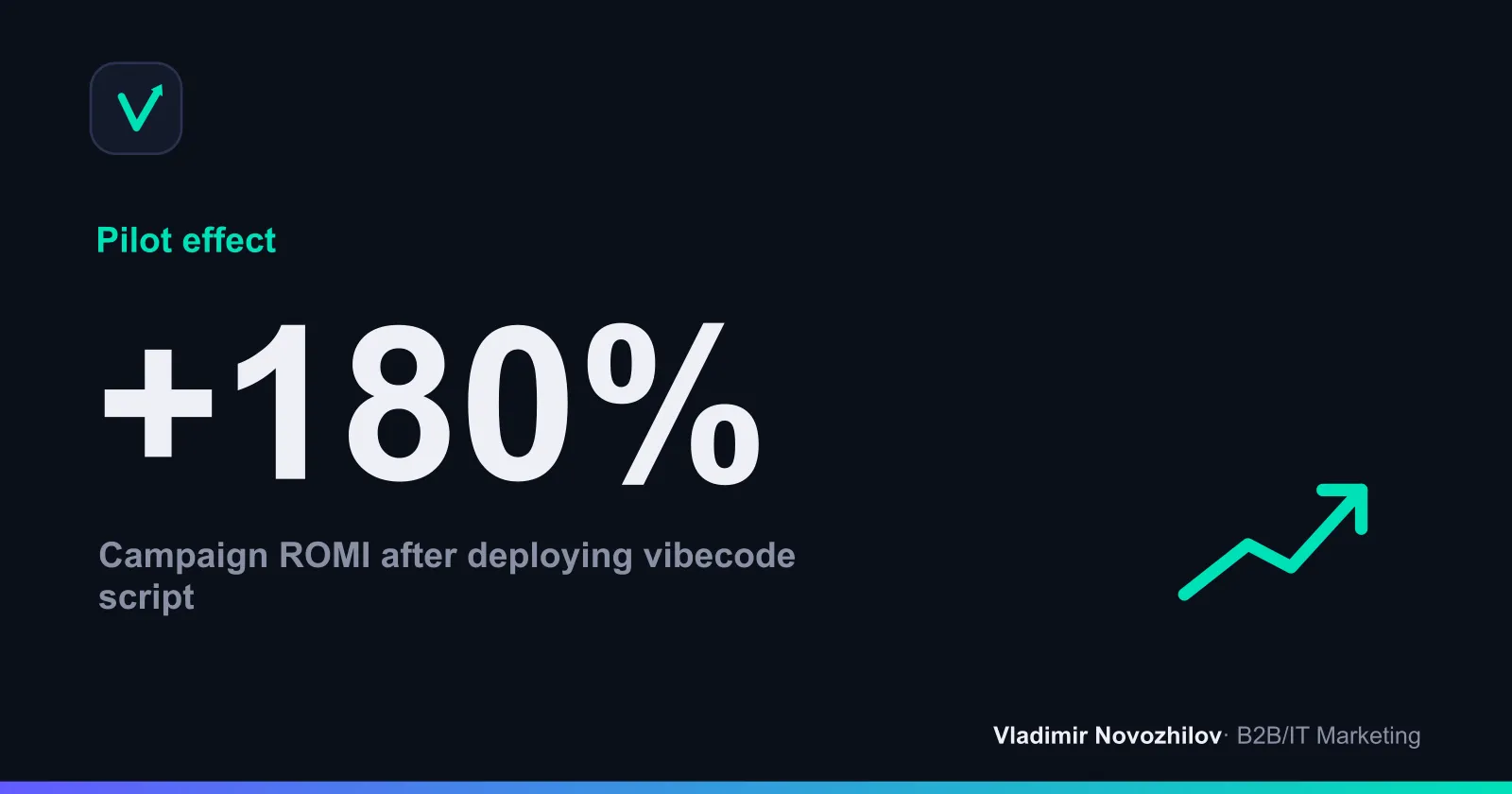
- Before: budget 500 000 ₽, revenue 650 000 ₽ → ROMI = (650−500)/500 = 0.3 = 30%.
- After: same budget, revenue 1 400 000 ₽ (due to channel reallocation and lower CAC) → ROMI = (1 400−500)/500 = 1.8 = 180%.
Common beginner mistakes and how to avoid them
- Tokens and passwords in code/prompts. Fix: env variables, hosted secrets, rotation.
- No rollback plan. Fix: releases with tags, DB backup, rollback scenario.
- Personal data in logs and tests. Fix: masking, anonymization, synthetic data.
- Lack of tests. Fix: smoke test checklist, basic unit tests for calculations (e.g., ROMI/CAC/LTV calculator).
- Illusion of a “finished product”. Fix: label MVP, maintain a backlog and SLA for responses.
- Vague requirements. Fix: break down the task in the prompt: inputs/outputs/validations/limits.
- UI overload. Fix: keep 1–2 primary actions per screen.
- UTM chaos. Fix: single dictionary and a UTM generator.
Tool list and pricing (short, 2026)
- Lovable: 15–25 USD/month; fast MVP start.
- Cursor: 20–30 USD/month; project work and refactoring.
- Claude Code: 20–25 USD/month; explanations and module generation.
- Replit: 10–20 USD/month; browser IDE and hosting for bots and scripts.
- Vercel: basic free tier, paid plans from ~20 USD/month for extra limits.
- Render: free to paid tiers ~7–25 USD/month for entry web services.
FAQ — answers to the most common marketer questions
- What is vibe‑coding and how is it different from no‑code?
- Vibe‑coding is code generation by LLMs for your task; you are the editor and integrator. No‑code is assembling prebuilt blocks. Vibe‑coding is more flexible but requires minimal engineering discipline.
- Do I need to know how to code?
- It’s enough to understand project file structure, install dependencies and deploy. Deep syntax knowledge is not required — the AI handles much of the rough work.
- How to protect personal data and secrets (152‑ФЗ/GDPR)?
- Don’t paste secrets into prompts; use env variables; anonymize personal data; for Russia — data localization; for the EU — legal bases and subject rights.
- How long do typical tasks take?
- Landing 2–4 h, parser 3–6 h, calculator 1–2 h, bot 2–4 h, dashboard 4–8 h.
- Where to deploy and how to roll back?
- Vercel for frontend; Render/Replit for bots. Version in GitHub, keep two latest releases and DB backups; test rollback.
A short reminder: vibe‑coding for marketing is not magic but a skill in task definition, review and discipline. Start with one MVP, calculate ROMI/CAC/LTV, document hours saved — then scale only what actually moves metrics.
FAQ
- Что такое вайбкодинг и чем он отличается от no-code?
- Vibe‑coding is assembling working tools with the help of LLMs that write or extend code from a task description. In no‑code you combine blocks in a visual builder; here generation happens in code (JavaScript/HTML/CSS etc.). The difference: more flexibility, fewer platform limits, but you need discipline in testing, deployment and security.
- Нужно ли уметь программировать, чтобы собирать инструменты через вайбкодинг?
- Deep programming skills are not mandatory, but basic understanding of web structure (files, styles, scripts), Git/GitHub and deployment principles will speed things up. You act as a task owner and code editor: you define requirements, review outputs and assemble the MVP.
- Как обезопасить персональные данные и токены при использовании AI‑инструментов (152‑ФЗ/GDPR)?
- Do not include tokens or personal data in prompts. Store secrets in environment variables, use server‑side calls for APIs and enable anonymization. For Russia — localize personal data and follow 152‑ФЗ; for the EU — establish legal bases and respect data subject rights under GDPR. Keep an access log and an incident response plan.
- Сколько времени занимает сборка типового лендинга, парсера или калькулятора?
- Landing MVP — 2–4 hours, price parser with Google Sheets export — 3–6 hours, ROMI/CAC calculator — 1–2 hours. Timelines depend on the completeness of the spec, availability of designs and number of integrations.
- Куда деплоить результат и как организовать простую поддержку и откат?
- For frontend MVPs — Vercel; for bots and background jobs — Render or Replit. Keep code in GitHub, publish releases with tags, configure env variables, backup DBs (SQLite/PostgreSQL) and have a rollback plan: previous release + DB dump.