Content system for social media: plan, categories, templates


TL;DR
Social media content works when it’s an optimized system: a plan and calendar, a rubricator with set proportions, an idea bank, batching, metrics, and CRM integration with automation. All on one framework so you get leads, not just likes.
Regular social media publishing works when it’s assembled into a system that solves business tasks. To get reach, engagement and leads you need a clear framework: a content plan, a rubricator, a calendar, an idea bank and a defined workflow.
What content includes and why it needs a plan
In SMM, content is text, visuals and video assembled into posts with a clear CTA. A content plan is a table with topics, rubrics, channels and dates: with it publishing becomes predictable and results measurable.
Why you need it:
- Stability: fewer “empty weeks,” more systemization.
- Mix balance: you keep content proportions across rubrics.
- Operations: roles, deadlines, batching and autoposting.
- Analytics: social metrics and leads in one dashboard.
How to link strategy to plan: from goals to a publishing grid
- Content strategy answers the “why” and “what to say”: goals, audience, positioning, messages, tone, key rubrics.
- Content plan — “what and when to publish”: list of topics, frequency, formats, platforms.
- Content calendar — a calendar view of the plan for a week/month.
Comparison by tasks and artifacts:
| Component | Horizon | What it answers | Artifacts |
|---|---|---|---|
| Content strategy | 6–12 mo | Goals, audience, differentiators, meaning | Message house, rubricator, tone of voice |
| Content plan | 4–12 wks | Topics, frequency, content proportions | Content plan table |
| Content calendar | 1–4 wks | Days/hours of publishing | Calendar with deadlines |
Brief: goals, audience and tone (template)
Answer briefly (1–2 lines per item):
- Quarterly goal: leads/applications, awareness, HR brand.
- Audience: segments, pains, selection criteria, barriers.
- USP/proofs: cases, numbers, certifications, expertise.
- Tone and formats: formal/friendly, short/longreads, video.
- Measurement: KPIs (reach, engagement, CTR, number of leads), frequency, reporting.
Pre‑publish checklist:
- There is a post goal and a clear CTA.
- Headline tested (A/B 2–3 variants).
- One main idea in the text; visual present.
- UTM tags and rubric labels added.
- Date/time set in scheduler; responsible person assigned.
Rubricator: types and proportions (examples for B2C and B2B)
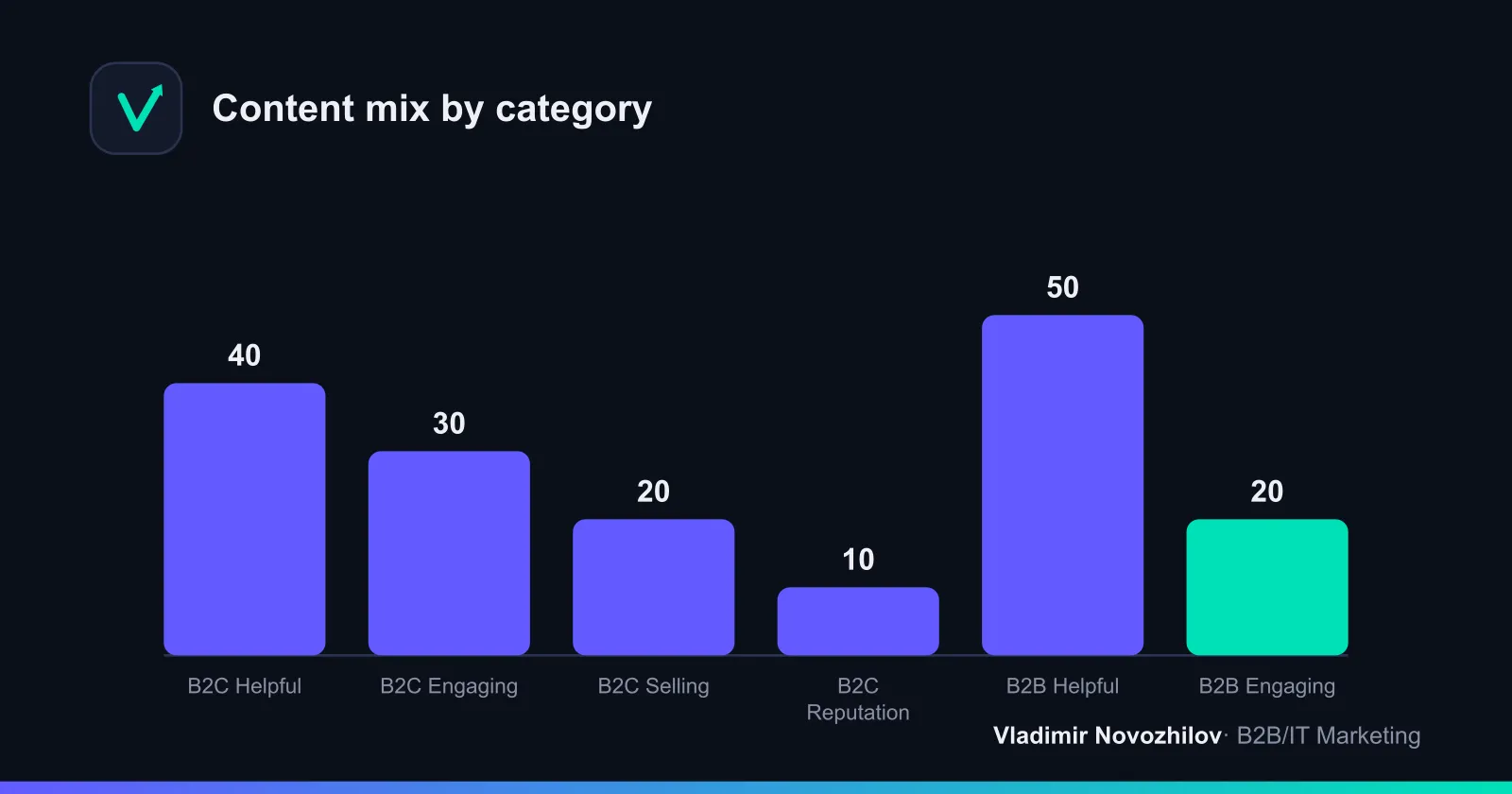
Basic types: useful, engaging, selling, reputational. Working content proportions:
- B2C: 40/30/20/10
- B2B: 50/20/20/10
B2B: examples of effective rubrics
For benchmarks and ideas search related B2B SMM queries and rubric examples.
- Useful: case breakdowns with numbers, implementation checklists, “solution architecture,” comparisons of approaches.
- Engaging: expert opinions, polls “what matters when choosing”, myth/fact.
- Selling: quarter offers, a “benefit calculator” in text, time‑sensitive trigger offers.
- Reputational: behind‑the‑scenes of implementations, certifications, speaking engagements.
Post ideas for B2B: 10 quick topics
- Case: “Reduced TTM by 23% in 6 weeks: schematic.” 2) Checklist for vendor selection. 3) 5 mistakes during implementation. 4) “Myth/fact” about the technology. 5) RFP breakdown. 6) How we calculate ROI. 7) How we meet SLA. 8) Pilot structure. 9) Migration guide. 10) Sales department FAQ.
E‑commerce and local business: rubric examples
- Useful: how‑to guides, size charts, “how to care for it.”
- Engaging: challenges, polls, UGC.
- Selling: new arrivals, bundles, limited offers, stock triggers.
- Reputational: reviews, production process, “team of the day.”
Content plan template: structure (Google Sheets/Notion) and example
Content plan template (copy to Google Sheets/Notion):
| Date | Channel | Rubric | Topic/title | Format | Goal | CTA | Responsible | Status | Comment | UTM |
|---|
Filled example (week, B2B):
| Date | Channel | Rubric | Topic | Format | Goal | CTA | Status |
|---|---|---|---|---|---|---|---|
| 07.10 | Useful | ”How to calculate pilot ROI” | Longread | Leads | ”Request ROI template” | Scheduled | |
| 09.10 | VK | Reputational | ”ISO 27001 certification” | Carousel | Trust | ”Download audit checklist” | Draft |
| 11.10 | Telegram | Engaging | ”Myth/fact: microservices” | Post | Engagement | ”Reply in comments” | Typeset |
| 12.10 | Selling | ”-20% on audit until 31.10” | Reels | Sales | ”Submit an application” | Ready |
Add a short description to the template: how rubrics and proportions are structured. This helps colleagues onboard faster.
Weekly grid and monthly calendar (with buffer)
Weekly grid (example for 4 posts): Mon — useful, Wed — engaging, Fri — selling, Sat — reputational. One reserve slot — Sun.
Three filled examples:
- B2B: Mon case, Wed myth/fact, Fri offer, Sat behind‑the‑scenes.
- E‑commerce: Mon product review, Wed UGC, Fri weekly bundle, Sat testimonial.
- Local business: Mon Q&A, Wed promo, Fri tips, Sat team.
Monthly content calendar: plan 70–80% of slots, leave 20–30% for newsjacking.
How to generate ideas: idea bank 50+ (sources and quick techniques)
Sources: sales questions, support, search suggestions, past post analytics, industry events. Techniques: 5×Why, anti‑guide, myth/fact, smart repurposing.
Idea bank (mark rubric):
- [Useful] 7 implementation metrics that a director sees. 2) [Useful] Audit checklist before a pilot. 3) [Useful] How to choose between X and Y. 4) [Useful] 10 common mistakes at launch. 5) [Useful] Savings calculator example. 6) [Useful] Mini guide to integration. 7) [Useful] Supplier comparison by criteria. 8) [Useful] How to pass security checks. 9) [Useful] Solution architecture diagram. 10) [Useful] 90‑day implementation roadmap. 11) [Engaging] Myth/fact about the technology. 12) [Engaging] Poll: “what matters when choosing.” 13) [Engaging] “It’s normal if…” in the industry. 14) [Engaging] We’ll review your case live. 15) [Engaging] Vote: logo/packaging. 16) [Engaging] Caption contest for UGC. 17) [Engaging] Compare two headlines (A/B). 18) [Engaging] Quiz “guess the metric.” 19) [Engaging] Trend analysis of the week. 20) [Engaging] AMA with an expert. 21) [Selling] Quarter offer. 22) [Selling] Pilot+training package. 23) [Selling] Deadline trigger. 24) [Selling] “X% off until date.” 25) [Selling] Trade‑in/upgrade. 26) [Selling] Bonus service hours. 27) [Selling] Gift for a review. 28) [Selling] Price micro‑announce. 29) [Selling] “Slots for October.” 30) [Selling] “Compare plans.” 31) [Reputational] Certificate/audit. 32) [Reputational] Implementation backstage. 33) [Reputational] Conference speech. 34) [Reputational] Partnership. 35) [Reputational] Client quote case. 36) [Reputational] “Day in the life of an engineer.” 37) [Useful] Glossary of terms. 38) [Useful] SLA cheat sheet. 39) [Useful] Step‑by‑step tutorial. 40) [Useful] “How to calculate TCO.” 41) [Engaging] “Wouldn’t it be great?” idea concept. 42) [Engaging] Expert forecast. 43) [Engaging] “Review my brief.” 44) [Selling] “Only for subscribers.” 45) [Selling] Starter bundle. 46) [Reputational] Brand story. 47) [Reputational] Volunteer project. 48) [Useful] Project risk map. 49) [Useful] Readiness checklist. 50) [Useful] “How to choose an integrator.” 51) [Engaging] Mini‑case for voting.
Batching and content production: roles, timelines, checklists
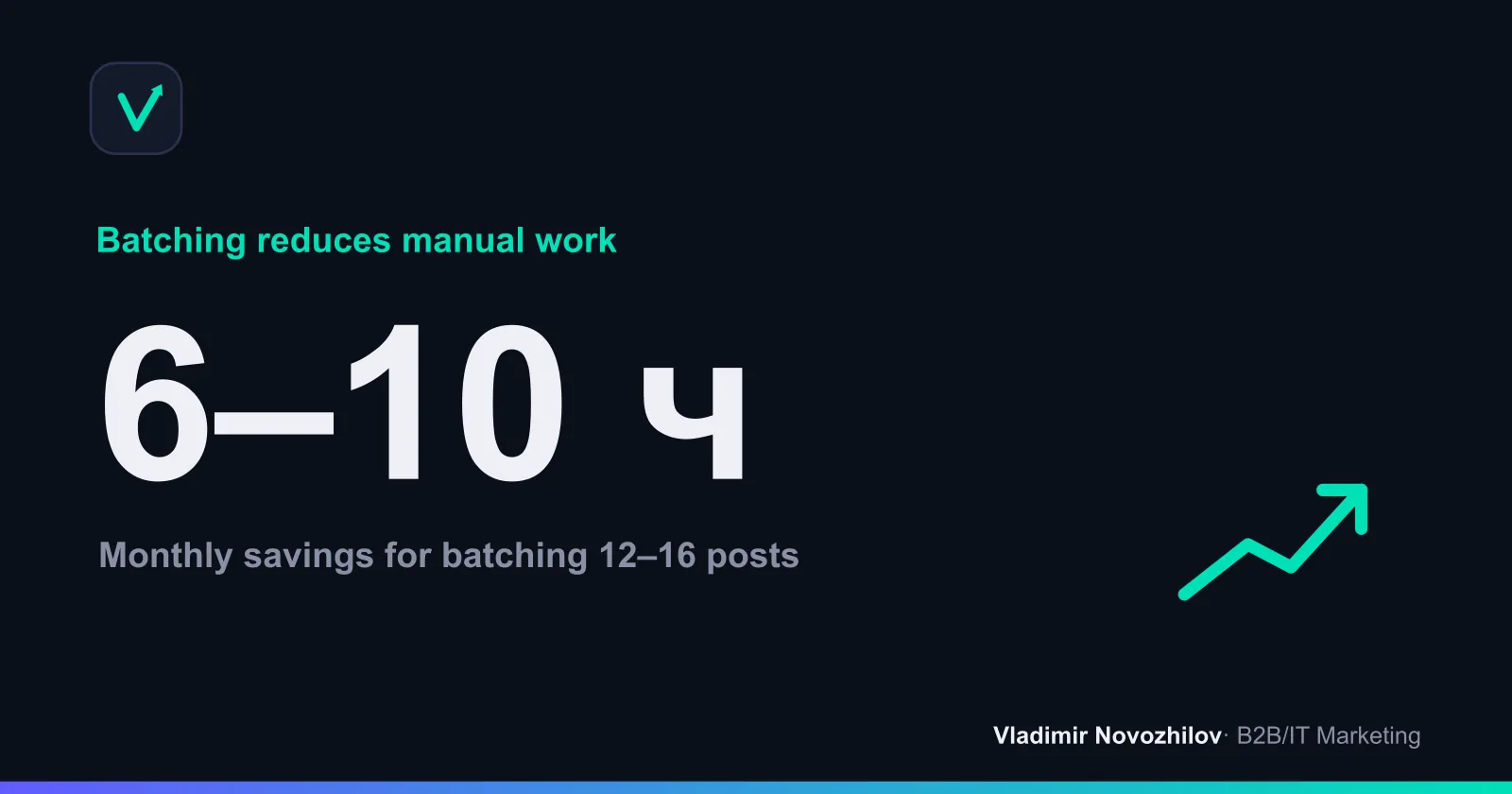
Batching — preparing content in batches: in one session you create 3–5 drafts, then layout and schedule everything together. This saves 6–10 hours per month.
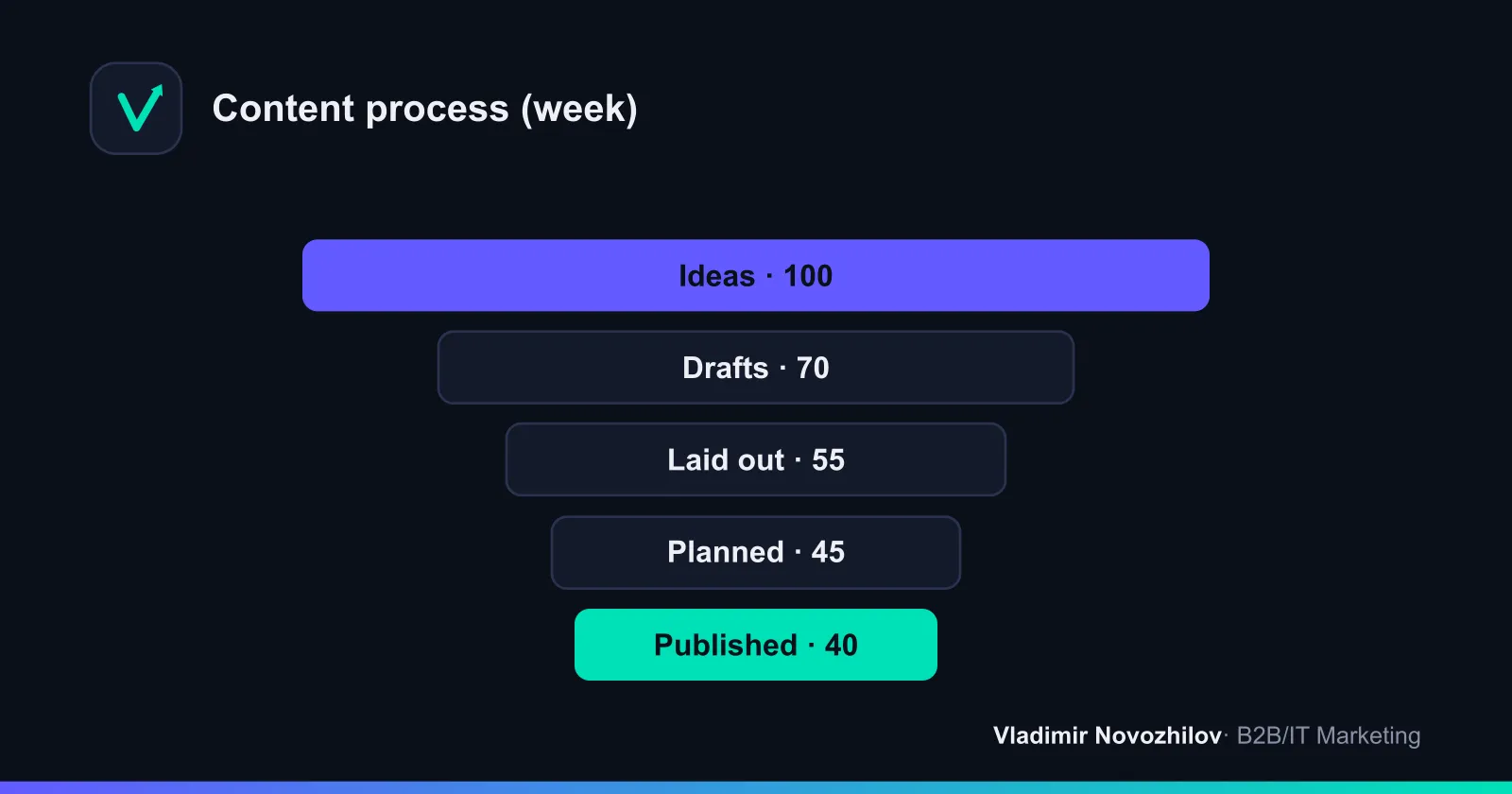
Roles and weekly deadlines: editor (brief and topics, Mon), author (drafts, Tue), designer (visuals, Wed), editor (edits, Thu), SMM (scheduler, Fri). Run the pre‑publish checklist every time.
Automation and tools: schedulers, CRM links, Zapier/Make
What to automate:
- Scheduling and autoposting: schedulers with calendars and UTM parameters.
- CRM integrations: leads from forms/links with UTM go to CRM with rubric and post tags.
- Idea collection: unified idea bank in Notion/spreadsheet, statuses and owners.
- Notifications: deadlines and “return for edits” in messenger.
Scenarios (copy logic to Zapier/Make):
- New lead with UTM=social → CRM → task to manager → tag “Source: post/rubric/channel.”
- Post published → record post/link/date/UTM in dashboard → reminder to reply to comments.
- If post CTR < 0.7% after 48h → task “update headline/cover”, repost to another network.
Metrics and dashboard: reach, leads, CTR and ROI
Minimum set: reach, engagement (ER), CTR, clicks, leads, CPL and leads by rubric.
Formulas:
- ER post = (likes + comments + saves) / reach × 100%.
- CTR = link clicks / impressions × 100%.
- Leads = number of form/chat leads with UTM=social.
- CPL = content and promotion costs / leads.
- Campaign ROI = (revenue − costs) / costs × 100%.
Mini‑dashboard example (week):
| Platform | Post | Rubric | Reach | ER % | Impressions | Clicks | CTR % | Leads | CPL, ₽ |
|---|---|---|---|---|---|---|---|---|---|
| VK | ROI Case | Useful | 12,300 | 4.1 | 18,000 | 260 | 1.44 | 9 | 1,780 |
| Telegram | Myth/fact | Engaging | 7,800 | 6.2 | — | — | — | 2 | 0 |
| Q4 Offer | Selling | 4,100 | 2.3 | 5,600 | 72 | 1.29 | 3 | 2,400 |
One topic — five networks: adapt for Instagram, VK, Telegram, LinkedIn and Facebook
Adaptation matrix (one topic — five formats):
| Element | VK | Telegram | |||
|---|---|---|---|---|---|
| Headline | 40–60 chars, clear benefit | 60–90 chars | 1‑line hook | 1–2 lines, business tone | Medium, neutral‑business |
| Body | Carousel/short text | Extended post | Concise longread | 1200–1500 chars | 600–900 chars |
| Visual | Reels/carousel | Carousel/cover | 1–2 images | Infographic | Photo/infographic |
| CTA | Tap/swipe | Follow link | Message the bot/chat | Request a demo | Learn more |
GEO notes: account for local holidays and time zones, legal restrictions on promos and personal data; in Russia prioritize VK/Telegram, for international B2B audience — LinkedIn/Instagram.
Templates and assets: Google Sheets, Notion, AI prompts
- Content plan template (Google Sheets/Notion): column structure above — copy and use.
- Ready weekly grid: apply examples from the “Weekly grid” section and save as PDF/PNG.
- AI prompts for generating posts (10):
- “Write a post [rubric=useful] for [audience] about [pain], add 3 benefit bullets and CTA [action]”
- “Create a 7‑slide carousel: thesis → steps → outcome for topic [topic]”
- “Compose a non‑aggressive selling post: pain → solution → social proof → offer → CTA”
- “Generate a myth/fact post on [topic], add 2 supporting numbers”
- “Make a 10‑point implementation checklist for [technology] with short explanations”
- “Create a Q&A of 7 questions about [product/service] in director‑level language”
- “Prepare a 30s Reels/short video script on [topic]”
- “Repurpose a longread into 5 short posts with different headlines”
- “Write a case in before/after format: context → action → result (numbers)”
- “Give 5 CTA variants for a post, goal — lead/demo”
- Idea prompts (5):
- “Collect 20 post ideas based on pains of [audience] and funnel stages”
- “Give 10 newsjacking ideas in my market for the next month”
- “Suggest 10 topics for A/B testing formats (carousel vs video)”
- “Form a rubricator with proportions for [niche] for a month”
- “Collect 15 headlines focused on the benefit [benefit]“
Common mistakes, monthly checklist and FAQ
Mistakes: no rubricator, overloading with “selling” posts, missing UTM and CRM links, ignoring A/B testing of headlines and formats, forgetting to reply to comments.
Monthly checklist:
- 4‑week plan ready at 70–80% + 20–30% buffer.
- Rubric proportions maintained per target model.
- A/B headline tests run in 3–5 posts.
- Social metrics and leads align in the dashboard.
- 1–2 hypotheses for next month formulated.
When the system is built — rubricator, content plan table, calendar, batching and automation — content works for leads, not just likes. Use the adaptation matrix, track metrics and improve based on data.
FAQ
- What posting frequency should I start with and how to scale without failures?
- Start with a sustainable rhythm (for example, 3–4 posts per week on a Mon–Sat grid) and plan 70–80% of slots in advance, leaving 20–30% for newsjacking. Increase frequency only after a month of stable publishing and met deadlines.
- What rubric proportions to choose for B2B and B2C?
- Baseline: B2C — 40/30/20/10 (useful/engaging/selling/reputational), B2B — 50/20/20/10. Then adjust by data: watch ER, CTR, leads and CPL by rubric in the dashboard and reallocate the grid monthly.
- What if we run out of ideas?
- Maintain an idea bank: collect questions from sales and support, use search suggestions, review past post takeaways and industry events. Use fast techniques — 5×Why, myth/fact, anti‑guide, repurposing longreads into short formats.
- How to connect social media to CRM without a developer?
- Tag traffic with UTM parameters, capture leads via forms/bots and route integrations through Zapier/Make: lead → CRM → task to manager with channel/rubric/post tags. Add auto‑recording of posts to the dashboard and reminders to reply to comments.
- Which metrics to watch first and how to calculate ROI?
- Minimum: reach, ER, CTR, clicks, leads, CPL. ROI = (revenue − costs) / costs × 100%. Analyze by rubric and platform, test headlines/covers and optimize what affects clicks and leads.