How to Build a Working Content Plan: Examples & Template

TL;DR
The main working document is a table‑calendar with topics, formats and publication dates. This article explains how a plan differs from strategy, types of plans, step‑by‑step assembly, a month example, a ready template, recommended tools, key metrics and a self‑check checklist.
Imagine a table or calendar where it’s pre‑marked what, when and on which platform will go out. Such a schedule with sections, topics, formats and dates removes the perennial question “what to publish today”. Below is a complete scheme: how to assemble a working plan from scratch, how it differs from a content strategy, which format to choose, a month example, a table template, a tools overview and key metrics. Suitable for B2B, IT products, agencies and personal brands.
In 15 years in marketing I’ve seen dozens of teams stumble not for lack of ideas but for lack of system. A plan doesn’t make content genius, but it turns bursts of activity into a steady stream that works toward business goals. Let’s start with the basics.
Why you need a content plan and what it includes
A document that answers four questions: what we publish (topic and format), when (date and time), where (channel: social networks, blog, email, site) and why (which section and goal it fulfills). In professional practice it’s also called an editorial plan, publishing plan or calendar — briefly, CP.
Why the business needs it:
- Regularity. Audiences and algorithms value consistency. A plan prevents disappearing for two weeks and then publishing five posts in one day.
- Time saving. Batch preparation is faster than spontaneous work. First you collect topics — then write and layout without the rush.
- Section balance. Without a system it’s easy to slide into pure sales. The plan keeps proportions between useful, engaging and selling content.
- Manageability. The team — SMM, copywriter, designer, targeting specialist — synchronizes in one document. It’s clear who is responsible for what.
- Analytics. It’s easier to compare intent and fact: what was published, what reached people, what converted.
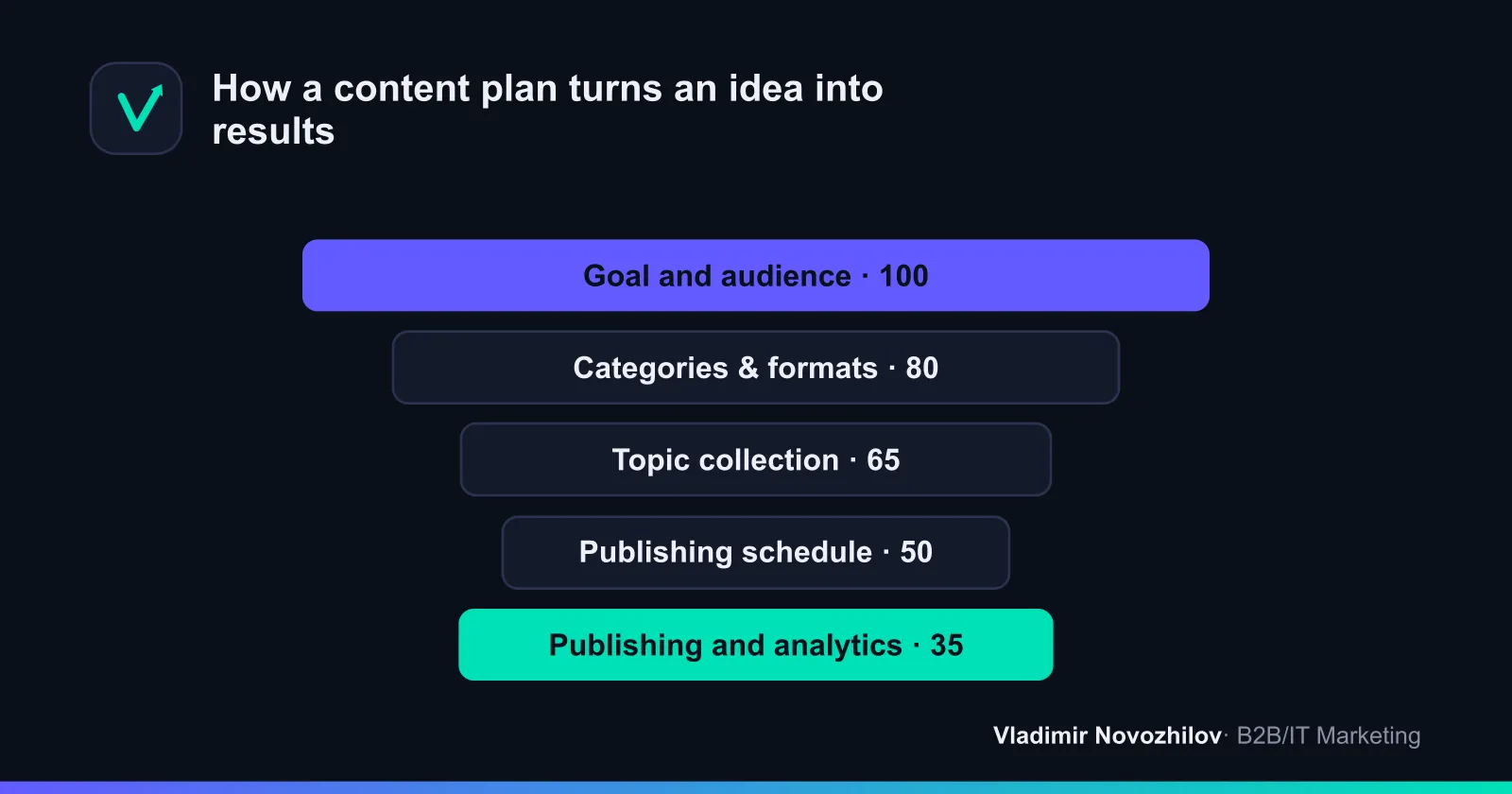
Important: a plan does not replace quality and doesn’t sell by itself. It’s about discipline and predictability. Without it even strong materials get lost in chaos.
How a content plan differs from a content strategy
These are two planning levels, and confusing them is a common mistake. A useful metaphor: strategy is the map, the plan is the route.
Content strategy answers “why” and “for whom”. It defines business goals, audience portrait, positioning, tone of voice, key topics, platforms and metrics on a 6–12 month horizon. It changes rarely.
Content plan is about “what” and “when”. It’s a concrete publication schedule for a week–month: dates, topics, formats, responsible people. It is reviewed regularly.
| Criterion | Content Strategy | Content Plan |
|---|---|---|
| Question | Why and for whom | What and when |
| Horizon | 6–12 months | Week — month |
| Level | Strategic | Operational |
| Content | Goals, TA, positioning, metrics | Dates, topics, formats, channels |
| How often it changes | Every six months–year | Constantly |
| Who is responsible | Marketer, manager | SMM specialist, editor |
The logic is simple: first strategy sets direction, then the plan lays it out into concrete posts. You can try to plan without strategy, but there’s a big risk of publishing regularly and beautifully — in the wrong direction.
Types of content plans: horizons, format and detail
There is no single “correct” format — choose based on the task across three axes.
By planning horizon
- Weekly — for testing hypotheses, launching a channel or operational niches. Maximum flexibility with a highly engaged team.
- Monthly — the golden standard. Detailed enough yet flexible: time to prepare materials, and the plan doesn’t get outdated quickly.
- Quarterly and annual — only reference points: seasonality, launches, major events, budgets. Detailing a year in advance is pointless.
By management format
- Calendar — date‑bound grid. You can immediately see frequency and gaps.
- Table (register) — rows as posts with columns: date, channel, section, topic, format, status. The most practical variant.
- Kanban board — cards by status “idea → in progress → ready → published”. Convenient for teams.
- Mind map — for brainstorming sections and topics at the start.
By level of detail
- General — only section and date. Works for experienced authors.
- Detailed — topic, theses, format, visual, CTA, links, UTM. Needed for teams and delegation.
| Axis | Variant | Who it fits |
|---|---|---|
| Horizon | Weekly | Tests, new channels |
| Horizon | Monthly | Most projects |
| Horizon | Quarterly/annual | Seasonality, launches |
| Format | Calendar | Visibility of frequency |
| Format | Table | Universal working tool |
| Format | Kanban board | Team collaboration |
| Detail | General | Single author, experienced |
| Detail | Detailed | Team, delegation |
Simple selection rule: if you manage one channel alone — take a monthly table with general detail. If you work as a team across multiple platforms — a monthly plan plus a kanban board with detailed cards.
How to build a content plan in 30 minutes: a quick algorithm
If the plan was needed yesterday, use the express version. It won’t replace full work, but it gives a working skeleton.
- 5 minutes — goal. Formulate one objective for the month: e.g., “+200 subscribers” or “10 leads from the blog”.
- 7 minutes — sections. List 4–5 permanent sections (for example: expert analysis, case, Q&A, behind the scenes, offer).
- 8 minutes — topics. For each section jot down 3–4 topics. You get 15–20 topics — enough for a month.
- 5 minutes — frequency and dates. Decide how often to publish per week and distribute topics by dates in a table.
- 5 minutes — formatting. Enter everything into a table with columns: date, section, topic, format, status.
In half an hour you’ll have a draft plan for the month. It will be refined afterward, but you can already start publishing.
Step‑by‑step instruction: how to create a content plan
Now a thorough assembly. A base that works for social networks, blog and newsletters.
Step 1. Set goals and analyze the audience
Start with “why”. Content without a goal is creativity for creativity’s sake. Possible goals: grow reach, engagement, leads, warm prospects to purchase, retain customers, build an expert image. Different goals demand different formats.
Next — the target audience. Even a brief portrait changes everything: pains, objections, language, platforms. Answer: who are these people, what tasks do they solve, what prevents them from buying, where they spend time, what language they speak. In B2B add roles: who searches for the solution and who approves the budget — they require different content types.
Record KPIs. Without measurable goals you can’t know whether the plan works. Example: “average post reach 3000, ER at least 4%, 15 leads per month.”
Step 2. Choose sections and content formats
A section catalog is a set of recurring blocks that repeat month to month. It removes half the headache: instead of “what to write about?” you ask “which section is today?”.
Classic balance of content types:
- Informational (useful) — guides, breakdowns, instructions, checklists. The basis of trust.
- Selling — offers, case studies, testimonials, comparisons, objection handling.
- Engaging (entertaining) — polls, questions, roundups, light formats.
- Image/branding — values, team, behind the scenes, expert opinion.
- User‑generated (UGC) — reviews, client cases, reposts of mentions.
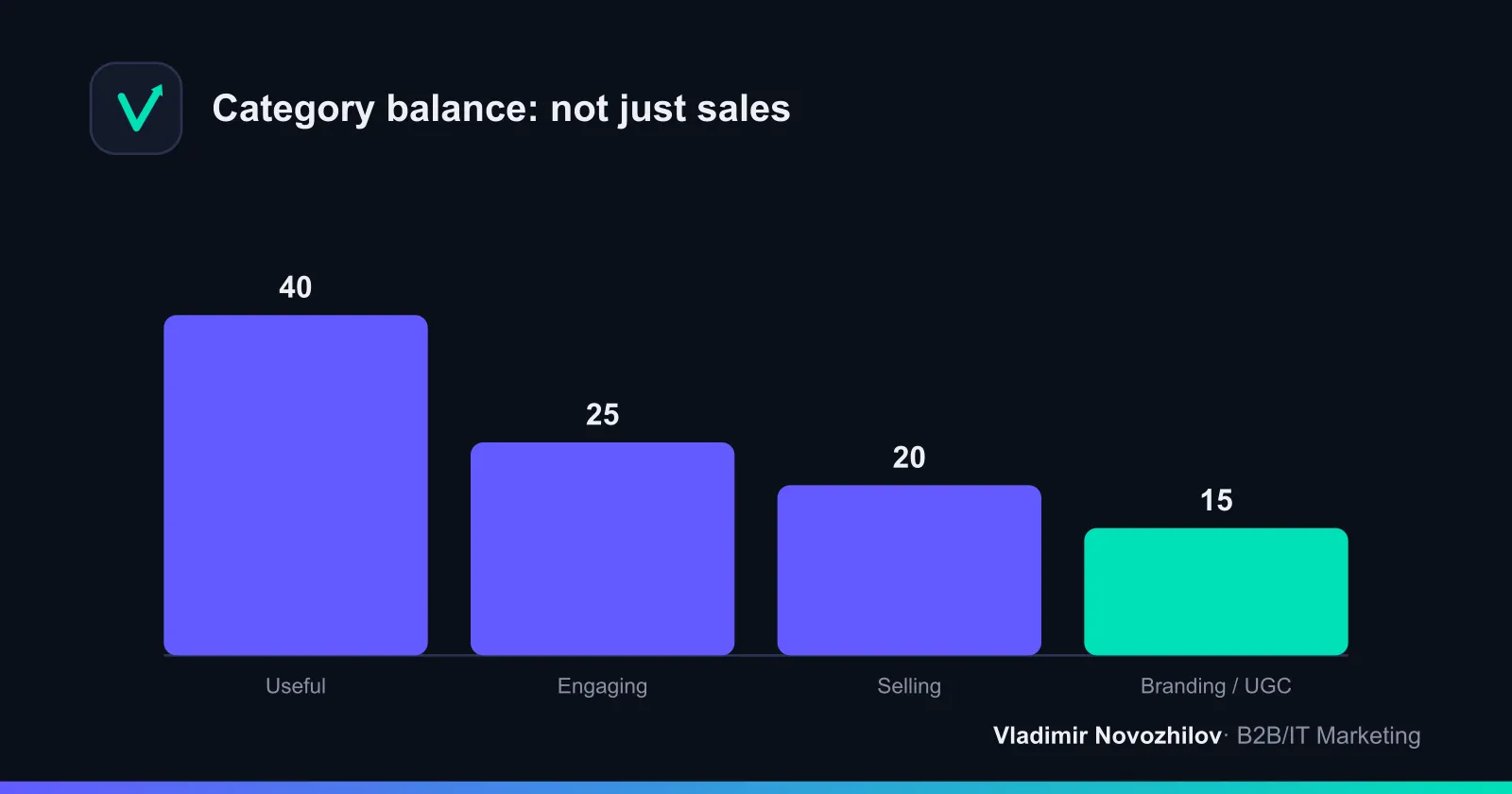
A practical ratio rule for most niches: ~40% useful, ~25% engaging, ~20% selling, ~15% branding and UGC. Selling “straight on” more often than every fifth post is a sure way to burn your audience.
A content matrix also helps — a table with formats on one axis and topics or funnel stages on the other. Intersections generate ideas: one topic can be expressed as a post, video, carousel, article and an email. This prevents monotony.
Step 3. Collect topics and news hooks
With sections in place, fill them with topics. Sources of ideas:
- Customer questions. Chats, comments and support conversations are ready topics for months.
- Search demand. Yandex.Wordstat shows what and how people search — crucial for a blog and site.
- Idea bank. A separate “warehouse” where the team drops thoughts, links and questions all month. Then you pull from it instead of squeezing ideas out before the deadline.
- Competitors. See what works for them, but don’t copy — reinterpret for your audience.
- News hooks. Industry events, seasonality, holidays, product news. Add important dates to the publishing calendar in advance.
- AI tools. Neural networks quickly generate topic and headline lists for given sections and audiences. Then do manual selection and refinement.
Tip: collect 1.5–2× the topics you need. Some will drop out or become irrelevant — the reserve saves the schedule.
Step 4. Design structure and publication frequency
Move from ideas to a schedule. Choose frequency based on resources, not ambitions: two strong posts a week consistently are better than seven forced ones and burnout.
A working plan table is a set of columns:
| Field | What it contains |
|---|---|
| Date | Publication day |
| Time | Optimal slot by audience activity |
| Channel | VKontakte, Telegram, Dzen, blog, email |
| Section | From the catalog |
| Topic / headline | Exact wording |
| Format | Post, video, carousel, article, email |
| Theses | 2–3 key ideas |
| Call to action | What the reader should do |
| Visual | Link to mock / status |
| Links and UTM tags | Where we lead and how we tag |
| Responsible | Who prepares it |
| Status | Idea / in progress / ready / published |
You don’t have to fill everything immediately — minimum: date, channel, section, topic, format, status. Add the rest as the team grows.
Content plan for social networks: VKontakte, Telegram, Dzen
The general algorithm is the same, but platforms have different rhythms and formats. There is no universal frequency — use common sense and your resources.
VKontakte. Text, visuals and short clips work well. A comfortable frequency is 3–5 posts per week. Long expert posts, roundups, polls and cases perform well. VK has built‑in scheduled posting — plan directly in the community timer.
Telegram. The rhythm values frequency and liveliness. Comfortable 4–7 messages per week, short and to the point. Formats: expert notes, opinions, digests, insights, voice messages, reactions and polls. Long materials lead to an article with a link.
Dzen — a platform for longreads and articles with a recommendation feed. Frequency is lower (1–3 materials per week), but publications live long and bring traffic via recommendations. Write comprehensively, with strong headlines and structure.
A practical approach is a shared calendar where one topic is adapted for each platform. A blog breakdown becomes a VK series, a short note in Telegram and a full article in Dzen. Such repackaging saves resources many times over.
Content plan for blog and website: the SEO approach
A blog/site plan is built around search demand. The horizon is longer: an article gains traffic over months, so plan by quarter.
SEO content plan algorithm:
- Collect semantics. Use Yandex.Wordstat to list queries by topic and group them by meaning — each group becomes an article.
- Assess frequency and competition. Start with queries that have demand and weak search results — that’s how you hit the top faster.
- Determine material type. Informational query — guide or overview; commercial — service page or roundup.
- Build clusters. One big article plus several supporting pieces connected by meaning. This strengthens the overall topic.
- Schedule by dates. Consider seasonality: publish seasonal material 1–2 months before peak demand.
For the blog add columns: main keyword, frequency, intent type, planned volume, search status. Always budget time to update old materials — rewrites and updates often yield more traffic than a new article.
Content plan for email campaigns
An email plan is a separate document: the logic of emails is different. It’s a one‑to‑one dialogue, sequencing of touches matters more than mere regularity.
What to plan in email:
- Regular emails — digest, useful newsletter, news. Frequency: from 1 email per week to 1–2 per month.
- Autoresponders — welcome series, warming sequences, reactivation of “sleepers”.
- Trigger emails — based on user action (abandoned cart, repeat purchase).
- Promo — announcements, offers, launches. No more often than the audience tolerates.
Add columns for email plans: recipient segment, subject, goal, offer, send date, metrics (open rate, CTR, unsubscribes). Put UTM tags on all links — otherwise you won’t track the newsletter’s contribution to sales.
Life hack: link email with other channels. A new blog article — announce it in the newsletter. One piece of content works in multiple contact points.
Monthly content plan: a ready example
I’ll show a sample content plan for a service company running Telegram and a blog. Frequency: 3 Telegram posts per week, 1 blog article per week. Month goal — 20 leads.
| Date | Channel | Section | Topic | Format | CTA |
|---|---|---|---|---|---|
| 02.06 | Telegram | Useful | 5 mistakes in a design brief | Post | Save |
| 04.06 | Telegram | Engagement | Poll: how do you choose a contractor | Poll | Vote |
| 05.06 | Blog | SEO-article | How to write a spec for website development | Article | Request |
| 06.06 | Telegram | Case | How we halved project timelines | Post | Discuss |
| 09.06 | Telegram | Useful | Handover checklist | Post+file | Download |
| 11.06 | Telegram | Behind the scenes | A day in the life of the team | Photo+text | React |
| 12.06 | Blog | SEO-article | What a project costs: price breakdown | Article | Request |
| 13.06 | Telegram | Selling | Service packages breakdown | Post | Get price |
| 16.06 | Telegram | Useful | How to accept work and not miss anything | Post | Save |
| 18.06 | Telegram | UGC | Client testimonial with results | Screenshot+text | Discuss |
| 19.06 | Blog | SEO-article | Mistakes when launching a project | Article | Request |
| 20.06 | Telegram | Engagement | Question: what’s more important — time or price | Post | Reply |
| 23.06 | Telegram | Useful | Mini‑guide to work stages | Carousel | Save |
| 25.06 | Telegram | Case | A project we saved in a week | Post | Discuss |
| 26.06 | Blog | SEO-article | How to choose a contractor: criteria | Article | Request |
| 27.06 | Telegram | Selling | Offer of the month + deadline | Post | Leave a request |
| 30.06 | Telegram | Summary | Digest of the month’s best materials | Post | Subscribe |
Note the balance: useful content predominates, selling posts are targeted, there are engagement posts and social proof. Selling posts are not consecutive — they are warmed up by useful content.
Template for a content plan: a table to create your own
A ready template is easiest to build in Google Sheets — free, team access, works on any device. Below is a structure to copy and fill.
Sheet 1 “Strategy” (filled once):
- Quarterly goal
- Audience portrait
- Section catalog (list of sections)
- Tone of voice
- KPI and metrics
Sheet 2 “Idea bank” (continually updated):
- Columns: idea, section, source, priority, status
Sheet 3 “Monthly plan” (main working sheet):
| Column | Purpose |
|---|---|
| Date | When we publish |
| Time | Publication slot |
| Channel | Platform |
| Section | From the catalog |
| Topic | Headline / gist |
| Format | Material type |
| Theses | Key ideas |
| CTA | Call to action |
| Visual | Mock status |
| UTM | Link tag |
| Responsible | Who does it |
| Status | Progress |
Sheet 4 “Analytics”:
- Columns: date, post, reach, ER, CTR, CR, conclusions
Add conditional formatting for “Status”: red — idea, yellow — in progress, green — published. You immediately see the bottlenecks. This skeleton is easily turned into a template for any niche — change sections and channels.
Publication calendar: how to manage and synchronize the team
A calendar is a visual view of the plan by day. It solves what a register table handles worse: at a glance you see frequency, gaps and overloads.
When multiple people work on content, the calendar becomes the synchronization point. Practices that remove chaos:
- Single source of truth. One document instead of five versions in messengers. Everyone looks at it.
- Task statuses. Kanban or color marking shows the stage of each material.
- Deadlines with buffer. Set an internal deadline earlier than publication for approvals and edits.
- Roles. Clearly assign who writes, who designs, who approves, who publishes. Have a “responsible” column in the table.
- Retrospective. Once a month the team reviews analytics and adjusts the plan. This keeps the calendar alive.
For autposting use an SMM scheduler: prepped posts will go live automatically. It’s especially useful when you manage several channels.
Tools and services for managing a content plan (comparison)
Choice depends on team size and budget. Below is a summary of key options.
| Tool | Type | Who it’s for | Pros | Cons |
|---|---|---|---|---|
| Google Sheets | Table | Starters, small teams | Free, flexible, collaborative | No autoposting, manual analytics |
| Trello | Kanban board | Visual management | Clear statuses, free tier | Weak for date‑driven content |
| Kaiten | Kanban board | Teams in Russia | Flexible boards, Russian UI | Requires setup |
| Notion | Knowledge base | Complex catalogs | All‑in‑one, templates, relations | Learning curve, English UI |
| SMM‑scheduler | Autoposting | Social media management | Scheduled posting, analytics | Paid, platform integrations |
| Yandex.Wordstat | Demand collection | Blog, site | Query data, free | Only semantics |
| AI tools | Idea generation | Brainstorming | Fast topic and headline lists | Needs manual verification |
Practical starter set: Google Sheets for the plan + Yandex.Wordstat for blog semantics + AI for ideas. When the team grows — add a kanban board and an SMM scheduler. A complex service nobody opens is worse than a simple table everyone looks at.
How to analyze the effectiveness of a content plan
A plan without analytics is a diary, not a growth tool. Effectiveness is measured by funnel metrics. Let’s go through formulas so you can calculate them yourself — no calculators required.
- Reach — how many unique users saw the material. The top of the funnel.
- ER (engagement rate) — engagement. Formula:
ER = (reactions + comments + shares) / reach × 100%. Norms depend on the platform, but 3–6% is a healthy benchmark for many niches. - CTR — click‑through rate. Formula:
CTR = clicks / impressions × 100%. Shows how much the headline and offer hook. - CR — conversion to target action. Formula:
CR = target actions / visits × 100%. These are leads, purchases, subscriptions.
Calculation example. A post was seen by 4000 people, it collected 120 reactions, 20 comments and 10 shares, produced 200 link clicks, of which 12 left a lead.
- ER = (120 + 20 + 10) / 4000 × 100% = 3.75%
- CTR by clicks = 200 / 4000 × 100% = 5%
- CR = 12 / 200 × 100% = 6%
Now it’s not “seems fine” but concrete numbers to compare with plan and previous month.
For site and email always use UTM tags — without them you won’t know which channel and which post brought traffic and revenue. Once a month export data into the “Analytics” sheet, mark section champions and strengthen them, and reconsider or drop weak ones.
Content plan examples for different niches
The logic is the same, but emphasis depends on the business. Three typical scenarios.
Online store (eCommerce)
Focus — product and sales, but without spam. Sections: product reviews, “top for …” roundups, FAQs about delivery and returns, seasonal promotions, UGC (buyer photos), useful tips for product use. High frequency — people buy on impulse. Link with seasonality and sales. Key metrics — CR and UTM traffic.
Personal brand of an expert
Focus — trust and expertise. Sections: cases, opinions on controversial industry topics, client mistakes, behind the scenes, answers to subscribers’ questions, soft offers. Selling posts no more often than one in five, with lots of useful and personal content. Metrics — ER and audience growth: loyalty matters for an expert.
B2B company blog
Focus — organic search traffic and leads. Sections: expert guides based on Yandex.Wordstat queries, cases with numbers, solution comparisons, industry analysis. Site plan is built on a quarterly horizon around semantic clusters. Metrics — organic traffic, search positions and leads from the blog.
Common mistakes when creating a content plan
Typical pitfalls:
- Only sales. A plan of pure offers burns the audience. Keep section balance.
- Unrealistic frequency. Planned seven posts a week — burned out in two. Plan by team resources, not ambitions.
- No goal and metrics. Publishing just to publish. Without KPIs you can’t improve.
- Ignore analytics. Don’t check what worked — repeat failing formats.
- Blindly copying competitors. Their audience and goals differ. Take ideas, not a copy.
- Too rigid a plan. A good news hook can be more important than the grid. Leave 10–20% for improvisation.
- Plan for the sake of plan. A pretty table that nobody looks at. The tool must be alive.
- One format for all platforms. A VK post copied to Telegram without adaptation performs worse. Repackage content.
Self‑check checklist for the finished content plan
Before putting the plan into operation run through this checklist. If all answers are “yes” — the plan is workable.
- There is a measurable monthly goal and KPIs
- The target audience portrait is considered
- A section catalog of 4–6 permanent sections is set
- The balance of content types is respected (not just sales)
- Topics are collected with a 1.5–2× buffer
- Frequency is realistic for team resources
- Each post has a date, channel, format and status
- Calls to action (CTAs) are specified
- External links have UTM tags
- News hooks and seasonality are accounted for
- Responsible people are assigned for each material
- There is an analytics sheet to match plan to fact
- 10–20% buffer left for operational topics
Copy or print the list — it saves hours of rework and catches holes before publication.
In short
A content plan is a system that turns chaotic posting into a predictable stream aligned with business goals. Build a strategy (why and for whom), create a section catalog and idea bank, map the month in a table with dates, formats and metrics. Maintain a shared calendar, repackage one piece of content across channels — social media, blog, email, site — and review analytics monthly for reach, ER, CTR and CR. Start with a simple Google Sheets template and add tools as the team grows. A plan won’t replace quality, but it gives the discipline without which even strong content gets lost. Use the structure in this article, adapt it to your niche — and your first working monthly plan will be ready in one evening.
FAQ
- What is the main difference between a content strategy and a content plan?
- Strategy answers “why” and “for whom”: business goals, target audience, positioning, key topics and metrics for 6–12 months. The plan is about “what” and “when”: specific topics, formats, dates and responsible people for a week–month. First set the direction (strategy), then break it into posts (plan).
- How often should you publish on social media to avoid burnout and losing reach?
- Base it on resources. On VKontakte, 3–5 posts per week is comfortable; on Telegram — 4–7 short messages; on Dzen — 1–3 longreads. Better two strong posts a week consistently than seven forced ones and burnout a month later.
- How to adapt one topic across different platforms without losing quality?
- Build a shared calendar and repackage content: a blog breakdown → a series of VK posts, a short note in TG, a longread in Dzen, and an email teaser. Keep the core idea, change format, length and emphasis for each platform.
- Which metrics to track to know the plan is working?
- Look at the funnel: reach, ER = (reactions+comments+shares)/reach×100%, CTR = clicks/impressions×100%, CR = target actions/visits×100%. For blog and email use UTM tags — without them the channel contribution is invisible.
- Which tools to start managing the plan with so you don't drown in services?
- Starter kit: Google Sheets for the plan, Yandex.Wordstat for blog semantics, AI tools for ideas. When the team grows — add a kanban board and an SMM scheduler. A complex tool nobody opens is worse than a simple table.
- Which mistakes most often break even a good content plan?
- Only sales without balanced sections, unrealistic frequency, no goals and KPIs, ignoring analytics, blind copying competitors, a rigid grid with no room for news, “plan for the sake of plan” and identical formats on all platforms.