Site or Landing in an Evening with AI: Practical Vibecoding

TL;DR
Building a working site without a programmer in one evening is realistic: define the goal, run a dialogue with AI agents — get code, content and integrations. This guide compares tools, supplies ready prompts and deployment checklists for Russia. We go from prototype to payments and analytics with emphasis on AI‑code review and security.
Building a working site in an evening is realistic: you define the goal, hold a dialogue with AI agents and receive code, content and integrations without manual development. In this guide I show how to go from prototype and texts to deploy, payments and analytics in Russia. We’ll review tools and ready prompts, AI‑code review and security so the process stays manageable rather than “black magic”.
How to build a site or landing with AI — no‑code not required
Iterative assembly via dialogue with an LLM delivers a pace comparable to a builder and the flexibility of code. You state business goals and constraints, an agent proposes structure, content and modules — you refine with prompts and push to production. This is neither no‑code nor the classic spec‑heavy cycle: you are the architect, AI is a multifunctional implementer. The term vibe coding is widely discussed by engineers and leads; the approach became practical with models at the OpenAI/GPT and Anthropic/Claude level (including Sonnet).
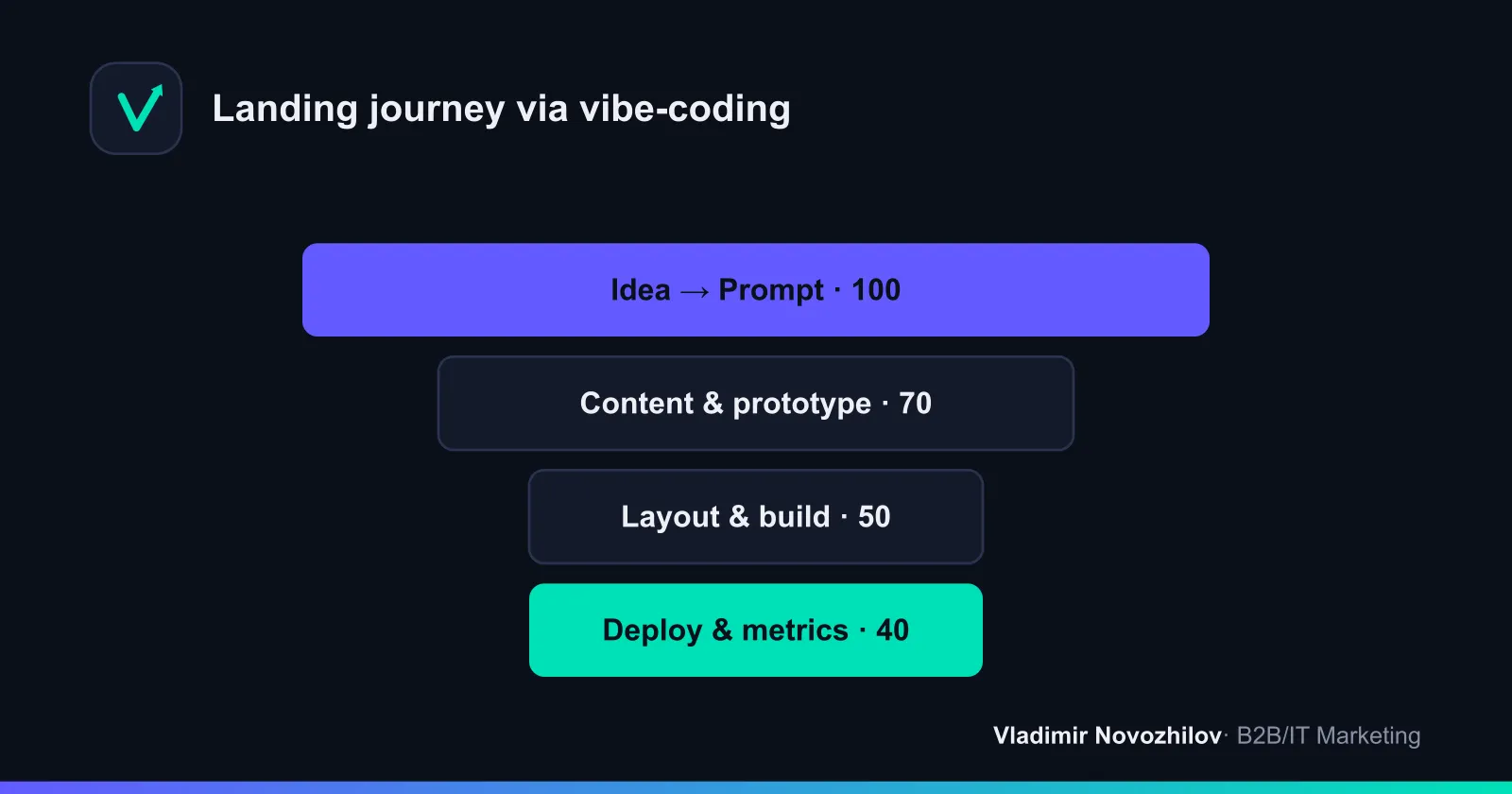
Core of the approach: how it differs from no‑code and “classic” development
In short:
- No‑code — visual builders. Fast but limited by the platform architecture.
- Classic development — maximum flexibility and quality, but costlier and slower.
- Vibecoding — AI speed + code flexibility. You set the goal, provide context (Prompt), the agent generates structure and code, you validate and deploy.
In practice the process changes:
- Spec → Prompt: textual requirements, data and examples instead of bulky specifications.
- Working artifacts appear immediately: prototype, content, layout, integrations.
- Role of architect: you make key decisions and are responsible for quality.
Where this works best: use cases and limits
Suitable for:
- Lead‑gen landing pages, events, product pages.
- Mini‑catalogs, MVP e‑commerce up to 50 SKUs.
- Prototypes: quickly test a hypothesis and collect feedback.
- Embedded widgets and microsites for B2B and IT services.
Limitations:
- Complex business logic, high load, regulatory requirements — demand high code quality and audit.
- Long‑term maintenance without an engineer is risky: you need review and monitoring processes.
- Availability of foreign services in Russia: some require an international card or VPN. Prepare local alternatives.
By scope: it’s suitable also for simple web apps, admin panels, data entry forms — with caveats around security and review.
Tools and comparison: Cursor, Claude Code, Replit, Lovable, Bolt.new, Tilda and more
Tool classes and a brief note on each: IDE assistants (Cursor, GitHub Copilot), cloud agents (Replit Agent, Lovable, Bolt.new), editor‑generators and builders (Tilda). Models: OpenAI / GPT, Anthropic / Claude (Sonnet). For orchestrating integrations — MCP (agent integration protocol), which lets agents call external tools.
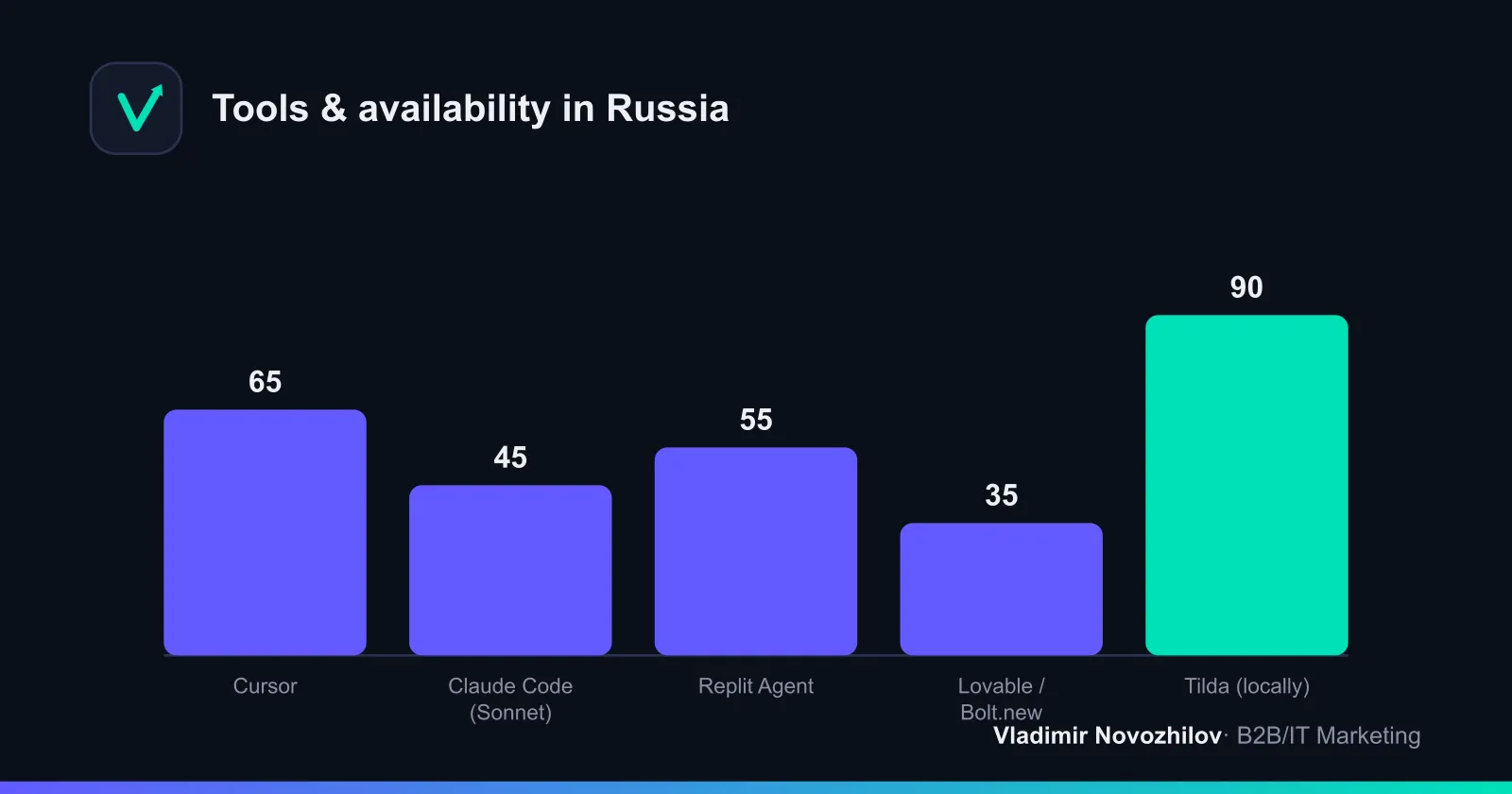
Comparative table (indicative, without links):
| Инструмент | Класс | Что умеет | Цена ориентир | Доступность в РФ | Ограничения |
|---|---|---|---|---|---|
| Cursor | IDE‑assistant | Code generation/editing, project chat | Free/Pro | Partially (VPN may be needed) | Requires basic code knowledge |
| Claude Code (Sonnet) | AI agent | Deep requirement understanding, module generation | Usage‑based | Access limited, VPN possible | Payments — foreign cards |
| OpenAI / GPT | Model | Text/code generation, tools | Usage‑based | Limited | Content & payment policies |
| GitHub Copilot | IDE helper | Suggestions, autocomplete | Subscription | Limited | Requires GitHub and payment |
| Replit Agent | Cloud agent | Projects with runtime, fast deploy | Free/Pro | Limited | Performance, region |
| Lovable | App generator | “Prompt → app”, preview | Free/Pro | Partial | Less control over code |
| Bolt.new | Fast generator | Projects from prompts in minutes | Free | Partial | Export/deploy — limitations |
| Tilda | Builder | Ready blocks, forms, payments in Russia | Subscription | Locally available | Architectural constraints of builder |
Notes on combining with Tilda. In practice it’s a compromise: generate content and HTML snippets with AI and paste into Tilda, where you connect domain, forms, payments and metrics. You get speed plus local availability.
Step‑by‑step: from prompt to working landing
Step 0. Role of the architect and the spec
- Describe the goal, audience, offer, 1–2 target actions, legal constraints (152‑ФЗ), integrations (CRM, payments).
- Prepare tone and structure references.
Step 1. Prompt for structure
- Ask the model (GPT/Claude) to generate a block map: Header, Hero, Social proof, Benefits, Pricing, FAQ, CTA, Footer.
Step 2. Content and design system
- Generate text for each block, a palette and typography. Lock components.
Step 3. Markup and responsiveness
- Use Cursor or similar: “create a responsive landing in plain HTML/CSS + Tailwind, forms with validation, SVG icons, Lighthouse optimization ≥ 90/90/90/90”.
Step 4. Integrations
- Forms: webhook → Bitrix24 or 1C, copy to Email. Payments: ЮKassa/CloudPayments/Robokassa. MCP — for agents calling external tools (if needed).
Step 5. Deploy
- Static hosting or Tilda. Connect domain and SSL, check robots.txt, sitemap.xml, favicon, Open Graph.
Step 6. Metrics and tests
- Yandex Metrica, goals/cross‑channel analytics, anti‑spam, backups.
Step 7. Review and release
- Linter, basic unit tests, manual scenario checks, security checklist (below).
Example prompt for a landing: header, pricing and form — ready template
Copy and adapt:
You are a frontend developer and copywriter. Generate a single‑page landing for the B2B service “Marketing Audit”. Requirements:
1) Structure: Header (logo+menu), Hero (headline ≤60 chars, subhead ≤120, CTA button), Social proof (3 logos + 1 quote), Benefits (3–5 items), Pricing (3 plans), FAQ (5 questions), Contact form.
2) Tone: business, concise. Audience: small business owners in Russia.
3) Markup: HTML5 + Tailwind CSS, responsive 360–1440px, dark/light theme.
4) Form: name, phone (mask +7), email, checkbox “I agree with the 152‑ФЗ policy”. Client‑side validation.
5) Form submit: fetch POST JSON to /lead, duplicate to email admin@site.ru.
6) SEO: title, description, Open Graph, h1–h3, alt for images, FAQPage microdata.
7) Performance: images as <img loading="lazy">, system‑ui fonts, Lighthouse ≥ 90 on all metrics.
Output: index.html, styles.css (inline <style> allowed), text for all blocks.
Example prompt for an online store: product card
Build a product card (clothing) in HTML/CSS/JS: gallery (3 photos, lazy load), price, sizes (buttons S/M/L), quantity counter, “Add to cart”, shipping/returns block, reviews (3), recommended products (4 cards). Provide a JSON data schema for CSV import (id, title, price, sku, size, image, category).
Add a “Buy” button that leads to payment (stub). For Russian payment gateways leave integration points: ЮKassa, CloudPayments, Robokassa.
Deployment checklist: hosting, domain, SSL, payments and analytics (Russia)
- Domain and SSL: verify NS, A/AAAA, CNAME, HSTS. Ensure HTTPS is enabled.
- Hosting: static (fast and cheap) or a builder. For export ZIP — CI/CD support preferable.
- Payments:
- ЮKassa: contract, payment methods, notifications, test payments.
- CloudPayments: widget, webhook, test cards, 3‑D Secure.
- Robokassa: fiscalization if required, order statuses.
- CRM: Bitrix24 or 1C — check lead fields, sources, UTM; record GDPR/152‑ФЗ flags.
- Analytics: Yandex Metrica, form and payment events, e‑commerce params.
- SEO/Tech: robots.txt, sitemap.xml, canonical, 404/500 pages, favicons, Open Graph, preconnect.
- Backups: backup code and form data; export lead data daily.
- Legal: data processing policy, offer, company details, consent checkbox, storing data in Russia.
Prompt templates, spec structure and fragment library
Fix your role: you are the architect. Give AI clear boundaries.
Spec template (7 points):
- Goal and KPI (leads, submissions, CR). 2) Audience and JTBD. 3) Page and block architecture. 4) Content requirements (tone, proof points). 5) Integrations (CRM, payments, MCP tools). 6) Security and 152‑ФЗ compliance. 7) Acceptance criteria (speed, Lighthouse, validators).
Fragment library — prompts for vibecoding:
- Header: “Build a sticky header: SVG logo left, menu of 5 items right, CTA button, responsive 320–1440px, dark theme”.
- Pricing: “Create a pricing table of 3 plans: Starter/Pro/Business; show price in RUB/month, 5 features, CTA under each, highlight Pro”.
- Lead form: “Create a form (name, phone +7 mask, email, company, 152‑ФЗ checkbox). Validation + error messages, anti‑spam honeypot, POST to /lead”.
- FAQ: “Make a 6‑question accordion with FAQPage microdata and answers ≤ 300 characters”.
Scaling hint phrase: “Break code into components, add JSDoc‑style comments, extract constants, prepare hooks for payments (ЮKassa/CloudPayments/Robokassa)”.
How to test and review AI code: security, tests, responsibility
AI‑code review checklist:
- Code style: linter (ESLint), formatter (Prettier), ban inline scripts where unnecessary.
- Security: Content Security Policy, HTTPS only, input sanitization, XSS/CSRF protections, token hiding.
- Data: 152‑ФЗ compliance, minimize PII, retention periods, role‑based access.
- Tests: unit tests for form validation and data formatting; e2e for key flows (page open, form submit, payment flow).
- Performance: Lighthouse ≥ 90, optimized images, critical CSS, lazy loading.
- Logs and monitoring: 4xx/5xx, response times, crash alerts.
- Responsibility: record acceptance criteria in the spec and the rollback process.
Cost and time: plan for a startup or small business
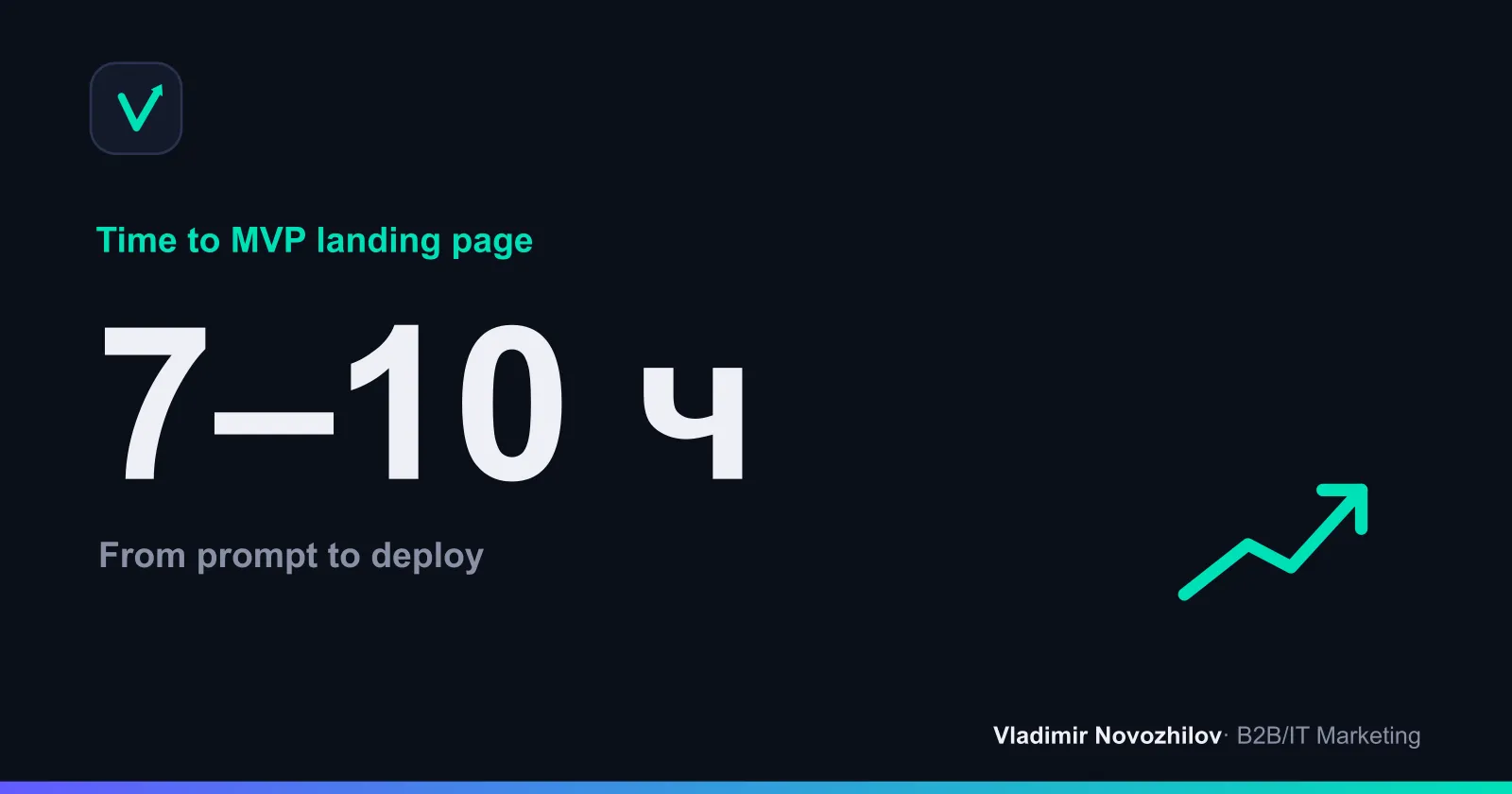
- Time: prototype — 2–4 hours, landing — 7–10 hours, store (up to 50 SKUs) — 1–2 days.
- Monthly costs (estimates):
- AI (OpenAI / GPT or Anthropic / Claude Sonnet): $0–50 usage.
- IDE assistant (Cursor/GitHub Copilot): $0–20.
- Hosting/domain/SSL: $5–15.
- Payment gateway: 0%–3% commission.
- In Russia some services require an international card or VPN — budget local alternatives (Tilda, local hosting, Russian gateways).
Common mistakes and how to avoid them
- No architect role: prompts are scattered — result is raw. Fix: single spec and prompt backlog.
- Overuse of animations and custom fonts — speed drops. Fix: system fonts, lazy load, critical CSS.
- Ignoring 152‑ФЗ and data storage. Fix: policy, consent checkboxes, store in Russia.
- Deploying without tests. Fix: e2e on key paths and manual checklist testing.
- No fallback for service availability in Russia. Fix: duplicate deploy and payment paths.
Case studies: successful landings built this way
- Case 1: B2B marketing audit. Landing built in 9 hours: 8 blocks, validated form, Bitrix24 integration. Result: 3.5% conversion from warm traffic, 17 leads first week.
- Case 2: Online course. Landing built with AI and payments via ЮKassa. Time — 1 day. Result: 2.1% CR, traffic ROI 1.3× in 10 days.
- Case 3: MVP merch store (up to 30 SKUs). Generated product cards, cart, Robokassa. Result: first sales on launch day, time to release — 14 hours.
Pricing table template and sample CSV for import
Sample pricing section (Markdown → convert to HTML via AI):
| План | Цена/мес | Для кого | Фичи |
|---|---|---|---|
| Starter | 990 ₽ | Startup | 3 pages, form, Metrica |
| Pro | 2 900 ₽ | Small business | 10 pages, A/B, CRM, payments |
| Business | 7 900 ₽ | B2B unit | 25 pages, SLA, roles, backups |
Sample CSV (UTF‑8):
plan,price,features
Starter,990,"3 страницы; форма; Метрика"
Pro,2900,"10 страниц; A/B; CRM; оплаты"
Business,7900,"25 страниц; SLA; роли; бэкапы"
Mini case: from prompt to launched landing (code/archive)
- Prompt: take the template above and adapt it to your offer.
- AI result — index.html. Save as a file:
<!doctype html>
<html lang="ru">
<head>
<meta charset="utf-8"><meta name="viewport" content="width=device-width, initial-scale=1">
<title>Аудит маркетинга — повысим лиды за 14 дней</title>
<meta name="description" content="Аудит маркетинга для B2B: выявим точки роста, настроим аналитику, дадим план из 10 шагов.">
<style>body{font-family:system-ui;margin:0} .container{max-width:980px;margin:0 auto;padding:24px} .btn{background:#0ea5e9;color:#fff;padding:12px 16px;border-radius:8px;text-decoration:none}</style>
</head>
<body>
<header class="container"><h1>Аудит маркетинга</h1><a class="btn" href="#lead">Оставить заявку</a></header>
<main class="container"><section><h2>Что получите</h2><ul><li>10 точек роста</li><li>Настроенная Метрика</li><li>План на 30 дней</li></ul></section>
<section id="pricing"><h2>Тарифы</h2><ul><li>Starter — 990 ₽</li><li>Pro — 2 900 ₽</li></ul></section>
<section id="faq"><h2>FAQ</h2><details><summary>Сколько длится аудит?</summary><p>5 рабочих дней с даты доступа.</p></details></section>
<section id="lead"><h2>Заявка</h2><form id="leadForm"><input name="name" placeholder="Имя" required><input name="phone" placeholder="Телефон +7" required><label><input type="checkbox" required>Согласен с политикой 152‑ФЗ</label><button type="submit">Отправить</button></form></section>
</main>
<script>document.querySelector('#leadForm').addEventListener('submit',async(e)=>{e.preventDefault();const f=new FormData(e.target);const data=Object.fromEntries(f.entries());await fetch('/lead',{method:'POST',headers:{'Content-Type':'application/json'},body:JSON.stringify(data)});alert('Заявка отправлена');});</script>
</body>
</html>- Package to zip (index.html + assets if needed) and upload to hosting or paste into Tilda as HTML blocks. Verify the deployment checklist.
Prompts for vibecoding: quick phrase generator
- “Formulate a value proposition in one sentence ≤ 120 characters for audience: …”
- “Create a benefits block: 5 items, each ≤ 90 characters, no fluff, business tone”.
- “Make CTA variants (buttons) for 2 actions: lead and consultation”.
- “Proofread, simplify long phrases, return business‑appropriate synonyms”.
- “Add FAQPage and BreadcrumbList microdata, validate HTML5”.
10 steps: concise process summary
- Goal and offer. 2) Block map. 3) Draft content. 4) Generate markup. 5) Responsive. 6) Form/validation. 7) Payments/CRM. 8) Metrics. 9) Review/tests. 10) Deploy and backups.
Security and production hardening of AI‑generated code
- Secrets out of repo, do not commit .env.
- CORS policy, restrict webhook domains.
- Update dependencies and check licenses.
- Incident plan: contacts, RTO/RPO, daily backups.
Tools and availability in Russia: practical notes
- Some cloud services may require an international card or VPN. Plan B: builders, local hosting, offline payments.
- For order logic and inventory — integrate with 1C/Bitrix24. Describe interfaces to agents (via MCP) and generate adapters.
Selection summary by task
- Single page — Cursor/Claude Code → export → static hosting or Tilda.
- Store up to 50 SKUs — generate product cards + local payment gateway.
- For more complex needs bring a developer for review and automation.
FAQ
- How does vibecoding differ from no‑code and classic development?
- Vibecoding is a dialogue with AI where you set the goal and constraints and an agent generates code and content. It's more flexible and faster than many no‑code flows and easier to start than traditional development. You act as the architect, AI is the executor.
- What tasks is this approach suitable for?
- Landing pages for lead generation and events, product pages, mini catalogs and MVP stores up to 50 SKUs, quick prototypes, widgets and microsites for B2B/IT. Complex logic and high load require a proper audit.
- What limitations and risks should be considered?
- Complex business logic and regulation require code review and monitoring. Long‑term maintenance without an engineer is risky. Access to foreign services in Russia may need VPN and an international card — keep local alternatives ready.
- Which tools to use and what about availability in Russia?
- IDE assistants (Cursor, Copilot), cloud agents (Replit Agent, Lovable, Bolt.new), builders (Tilda). Models — GPT and Claude. Some services are restricted in Russia, so combine code generation with Tilda for domain, forms, payments and metrics.
- How much time and money does it take?
- Prototype — 2–4 hours, landing — 7–10 hours, store up to 50 SKUs — 1–2 days. Monthly: AI — $0–50, IDE — $0–20, hosting/domain/SSL — $5–15, gateways — 0–3% fees. In Russia budget for local services and fallback options.